My philosophical thoughts on Futuristic User Interfaces from sci-fi and anime movies

Futuristic user interfaces from cyberpunk and anime movies

The thing that strikes me most about this uber collections just how indecipherable many of these future UI’s are, and how unintuitive nearly **all** are.

stark monitors

I can only conclude from looking at these (and remembering many others from past sci-fi romps) that in Hollywood, and especially in the dark days of personal computing (when many of these movies were made), computers and their UI’s have nearly always looked absolutely inscrutable to most of the population, and that the only hope most civilians (not engineers) had for the future was that humanity would get genetically smarter as we advanced.

We would get smart enough that as a species, our brains would finally be able to treat these masses of poorly-laid-out information and instructions as a normal course of interfacing with machines, and would be able to process this stream of pixels in real time. It really says more about our hopes for the species in the future (less broken, reaching pinnacles of performance and capability) than it does about what we aspire from our machinery (which apparently, was very little – they would remain cryptic arbiters of control over our environment). I am SO GLAD that we have already at this point in computing technology found ways to start to think “human-first” in the human-computer interaction.

The plague of “smart refrigerators”

I think we’ve all by now heard of the mad, magical future in which your new refrigerator will have the intelligence to know when you’ve just run out of milk and will automatically order more for you. A perfect digital servant, that just happens to knew exactly which items in your fridge you need repeatedly, at a perfect frequency to match their consumption. But what about stuff I bought once and no longer want? What about the milk that went bad (even before the due date) and has to be poured out all at once? And what about all the commodities I keep on the shelf, and put in the fridge once I open them?

This so-called “smart fridge” is one of those nearly-generic, ubiquitous, almost brainless examples trotted out as a stand-in for for future tech, just as we see those stupid example apps show up on every new “extensible” piece of technology (phone, widgets framework, whatever) – the stocks, sports scores and weather apps. The apps that *no one* ever uses more than the first week of owning that tech (well, I’m sure there’s someone – like the dev – who must use them, but no one I know – and not like “I don’t know anyone who will admit to buying a Michael Jackson album while he was alive”).

Which reminds me of the foolish crapware that used to show up only on new PCs – but now ships with some Android phones and with all “smart TVs”. Ugh – I saw a report recently (https://www.npdgroupblog.com/internet-connected-tvs-are-used-to-watch-tv-and-thats-about-all/) that most smart TV users just watch live, streamed or pre recorded content on their TVs, and almost none use the “smart” apps (generally less than 10% of smart TVs). In my experience they’re a resource of last resort – like when everything else has stopped working you’ll try them, but dog help you if you try willingly – hopes dashed, spirit mashed, ego crashed.

Which also reminds me of a great blog article by Scott Hanselman (My car ships with crapware http://www.hanselman.com/blog/MyCarShipsWithCrapware.aspx) about the terrible interface to the in-dash entertainment system in his new Prius. I’ve got the same one, and I fell victim to the same wow factor when considering the purchase. Once I actually tried to *use* the onboard apps, however, I quickly gave up – too slow, too many clicks, too many unintuitive choices, too few usages that weren’t much more efficient on my smartphone.

I happen to agree with Hanselman – not just about my in-car screen, but the in-TV “smarts” and the soon-to-be-everywhere “smart” appliances. I’d much prefer (at this stage in the “smarts” development) that these lesser apps be removed entirely in favour of just giving me a fully-integrated big screen on which to mirror my already-quite-handy pocket-sized computer. I understand the need for these industries to try to find ways to achieve bigger margins on the sales of these well-established markets. I just believe that these are poorly-executed, lesser-than bolt-ons that add nothing to the primary experience of the device to which they’re attached, and which will be in a few short years a supreme waste of space and an embarrassing relic. I fully expect that I’ll be unable to use *any* of the onboard capabilities of the Prius Entertainment system in three years’ time, and will have to add an aftermarket device or just sell the car to some rube.

I’d personally love to rip and replace the smart interface on my TV with something that was receiving active updates for more than six months from the manufacturer, and which provided me actually-helpful and complementary capabilities I can use right from my TV – and which aren’t just easier and more intuitive on my phone. How’s about a TV guide wired right into my TV? Or something that told me how much TV I’ve watched for the past month or year, and a breakdown of what kinds of shows I’ve watched? (Not that I’d find that info indispensable, but at least it would relate directly and more tightly with the device from which it derived.) How’s about a remote upload capability (push only, no pull – no need to freak out the privacy dudes) for all that data – and more, like power consumption and device health statistics, so I could do something useful and more permanent with that data?

And as for the fridge: how’s about a sensor that tells me how “empty” the fridge is, giving me a clue I should go shopping soon? This could be based on how much power it’s taking to cool the contents each day – or how much the fridge weighs (compared to an average of the last six max weight measures). Or what if the fridge could actually pinpoint where that foul smell is coming from – and better, could give you a warning when the crisper is getting more “moist” (i.e. more “rotty”) than it should be.

That would be a smart device I would actually appreciate.

A few notes on Don’t Make Me Think

Encountering Steve early in my transformation to a UX geek profoundly affected me. I’ve been re-reading his seminal book lately and captured a few thoughts I’ll share with you.

His book “Don’t Make Me Think” is one of the most shockingly plain and easy discussions of web usability I’ve seen, with lots of subtle lessons woven into a deceptively easy-to-read discussion. Easy to follow, both anecdotal and evidence-bound, and contains many dozens of insights distilled down to the very nut of the problem. No overlong self-pleasuring discussion of theory or why things should be different than they are – Krug recognizes first and foremost that the best systems give users the easiest path to success, and leaves the art of user experience design up to the definition of ‘success’ (to be struggled over by users, designers and stakeholders).

One of the great lessons of this book is typified by the following passage in chapter 8:

“The point is, it’s not productive to ask questions like ‘Do most people like pulldown menus?’ The right kind of question to ask is ‘Does this pulldown, with these items and this wording in this context on this page create a good experience for most people who are likely to use this site?’ And there’s really only one way to answer that kind of question: testing. You have to use the collective skill, experience, creativity and common sense of the team to build some version of the thing (even a crude version), then watch ordinary people carefully as they try to figure out what it is and how to use it. There’s no substitute for it.”

This lesson has echoed in my head for a year while I ruminated on it. I suppose I wanted to find a shortcut, see of there were other reasonably-equivalent ways to achieve the same outcome; you know how it goes, and you know how it turned out. Now I quote this idea at people all the time, and I keep hammering myself over the head with it every time I try to take a shortcut. Doesn’t mean I don’t take the shortcut sometimes, but I’m making sure I’m aware that I’ve optimised out the most effective way to determine the best design.

Another one that resonates every time I read it: “What testing can do is is provide you with invaluable input which, taken together with your experience, professional judgment and common sense, will make it easier for you to choose wisely – and with greater confidence – between ‘a’ and ‘b’.”. User testing gets presented by some practitioners (usually the ones fesh out of academia, or those who are terrified of the lack of rigor and thoroughness in the business world – or both) as a terribly important practice with lots of rules about statistical validity and ability to “prove hypotheses”. In my own experience even, it’s amazing to get that outside perspective – even if you throw some or much of the feedback and observations away.

I’m also permanent changed by Krug’s perspective and emphasis on navigation. Thinking of it like the navigation you need when walking into a department store is brilliant, invaluable advice. I think of this every time I design a web site (and in some cases even do a passable job of reaching a reasonable level of clarity).

Every UX/usability tome I pick up gets compared to this, and many predictably (and deservedly) fall short. It makes for much quicker reading sessions on the dry or artificially-academic doorstops.

Delight 2012 conference

“Technology is nothing without humanity.” Not only are Mount Hood using technology to make the rental process less painful and gruelling for customers.

But they’re also using RFID as a means of not only getting traffic patterns and telemetry on missing skiers, but enable every customer to visualise their usage across the entire season’s visits.

Not least, every time the speaker ran into PowerPoint trouble during the presentation, he’d repeat the mantra to great amusement.

There were a number of presentations by iSite Design’s favourite customers, some of which were informative and insightful (Ruby Receptionists, Nordstrom Labs), but not all. In a few cases I had the visceral reaction of wondering if the session was designed for my benefit or the speaker’s.

I think the greatest lesson I learned that day was hearing how many organisations in Portland are finding their best ways to make their customers’ experience with them as pleasant and friction-free as possible.

The most interesting takeaway? Nordstrom Labs has a metric they keep prominently displayed in their workspace: Number Of Days Since We Left The Lab. The day after every customer visit, the clock starts counting. I’d like to start tracking my own personal “number of days since I spoke to a customer” metric. As of today, that metric stands at five.

My experience design manifesto (as of 2012-10-18, 9:18am)

20121018-091731.jpg

The most fun, most inspiring work that I do these days is changing the experience of my customers.

Change their experience of laborious, confusing and bloated processes to something that gets to the heart of *helping* them. Help them figure out what is the goal at each stage or zoom level, how to describe the results that would mean they were successful, and see examples of what has been deemed acceptable.

Change their experience of learning how to find the training materials they need – from navigating a far-too-dense eye chart to a needs-centric dashboard of only-what-each-user-needs-to-see information.

Changing their experience of talking to my team about what it would take to adapt our processes to their unique business needs. Listening hard to hear not only what they ask for but what they really need – probing and pursuing that ground truth until I’m satisfied that I’ve found the subterranean lair in which their most closely-guarded desires are secreted, then patiently and persistently coaxing them out into considering a new, more satisfying way to satisfy the needs they have (and not the needs they happened to visualise when they first encountered me).

I defend my customers to the point of making myself hoarse. I impersonate them to the point that colleagues wonder how long I must’ve worked in that field.

Too many UX books to read – Content Strategy or Agile Experience?

After a six-year slide away from reading long-form books (I’m almost exclusively reading graphic novels by now), my career shift into UX is forcing me to face the daunting task of reading a bunch of significant works to “catch up” on what’s gone before me.

Getting indoctrinated into a new culture is always a stressful situation: I’m doing this voluntarily, but I’m still nervous about “following the right gurus” and “not losing my own unique perspective on the world”.  I don’t want to pick the wrong texts to start out – the first few will anchor the rest of my learning, and the last thing I want to do is read stuff that’s no longer relevant or will only make me a “me too” player in this culture.  I’d much rather do what I’ve done in the last two careers I’ve had: find something that’s just emerging, get caught up quickly and find my own unique spin on the subject.

Focus: What’s My Next Book?

So I’m at a strategic and tactical crossroads right now (i.e. today): two very new books I have good tactical reasons to read, with not a lot of excess energy to invest in either of them (let alone both):

Agile Experience Design is the next book being discussed at the UX Book Club PDX .  I’ve never attended, but there’s a bunch of folks I’ve met that recommend and/or belong to the club, and who are planning to go out for the meet.  I’d feel like a fraud to show up without having at least read a fair chunk of the book. More than that though, I strongly believe that so much of SW development is “going Agile” [even at my Big Corp work there’s a ton of movement in that direction], and I can see the writing on the wall – if you can’t contribute Design and UX to a Sprint-driven world, then you’ll be left behind, you’ll be frustrated, and you’ll fail at the real mission of your work (to make the iterations relevant and successful for the users).
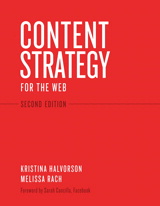
Content Strategy for the Web is something I did *not* expect to ever look into, but I decided to go out for the PDX Content Strategy Meetup this past week, where the author (Kristina Halvorson) led a rousing, fascinating Q&A session on Content Strategy. I honestly didn’t know that I had a “content strategy” problem, even though I’ve been working as an editor, knowledge manager, author, collateral manager and site owner in various roles for over a decade.  Damned glad I went out to this – about ten minutes into the session, I realized I’m in *exactly* the kind of pain and lack of strategy that Kristina is preaching.
I am now feeling *very* motivated to dig my way out of this “content strategy hole” I’ve gotten dug into.  In fact, I can accept some responsibility for the problem – I’ve let our content languish & drift, fearing the gauntlet of reviews I fear I’d have to do before I would be “allowed” to publish a fresh, tight and goal-oriented set of content for our users.

My First Impressions of these two books

Agile Experience Design: intro/background/justification in the first section, tools/techniques in the second.  I foolishly started from the beginning, even though I knew I would get bored.  And thus my wish was granted – here’s what I’ve said on Goodreads so far: “Starts out fairly hard to “get into” – even though the authors are clearly motivated to convey something they strongly believe in, it’s amazing to me how hard it is to wade through the first chapter. It’s all setup, strangely very dry and content-free. The payoff will likely come in the 2nd half of the book where they dig into tools and practices, but I figured I should start off by understanding the mindset of the authors, but slogging through the first chapter alone has been challenging to say the least.
Content Strategy of the Web: engaging from the get-go.  Kristina doesn’t mess around – she directly engages with her reader, and wants you to know she understands the problem space and that she’s got some immediate things for you to do.  No f***ing around.  And I see exactly how her lessons will immediately benefit me – I’ll be able to deliver a “content strategy” to my boss in the next week or two, if I read just a few more chapters here.  Easy.
Even though I *want* to participate in the Agile UX conversation next month, there’s no question for me where my eyeball time will be spent.  Kristina, you have another convert!
Categories ux

Grappling with the perennial question: am I using the right tool for UX design?

I’ve been using Balsamiq
for years, gets me some pretty quick “sketchy” wireframes worked out without
fussing too much over the pixel-ish details, and is usually enough for my very
tolerant developers to coalesce around the ideas I’m otherwise hand-waving too
much about.  Great for communicating “what
controls will go where”, but not terribly great at communicating layout [the
controls can only be manipulated a little], and always feels a bit limited in
terms of what kinds of controls I can bring to bear.
Lately I’ve been struggling in certain scenarios with coming
up with something more flexible – and while I can’t quite put my finger on what’s
missing, I *do* know that I’ve been avoiding opening up Balsamiq more
often and going back to my pen-and-paper notebook for sketching out simple
ideas.
Maybe I’m actually trying to design flows, not “pages” [i.e.
prototypes not just wireframes], so maybe it’s not just about “what goes where
on the page” but “how does a user intercept functionality”.
Regardless, every time I see another discussion of “wireframing”, “mocking” and 
“prototyping” tools {as much as those are ill-defined – or at least
not-terribly-precisely-used – terms}, I end up looking for something that would
fill this mysterious void.  Here’s what’s
been on my radar lately:
  • The celebration of pen & paper: e.g. Shades of
    Grey: Thoughts on Sketching
  • Axure: saw this
    demo’d at PDX-UX user group a couple of months ago.
      Wonderfully productive, near-code (without
    the code-construction overhead) to demonstrate not just a static page, but also
    to richly illustrate the user interactions in a way that drives real
    conversation with stakeholders about what’s working and what’s missing.
      Has a striking similarity to Visio for how to
    build the work product in this tool.
     
    Requires customization to get the full value for your money.  Great bang for your buck when pre-testing
    usability before ‘coding’.
  • OmniGraffle: so very
    different from Axure – saw this demo’d next to Axure at the PDX-UX group.
      Orientation to line drawing (freehand on the
    iPad), rather than a set of pre-canned shapes.
     
    Great for people that do their wireframes in Illustrator – much faster.
  • Invision:
    import your own graphics from other tools, wire them together with
    interactions, and share the crap out of them.
     
    Online, reasonable monthly rates. 
    Tempting.
  • UXPin: similar plans to
    Invision.
      Killer value prop for a guy
    like me who still doodles on paper: “You can now literally put your design
    ideas from paper into the App and continue your work. Amazingly simple.”
  • Mockflow:
    very ‘sketchy’, as much or moreso than Balsamiq.
      No major visible differences at a 2-minute
    glance.
  • Visio: hardly “sexy” but not uncommon in these
    settings.
      Excels (!) at Interaction
    Design diagramming, which is complementary to the topic at hand.
  • Microsoft Expression Studio: I am conflicted on
    this.
      I’ve used a lot of the related MS
    tools (FrontPage, Visual Studio, SharePoint Designer, Visio) for related tasks,
    but I can’t get my head out of the notion that Expression tries to do
    everything (design, workflow, code, UI) and can’t help [given Microsoft’s poor
    but consistent track record] but do everything *
    almost* well.

And here’s a couple
of the discussions
on this topic that I most recently butted up against.  The quora discussion makes a solid case for
high-fidelity prototypes, the different approaches used with different audiences,
and the real difference between prototyping and wireframing.  To wit:
·        
Wireframes are static – you will fill in the
interactions implicit between these static pictures.
·        
Prototypes should be dynamic – explicitly illustrating
as much of the *interaction* as possible – as much attention to the
interactions as the wireframes.
I like to think of prototypes as “storyboarding” like directors
& DP’s do for movies, and wireframes as “photos” snapped with varying
lenses on the camera.
Now for the $64K question: What do you use and why?

How to practice user experience design

Spotted a fascinating discussion of some of Google’s recent UX design changes to various of their apps, and some excellent responses.

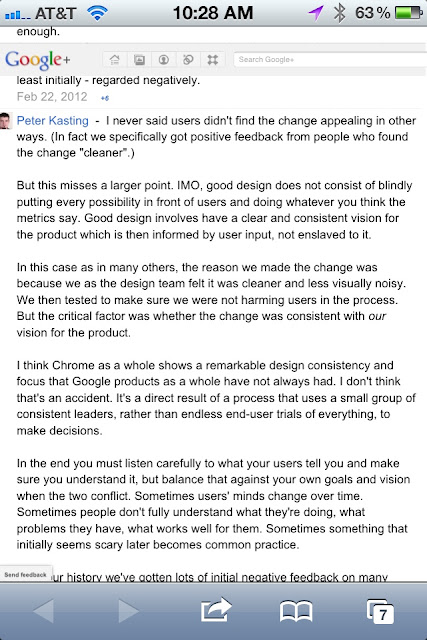
The discussion started with Kevin Fox, a former lead designer on many of Google’s premier apps. The responses include at least a couple of *current* uX designers from Google, including the response from Peter Kasting I snapshot’d in the enclosed image.

I note this especially as something inspirational to my own career as a UX designer – user feedback is essential, but not the whole story, and a strong design vision is just as essential to ensuring continuity, clarity and consistency.

I live my life these days walking that fine tightrope, and I appreciate those others who share their own experience of it.

Usability and UX – are you a practitioner? How to hone my instincts?

My career has been veering for a couple of years now towards the squishy-but-satisfying creative arenas of Usability & UX (User Experience), and I’d like to make this an explicit career direction. That means (a) meeting other folks already practicing these disciplines, (b) learning how to behave more like them, and (c) sharing my experiences with any who are looking to learn from newer practitioners. I expect the full transition to take a number of years, but where I have creative freedom in my job to flex in these directions I’ll be taking advantage of every chance I get.
As for immediate changes:

  • I’m joining some local user groups here in Portland (PDX UX already, Chifoo and IxDA next)
  • I’ve been re-reading “Don’t Make Me Think” from my iPhone while commuting
  • I’ve bookmarked this discussion on Slashdot (! yes, ironic to find Linux geeks who can spell UX)

What’s next? Who should I be talking to? Where should I seek out like-minded folks? What should I be reading/doing/learning next?