Running *nix apps on Win10 “Anniversary update”: initial findings

Ever since Microsoft announced the “Bash on Windows” inclusion in the Anniversary update of Win10, I’ve been positively *itching* to try it out.  I spent *hours* in Git Bash, Cygwin and other workarounds inside Windows to get tools like Vagrant to work natively in Windows.

Spoiler: it never quite worked. [Aside: if anyone has any idea how to get rsync to work in Cygwin or similarly *without* the Bash shell on Windows, let’s talk.  That was the killer flaw.]

Deciphering the (hidden) installation of Bash

I downloaded the update first thing this morning and got it installed, turned on Developer Mode, then…got stumped by Hanselman’s article (above) on how exactly to get the shell/subsystem itself installed.  [Seems like something got mangled in translation, since “…and adding the Feature, run you bash and are prompted to get Ubuntu on Windows from Canonical via the Windows Store…” doesn’t make any grammatical sense, and searching the Windows Store for “ubuntu”, “bash” or “canonical” didn’t turn up anything useful.]

The Windows10 subreddit’s megathread today left incomplete instructions, and a rumour that this was only available on Win10 Pro (not Home).

Instead, it turns out that you have to navigate to legacy control panel to enable, after you’ve turned on Developer Mode (thanks MSDN Blogs):

Control Panel >> Programs >> Turn Windows features on or off, then check “Windows Subsystem for Linux (Beta)”.  Then reboot once again.
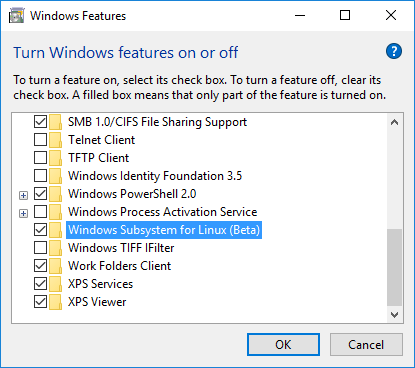
WindowsFeaturesDialog

Then fire up CMD.EXE and type “bash” to initiate the installation of “Ubuntu on Windows”:
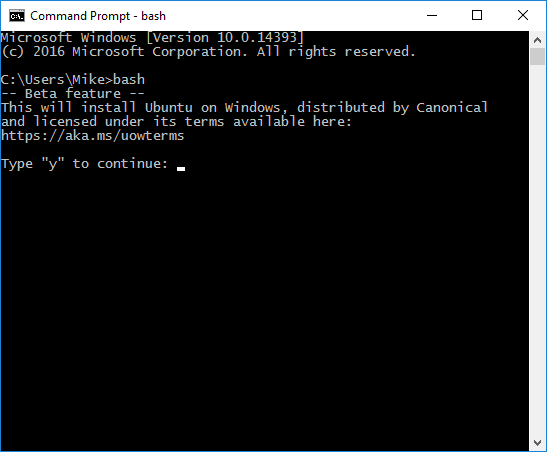
BashUbuntuWin10Install

Now to use it!

Once installed, it’s got plenty of helpful hints built in (or else Ubuntu has gotten even easier than I remember), such as:

BashUbuntuWin10Hints

Npm, rpm, vagrant, git, ansible, virtualbox are similarly ‘hinted’.

Getting up-to-date software installed

Weirdly, Ansible 1.5.4 was installed, not from the 2.x version.  What gives?  OK, time to chase a rat through a rathole…

This article implies I could try to get a trusty-backport of ansible:
https://blogs.msdn.microsoft.com/commandline/2016/04/06/bash-on-ubuntu-on-windows-download-now-3/

Does that mean the Ubuntu on Windows is effectively an old version of Ubuntu?  How can I even figure that out?

Running ‘apt-get –version’ indicates we have apt 1.0.1ubuntu2 for amb64 compiled on Jan 12 2016.  That seems relatively recent…

Running ‘apt-cache policy ansible’ gives me the following output:

mike@MIKE-WIN10-SSD:/etc/apt$ apt-cache policy ansible 
ansible: 
  Installed: 1.5.4+dfsg-1 
  Candidate: 1.5.4+dfsg-1 
  Version table: 
 *** 1.5.4+dfsg-1 0 
        500 http://archive.ubuntu.com/ubuntu/ trusty/universe amd64 Packages 
        100 /var/lib/dpkg/status

Looking at /etc/apt/sources.list, there’s only three listed by default:

mike@MIKE-WIN10-SSD:/etc/apt$ cat sources.list 
deb http://archive.ubuntu.com/ubuntu trusty main restricted universe multiverse 
deb http://archive.ubuntu.com/ubuntu trusty-updates main restricted universe multiverse 
deb http://security.ubuntu.com/ubuntu trusty-security main restricted universe multiverse

So is there some reason why Ubuntu-on-Windows’ package manager (apt) doesn’t even list > 1.5.4 as an available installation?  ‘Cause I was previously running v2.2.0 of Ansible on native Ubuntu (just last month).

I *could* run from source in a subdirectory from my home directory – but I’m shamefully (blissfully?) unaware of the implications – are there common configuration files that might stomp on each other?  Is there common code stuffed in some dark location that is better left alone?

Or should I add the source repo mentioned here?  That seems the safest option, because then apt should manage the dependencies and not leave me with two installs of ansible (1.5.4 and 2.x).

Turns out the “Latest Releases via Apt (Ubuntu)” seems to have done well enough – now ‘ansible –version’ returns “ansible 2.1.1.0”, which appears to be latest according to https://launchpad.net/~ansible/+archive/ubuntu/ansible.

Deciphering hands-on install dependencies

Next I tried installing vagrant, which went OK, but then complained about an incomplete installation:

mike@MIKE-WIN10-SSD:/mnt/c/Users/Mike/VirtualBox VMs/BaseDebianServer$ vagrant up

VirtualBox is complaining that the installation is incomplete. Please run
`VBoxManage --version` to see the error message which should contain
instructions on how to fix this error. 

mike@MIKE-WIN10-SSD:/mnt/c/Users/Mike/VirtualBox VMs/BaseDebianServer$ VBoxManage --version 
WARNING: The character device /dev/vboxdrv does not exist. 
         Please install the virtualbox-dkms package and the appropriate 
         headers, most likely linux-headers-3.4.0+. 

         You will not be able to start VMs until this problem is fixed.

So, tried ‘sudo apt-get install linux-headers-3.4.0’ and it couldn’t find a match.  Tried ‘apt-cache search linux-headers’ and it came back with a wide array of options – 3.13, 3.16, 3.19, 4.2, 4.4 (many subversions and variants available).

Stopped me dead in my tracks – which one would be appropriate to the Ubuntu that ships as “Ubuntu for Windows” in the Win10 Anniversary Update?  Not that header files *should* interact with the operations of the OS, but on the off-chance that there’s some unexpected interaction, I’d rather be a little methodical than have to figure out how to wipe and reinstall.

Figuring out what is the equivalent “version of Ubuntu” that ships with this subsystem isn’t trivial:

  • According to /etc/issue, it’s “Ubuntu 14.04.4 LTS”.
  • What version of the Linux kernel comes with 14.04.4?
  • According to ‘uname -r’, it’s “3.4.0+”, which seems suspiciously under-specific.
  • According to /proc/version, its “Linux version 3.4.0-Microsoft (Microsoft@Microsoft.com) (gcc version 4.7 (GCC) ) #1 SMP PREEMPT Wed Dec 31  14:42:53 PST 2014”.

That’s enough for one day – custom versions of the OS should make one ponder.  Tune in next time to see what kind of destruction I can wring out of my freshly-unix-ized Windows box.

P.S. Note to self: it’s cool to get an environment running; it’s even better for it to stay up to date.  This dude did a great job of documenting his process for keeping all the packages current.

Problems-to-solve: finding meetup-friendly spaces in Portland

Preamble

Sometimes I encounter a problem in my day to day life that I find so frustrating – and to me, so obvious (hasn’t been thought of by some PM already; or should’ve been caught by PO/PM acceptance validation, or during usability testing, or in the User Story’s acceptance criteria) that I can’t help thinking of how I’d have pitched this to the engineering team myself.

Think of this as a Product Guy’s version of “fantasy football” – “fantasy product ownership/management”.

Summary

User Story: as the organizer of a Meetup in Portland, I want to be able to quickly find all the meetup-friendly spaces in Portland so that I can book my meetup in a suitable space.

BDD Scenario: Given that I have an existing meetup group AND that the meetup does not have an booked meetup space, when I search for available meetup-friendly spaces in Portland, then I see a listing of such spaces in Portland including address, contact info and maximum number of attendees.

Background

I’ve been an active participant in the meetup scene in Portland for a few years now. I’ve briefly co-led a meetup as well, and been solicited to help organize a number of other meetups.

One of the phenomena I’ve observed is how challenging it can be for some meetups to find a space for their meetings. Many meetups find one space, lock it in for a year and never roam. Some meetups have to change spaces from month to month, and regularly put out a call to attendees to help them find suitable locations. And once in a while, a meetup has to change venues for space or other logistical reasons (e.g. a very popular speaker is coming to town).

Whenever I talk to meetup organizers about this part of the job, it strikes me as odd that they’re all operating like this is a high-school gossip circle: no one has all the information, there is no central place to find out where to go/who to talk to, and most people are left to ask friends if they happen to know of any spaces.

In a tech-savvy city such as Portland, where we have dozens of meetups every day, and many tech conferences a month, it’s surprising to find that getting a meetup successfully housed relies so much on word of mouth (or just using your employer’s space, if you’re lucky to be in such a position).

I’ve been at meetups in some great spaces, nearly all of them in a public-friendly space of tech employers across Portland. Where is the central directory of these spaces? Is there an intentional *lack* of public listing, so that these spaces don’t get overrun? Is this a word-of-mouth resource so that only those event organizers with a personal referral are deemed ‘vetted’ for use?

From the point of view of the owners of these spaces, I can imagine there’s little incentive to make this a seven-nights-a-week resource. Most of these employers don’t employ staff to stick around at night to police these spaces; many of them seem to leave the responsibility up to an employee [often an existing member of the meetup group] to chaperone the meetup attendees and shoo them out when they’re too tired or have to go home/back to work.

My Fantasy Scenario

Any meetup organizer in Portland will be able to find suitable meetup spaces and begin negotiating for available dates/times. A “suitable” space would be qualified on such criteria as:

  • Location
  • Number of people the space can legally accommodate
  • Number of seats available
  • Days and hours the space is potentially available (e.g. M-F 5-8, weekends by arrangement)
  • A/V availability (projector, microphone)
  • Guest wifi availability
  • Amenities (beer, food, snacks, bike parking)
  • Special notes (e.g. door access arrangements, must arrange to have employee chaperone the space)
  • Contact info to inquire about space availability [email, phone, booking system]

Future features

I can also see a need for a service that similarly lists conference-friendly spaces around town – especially for low-budget conferences that can’t afford the corporate convention spaces. I’ve been at many community-oriented conferences here in Portland, and I’m betting the number of spaces I’ve visited [e.g. Eliot Center, Armory, Ambridge, Portland Art Museum, Center for the Arts], still aren’t anywhere near the secret treasures that await.

  • Number of separate/separable rooms and their seating
  • Additional limitations/requirements e.g. if food/drinks, must always use the contracted catering

Workarounds Tried

Workaround: the http://workfrom.co service includes a filter for “Free Community Spaces”, labelled Community spaces are free and open to all, no purchase required. Common community spaces include libraries, student unions and banks. Unfortunately, as of now there are only five listings (three of them public library spaces).

Workaround: I was told by a friend that Cvent has a listing of event spaces in Portland. My search of their site led to this searchable interface. Unfortunately, this service appears to be more oriented to helping someone plan a conference or business meeting and keeping attendees entertained/occupied – where “venue type” = “corporate

Mashing the marvelous wrapper until it responds, part 1: prereq/setup

I haven’t used a dynamic language for coding nearly as much as strongly-typed, compiled languages so approaching Python was a little nervous-making for me.  It’s not every day you look into the abyss of your own technical inadequacies and find a way to keep going.

Here’s how embarrassing it got for me: I knew enough to clone the code to my computer and to copy the example code into a .py file, but beyond that it felt like I was doing the same thing I always do when learning a new language: trying to guess at the basics of using the language that everyone who’s writing about it already knows and has long since forgotten, they’re so obvious.  Obvious to everyone but the neophyte.

Second, is that I don’t respond well to the canonical means of learning a language (at least according to all the “Learn [language_x] from scratch” books I’ve picked up over the years), which is

  • Chapter 1: History, Philosophy and Holy Wars of the Language
  • Chapter 2: Installing The Author’s Favourite IDE
  • Chapter 3: Everything You Don’t Have a Use For in Data Types
  • Chapter 4: Advanced Usage of Variables, Consts and Polymorphism
  • Chapter 5: Hello World
  • Chapter 6: Why Hello World Is a Terrible Lesson
  • Chapter 7: Author’s Favourite Language Tricks

… etc.

I tend to learn best by attacking a specific, relevant problem hands-on – having a real problem I felt motivated to attack is how these projects came to be (EFSCertUpdater, CacheMyWork).  So for now, despite a near-complete lack of context or mentors, I decided to dive into the code and start monkeying with it.

Riches of Embarrassment

I quickly found a number of “learning opportunities” – I didn’t know how to:

  1. Run the example script (hint: install the python package for your OS, make sure the python binary is in your current shell’s path, and don’t use the Windows Git Bash shell as there’s some weird bug currently at work)
  2. Install the dependencies (hint: run “pip install xxxx”, where “xxxx” is whatever shows up at the end of an error message like this:
    C:\Users\Mike\code\marvelous>python example.py 
    Traceback (most recent call last):     
        File "example.py", line 5, in <module>
            from config import public_key, private_key 
    ImportError: No module named config

    In this example, I ran “pip install config” to resolve this error.

  3. Set the public & private keys (hint: there was some mention of setting environment variables, but it turns out that for this example script I had to paste them into a file named “config” – no, for python the file needs to be named “config.py even though it’s text not a script you would run on its own – and make sure the config.py file is stored in the same folder as the script you’re running.  Its contents should look similar to these (no, these aren’t really my keys):
        public_key = 81c4290c6c8bcf234abd85970837c97 
        private_key = c11d3f61b57a60997234abdbaf65598e5b96

    Nope, don’t forget – when you declare a variable in most languages, and the variable is not a numeric value, you have to wrap the variable’s value in some type of quotation marks.  [Y’see, this is one of the things that bugs me about languages that don’t enforce strong typing – without it, it’s easy for casual users to forget how strings have to be handled]:

        public_key = '81c4290c6c8bcf234abd85970837c97' 
        private_key = 'c11d3f61b57a60997234abdbaf65598e5b96'
  4. Properly call into other Classes in your code – I started to notice in Robert’s Marvelous wrapper that his Python code would do things like this – the comic.py file defined
         class ComicSchema(Schema):

    …and the calling code would state

        import comic 
        … 
        schema = comic.ComicSchema()

    This was initially confusing to me, because I’m used to compiled languages like C# where you import the defined name of the Class, not the filename container in which the class is defined.  If this were C# code, the calling code would probably look more like this:

        using ComicSchema;
        … 
        _schema Schema = ComicSchema();

    (Yes, I’m sure I’ve borked the C# syntax somehow, but for sake of this sad explanation, I hope you get the idea where my brain started out.)

    I’m inferring that for a scripted/dynamic language like Python, the Python interpreter doesn’t have any preconceived notion of where to find the Classes – it has to be instructed to look at specific files first (import comic, which I’m guessing implies import comic.py), then further to inspect a specified file for the Class of interest (schema = comic.ComicSchema(), where comic. indicates the file to inspect for the ComicSchema() class).

Status: Learning

So far, I’m feeling (a) stupid that I have to admit these were not things with which I sprang from the womb, (b) grateful Python’s not *more* punishing, (c) smart-ish that fundamental debugging is something I’ve still retained and (d) good that I can pass along these lessons to other folks like me.

Coding Again? Experimenting with the Marvel API

I’ve been hanging around developers *entirely* too much lately.

These days I find myself telling myself the story that unless I get back into coding, I’m not going to be relevant in the tech industry any longer.

Hanging out (aka volunteering) at developer-focused conferences will do that to you:

Volunteering on open source projects will do that to you (jQuery Foundation‘s infrastructure team).

Interviewing for engineering-focused Product Owner and Technical Product Manager roles will do that to you. (Note: when did “technical” become equivalent to “I actively code in my day job/spare time”?)

One of the hang-ups I have that keeps me from investing the immense amount of grinding time it takes to make working code is that I haven’t found an itch to scratch that bugs me enough that I’m willing to commit myself to the effort. Plenty of ideas float their way past my brain, but very few (like CacheMyWork) get me emotionally engaged enough to surmount the activation energy necessary to fight alone past all the barriers: lonely nights, painful problem articulation, lack of buddy to work on it, and general frustration that I don’t know all the tricks and vocabulary that most good coders do.

Well, it finally happened. I found something that should keep me engaged: creating a stripped-down search interface into the Marvel comics catalogue.  Marvel.com provides a search on their site but I:

  1. keep forgetting where they buried it,
  2. find it cumbersome and slow to use, and
  3. never know if the missing references (e.g. appearances of Captain Marvel as a guest in others’ comics that aren’t returned in the search results) are because the search doesn’t work, or because the data is actually missing

Marvel launched an API a couple of years ago – I heard about it at the time and felt excited that my favourite comics publisher had embraced the Age of APIs.  But didn’t feel like doing anything with it.

Fast forward two years: I’m a diehard user of Marvel Unlimited, my comics reading is about half-Marvel these days, and I’m spending a lot of time trying to weave together a picture of how the characters relate, when they’ve bumped into each other, what issue certain happenings occurred in, etc

Possible questions I could answer if I write some code:

  • How socially-connected is Spidey compared with Wolverine?
  • When is the first appearance of any character?
  • What’s the chronological publication order of every comic crossover in any comics Event?

Possible language to use:

  • C# (know it)
  • F# (big hawtness at the .NET Fringe conf)
  • Python (feel like I should learn it)
  • Typescript (ES6 – like JavaScript with static types and other frustration-killers)
  • ScriptCS (a scriptable C#)

More important than choice of language though is availability of wrappers for the API – while I’m sure it would be very instructive to immediately start climbing the cliff of building “zero tech” code, I learn far faster when I have visible results, than when I’m still fiddling with getting the right types for my variables or trying to remember where and when to set the right kind of closing braces.

So for sake of argument I’m going to try out the second package I found – Robert Kuykendall’s “marvelous” python wrapper: https://github.com/rkuykendall/marvelous

See you when I’ve got something to report.

Hashicorp Vault + Ansible + CD: open source infra, option 2

“How can we publish our server configuration scripts as open source code without exposing our secrets to the world?”

In my first take on this problem, I fell down the rabbit hole of Ansible’s Vault technology – a single-password-driven encryption implementation that encrypts whole files and demands they be decrypted by interactive input or static filesystem input at runtime. Not a bad first try, but feels a little brittle (to changes in the devops team, to accidental inclusion in your git commits, or to division-of-labour concerns).

There’s another technology actively being developed for the devops world, by the Hashicorp project, also (confusingly/inevitably) called Vault. [I’ll call it HVault from here on, to distinguish from Ansible Vault >> AVault.]

HVault is a technology that (at least from a cursory review of the intro) promises to solve the brittle problems above. It’s an API-driven lockbox and runtime-proxy for all manner of secrets, making it possible to store and retrieve static secrets, provision secrets to some roles/users and not others, and create limited-time-use credentials for applications that have been integrated with HVault.

Implementation Options

So for our team’s purposes, we only need to worry about static secrets so far. There’s two possible ways I can see us trying to integrate this:

  1. retrieve the secrets (SSH passphrases, SSL private keys, passwords) directly and one-by-one from HVault, or
  2. retrieve just an AVault password that then unlocks all the other secrets embedded in our Ansible YAML files (using reinteractive’s pseudo-leaf indirection scheme).

(1) has the advantage of requiring one fewer technologies, which is a tempting decision factor – but it comes at the expense of creating a dependency/entanglement between HVault and our Ansible code (in naming and managing the key-value pairs for each secret) and of having to find/use a runtime solution to injecting each secret into the appropriate file(s).

(2) simplifies the problem of injecting secrets at runtime to a single secret (i.e. AVault can accept a script to insert the AVault password) and enables us to use a known quantity (AVault) for managing secrets in the Ansible YAMLs, but also means that (a) those editing the “secret-storing YAMLs” will still have to have access to a copy of the AVault password, (b) we face the future burden to plan for breaking changes introduced by both AVault and HVault, and (c) all secrets will be dumped to disk in plaintext on our continuous deployment (CD) server.

Thoughts on Choosing For Our Team

Personally, I favour (1) or even just using AVault alone. While the theoretical “separation of duties” potential for AVault + HVault is supposed to be more attractive to a security geek like me, this just seems like needless complexity for effectively very little gain. Teaching our volunteers (now and in the future) how to manage two secrets-protecting technologies would be more painful, and we double the risks of dealing with a breaking change (or loss of active development) for a necessary and non-trivially-integrated technology in our stack.

Further, if I had to stick with one, I’d stay “single vendor” and use AVault rather than spread us across two projects with different needs & design philosophies. Once we accept that there’s an occasional “out of band initialization” burden for setting up either vault, and that we’d likely have to share access to larger numbers of secrets with a wider set of the team than ideal, I think the day-to-day management overhead of AVault is no worse (and possibly lighter) than HVault.

Pseudo-Solution for an HVault-only Implementation

Assuming for the moment that we proceed with (1), this (I think) is the logical setup to make it work:

  • Setup an HVault instance
  • Design a naming scheme for secrets
  • Populate HVault with secrets
  • Install Consul Template as a service
  • Rewrite all secret-containing Ansible YAMLs with Consul Template templating variables (matching the HVault naming)
  • Rewrite CD scripts to pull HVault secrets and rewrite all secret-containing Ansible YAMLs
  • Populate the HVault environment variables to enable CD scripts to authenticate to HVault

Operational Concerns

If the HVault instance is running on a server in the production infrastructure, can HVault be configured to only allow connections from other servers that require access to the HVault secrets? This would reduce the risk that knowledge of the HVault (authentication token and address as used here) wouldn’t provide instant access to the secrets from anywhere on the Internet. This would be considered a defense-in-depth measure in case ip_tables and SSH protections could be circumvented to allow incoming traffic at the network level.

The HVault discussions about “flexibility” and “developer considerations” lead me to conclude that – for a volunteer team using part-time time slivers to manage an open source project’s infrastructure – HVault Cubbyhole just isn’t low-impact, fully-baked enough at this time to make it worth the extra development effort to create a full solution for our needs. While Cubbyhole addresses an interesting edge case in making on-the-wire HVault tokens less vulnerable, it doesn’t substantially mitigate (for us, at least) the bootstrapping problem, especially when it comes to a single-server HVault+deployment service setup.

Residual Security Issues

  • All this gyration with HVault is meant to help solve the problems of (a) storing all Ansible YAML-bound secrets in plaintext, (b) storing a static secret (the AVault password) in plaintext on our CD server, and (c) finding some way to keep any secrets from showing up in our github repo.
  • However, there’s still the problem of authenticating a CD process to HVault to retrieve secret(s) in the first place
  • We’re still looking to remove human intervention from standard deployments, which means persisting the authentication secret (token, directory-managed user/pass, etc) somewhere on disk (e.g. export VAULT_TOKEN=xxxx)
  • Whatever mechanism we use will ultimately be documented – either directly in our github repo, or in documentation we end up publishing for use by other infrastructure operators and those who wish to follow our advice


This is not the final word – these are merely my initial thoughts, and I’m looking forward to members of the team bringing their take to these technologies, comparisons and issues.  I’m bound to learn something and we’ll check back with the results.

Reading List

Intro to Hashicorp Vault: https://www.vaultproject.io/intro/

Blog example using HVault with Chef: https://www.hashicorp.com/blog/using-hashicorp-vault-with-chef.html

Example Chef Recipe for using HVault https://gist.github.com/sethvargo/6f1a315094fbd1a18c6d

Ansible lookup module to retrieve secrets from HVault https://github.com/jhaals/ansible-vault

Ansible modules for interacting with HVault https://github.com/TerryHowe/ansible-modules-hashivault

Ansible Vault for an open source project: adventures in simplified indirection

“How can we publish our server configuration scripts as open source code without exposing our secrets to the world?”

It seemed like a simple enough mission. There are untold numbers of open source projects publishing directly to github.com; most large projects have secrets of one form or another. Someone must have figured out a pattern for keeping the secrets *near* the code without actually publishing them (or a key leading to them) as plaintext *in* the code, yes?

However, a cursory examination of tutorials on Ansible Vault left me with an uneasy feeling. It appears that a typical pattern for this kind of setup is to partition your secrets as variables in an Ansible Role, encrypt the variables, and unlock them at runtime with reference to a password file (~/.vault_pass.txt) [or an interactive prompt at each Ansible run *shudder*]. The encrypted content is available as an AES256 blob, and the password file… well, here’s where I get the heebie-jeebies:

  1. While AES256 is a solid algorithm, it still feels…weird to publish such files to the WORLD. Distributed password cracking is quite a thing; how ridiculous of a password would we need to have to withstand an army of bots grinding away at a static password, used to unlock the encrypted secrets? Certainly not a password that anyone would feel comfortable typing by hand every time it’s prompted.
  2. Password files need to be managed, stored, backed up and distributed/distributable among project participants. Have you ever seen the docs for PGP re: handling the master passphrase? Last time I remember looking with a friend, he showed me four places where the docs said “DON’T FORGET THE PASSPHRASE”. [Worst case, what happens if the project lead gets hit by a bus?]

I guess I was expecting some kind of secured, daemon-based query-and-response RPC server, the way Jan-Piet Mens envisioned here.

Challenges

  • We have a distributed, all-volunteer team – hit-by-a-bus scenarios must be part of the plan
  • (AFAIK) We have no permanent “off-the-grid” servers – no place to stash a secret that isn’t itself backed up on the Internet – so there will have to be at least periodic bootstrapping, and multiple locations where the vault password will live

Concerns re: Lifecycle of Ansible Vault secrets:

  1. Who should be in possession of the master secret? Can this be abstracted or does anyone using it have to know its value?
  2. What about editing encrypted files? Do you have to decrypt them each time and re-encrypt, or does “ansible-vault edit” hand-wave all that for you?
    • Answer: no, “ansible-vault edit” doesn’t persist the decrypted contents to disk, just sends them to your editor and transparently re-encrypts on save.
  3. Does Ansible Vault use per-file AES keys or a single AES key for all operations with the same password (that is, is the vault password a seed for the key or does it encrypt the key)?
    • Answer: not confirmed, but perusing the source code and the docs never mention per-file encryption, and the encrypted contents do not appear to store an encrypted AES key, so it looks like one AES key per vault password.
  4. Where to store the vault password if you want to integrate it into a CD pipeline?
    • Answer: –vault-password-file ~/.vault_pass.txt OR EVEN –vault-password-file ~/.vault_pass.py, where the script sends the password to stdout]
  5. Does anyone have a viable scheme that doesn’t require a privileged operator to be present during every deployment (–ask-vault-pass)?
    • i.e. doesn’t that mean you’re in danger of including ~/.vault_pass.txt in your git commit at some point? If not, where does that secret live?
  6. If you incorporate LastPass into your workflow to keep a protected copy of the vault password, can *that* be incorporated into the CD pipeline somehow?
  7. Are there any prominent OSS projects that have published their infrastructure and used Ansible Vault to publish encrypted versions of their secrets?

Based on my reading of the docs and blogs, it seems like this is the proferred solution for maximum automation and maintainability:

  • Divvy up all your secrets as variables and use pseudo-leaf indirection (var files referencing prefixed variables in a separate file) as documented here.
  • Encrypt the leaf-node file(s) using a super-complex vault password
  • Store the vault password in ~/.vault_pass.txt
  • Call all ansible and ansible-playbook commands using the –vault-password-file option
  • Smart: wire up a pre-commit step in git to make sure the right files are always encrypted as documented here.
  • Backup the vault password in a password manager like LastPass (so that only necessary participants get access to that section)
  • Manually deploy the ,vault_pass.txt file to your Jenkins server or other CI/CD master and give no one else access to that server/root/file.
  • Limit the number of individuals who need to edit the encrypted file(s), and make sure they list.vault_pass.txt in their .gitignore file.

P.S. Next up – look into the use of Hashicorp’s Vault project.

Reading List

Ansible Vault Docs:
http://docs.ansible.com/ansible/playbooks_vault.html

This is an incredibly useful article of good practices for using Ansible (and Ansible Vault) in a reasonably productive way:
https://www.reinteractive.net/posts/167-ansible-real-life-good-practices

Occupied Neurons, early July 2016: security edition

Who are you, really: Safer and more convenient sign-in on the web – Google I/O 2016

Google shared some helpful tips for web developers to make it as easy as possible for users to securely sign in to your web site, from the Google Chrome team:

  • simple-if-annoying-that-we-still-have-to-use-these attributes to add to your forms to assist Password Manager apps
  • A Credential Management API that (though cryptically explained) smoothes out some of the steps in retrieving creds from the Chrome Credential Manager
  • This API also addresses some of the security threats (plaintext networks, Javascript-in-the-middle, XSS)
  • Then they discuss the FIDO UAF and U2F specs – where the U2F “security key” signs the server’s secondary challenge with a private key whose public key is already enrolled with the online identity the server is authenticating

The U2F “security key” USB dongle idea is cute and useful – it requires the user’s interaction with the button (can’t be automatically scraped by silent malware), uses RSA signatures to provide strong proof of possession and can’t be duplicated. But as with any physical “token”, it can be lost and it requires that physical interface (e.g. USB) that not all devices have. Smart cards and RSA tokens (the one-time key generators) never entirely caught on either, despite their laudable security laurels.

The Credential Manager API discussion reminds me of the Internet Explorer echo chamber from 10-15 years ago – Microsoft browser developers adding in all these proprietary hooks because they couldn’t imagine anyone *not* fully embracing IE as the one and only browser they would use everywhere. Disturbing to see Google slip into that same lazy arrogance – assuming that web developers will assume that their users will (a) always use Chrome and (b) be using Chrome’s Credential Manager (not an external password manager app) to store passwords.

Disappointing navel-gazing for the most part.

Google’s password-free logins may arrive on Android apps by year-end

Project Abacus creates a “Trust Score API” – an interesting concept which intends supplant the need for passwords or other explicit authentication demands, by taking ambient readings from sensors and user interaction patterns with their device to determine how likely it is that the current holder/user is equivalent to the identity being asserted/authenticated.

This is certainly more interesting technology, if only because it allows for the possibility that any organization/entity that wishes to set their own tolerance/threshold per-usage can do so, using different “Trust Scores” depending on how valuable the data/API/interaction is that the user is attempting. A simple lookup of a bank balance could require a lower score than making a transfer of money out of an account, for example.

The only trick to this is the user must allow Google to continuously measure All The Thingz from the device – listen on the microphone, watch all typing, observe all location data, see what’s in front of the camera lens. Etc. Etc. Etc.

If launched today, I suspect this would trip over most users’ “freak-out” instinct and would fail, so kudos to Google for taking it slow. They’re going to need to shore up the reputation of Android phones and their inscrutably cryptic if comprehensive permissions model and how well that’s sandboxed if they’ll ever get widespread trust for Google to watch everything you’re doing.

MICROSOFT WANTS TO PROTECT US FROM OUR OWN STUPID PASSWORDS

Looks like Microsoft is incorporating “widely-used hacked passwords” into the set of password rules that Active Directory can enforce against users trying to establish a weak password. Hopefully this’ll be less frustrating than the “complex passwords” rules that AD and some of Microsoft’s more zealous customers like to enforce, making it nigh-impossible to know what the rules are let alone give a sentient human a chance of getting a password you might want to type 20-50 times/day. [Not that I have any PTSD from that…]

Unfortunately, they do a piss-poor job of explaining how “Smart Password Lockout” works. I’m going to take a guess how this works, and hopefully someday it’ll be spelled out. It appears they’ve got some extra smarts in the AD password authentication routine that runs at the server-side – it can effectively determine whether the bad password authentication attempt came from an already-known device or not. This means that AD is keeping a rolling cache of the “familiar environments” – likely one that ages out the older records (e.g. flushing anything older than 30 days). What’s unclear is whether they’re recording remote IP addresses, remote computer names/identities, remote IP address subnets, or some new “cookie”-like data that wasn’t traditionally sent with the authentication stream.

If this is based on Kerberos/SAML exchanges, then it’s quite possible to capture the remote identity of the computer from which the exchange occurred (at least for machines that are part of the Active Directory domain). However, if this is meant as a more general-purpose mitigation for accounts used in more Internet (not Active Directory domain) setting, then unless Active Directory has added cookie-tracking capabilities it didn’t have a decade ago, I’d imagine they’re operating strictly on the remote IP address enveloped around any authentication request (Kerberos, NTLM, Basic, Digest).

Still seems a worthwhile effort – if it allows AD to lockout attackers trying to brute-force my account from locations where no successful authentication has taken place – AND continues to allow me to proceed past the “account lockout” at the same time – this is a big win for end users, especially where AD is used in Internet-facing settings like Azure.

Do You Demo? Do you act on the feedback? No? Then you ain’t agile

I am convinced that there are few practices in Agile (aka SCRUM to most people) that can’t be revised, bent, paused or outright abandoned – in the pursuit of a healthy, adaptive and productive engineering squad.

However, the end-of-iteration demo is one I am vehement about.  If you aren’t doing demos well, it’s my believe that you shouldn’t be calling yourself agile (let alone Agile(tm)).

Aside: AgilePDX is a local meetup community of people zealous about improving our employers’ ability to deliver better product – faster, more transparently and most importantly, with more value to our customers.

Our last pub lunch roundtable discussion was “The End of Agile?”, and Billy McGee posed a great question that still rings in my head:

Which of the rituals/rules/ceremonies can we abandon and still call ourselves Agile?

My initial (silent) response to this was “almost all of them”.

As I actually contributed to the discussion, I still claim that one of The Most Important ceremonies to stick with is the end-of-iteration DEMO. Get your feedback early and often (if more frequently than end-of-iteration, even better), and for dogs’ sake get at least *one* person to say something who’s from *outside* the team.  Then take an action on that feedback.

code demo

Until you get outside-the-team inspection, you can’t hope to truly adapt to the trouble you’ve just gotten into by being away from outsiders for that long.  Groupthink, too-close-to-the-problem, love for the solution you derived – it all clouds the objective reality that you’ve almost certainly done it wrong.

If you do this one thing [demo/feedback/react] consistently/more-than-haphazardly, and *act* on the feedback (discuss, change a story, throw away code, replan your roadmap), you will have done more to imbue confidence in your team from the rest of the organization, and they’ll give you a lot more room to be experimental and not “plan-to-perfection” drowned.

The most frustrating thing for management/leadership that aren’t there every day is feeling like we have no CONTROL over getting the right things delivered more effectively.  Not seeing the work that goes into delivering the product, the engineering process becomes just a black box – even for those who’ve been in the trenches, distance + time just leads the mind to question.

When things feel out of control, leaders use what few tools they have to do what they can to keep things steered correctly – demand reports and metrics to give them *something* to wrap hands around, start dictating process to get more ‘structure’ around this messy process, and asking for more detailed plans.

These are all proxies for “how can I help make sure we’re doing the right things?”  And like they say, a picture’s worth a thousand words.  Heck, a customer’s reaction is worth at least that much too.

I’ve seen myself react *far* better to the growing uncertainties when I get to see what’s been delivered so far – live UI, screenshots, even a tour of the source code.  Takes away so much anxiety just to *see* something is there, let alone whether it truly meets my personal objectives.  Give me something – anything – to comment on, and the fact that I engage in comments on the thing means (a) I’m asking for help to buy in, (b) I’m getting committed to the thing in front of me and (c) you’re getting early clues what I’ll want to see before the last responsible moment.

Even this is better than no feedback, no matter how painful it might be:

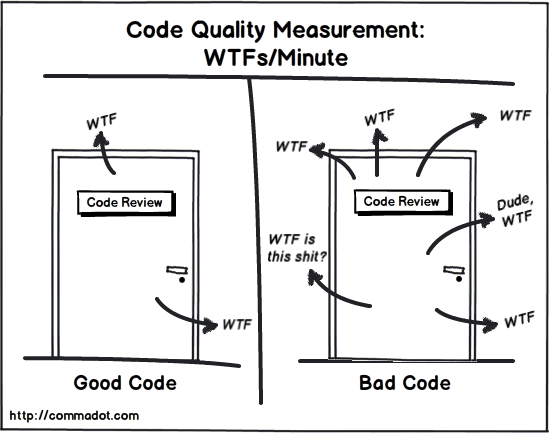
code quality

Coda: one of my colleagues asked me, “So, abandon retrospectives?”  It’s a good question.  They’re one of the few rituals that’s meant to help the team evolve to better performance and outcomes.  And here’s where I’m going to take a radical/lazy/wait-and-see position:

Personally, I’m inclined to skip (the process part of) the retro until and unless the team gets behind the “inspect and adapt” angle on the product in response to what happens during demo. My experience, engineers are more likely to start in that habit if it’s focused on their code, and if they’re not even willing to engage for the technology, I’m less inclined to skate uphill on the process side of things – as a PO/PM participant/observer, I’ve seen retro degrade quite often into a “here’s what happened”, “good/bad/ugly” historical review, and lose sight of the “what would you like to try changing next time?”

Occupied Neurons, late May 2016

Understanding Your New Google Analytics Options – Business 2 Community

Here’s where the performance analytics and “business analytics” companies need to keep an eye or two over their shoulder. This sounds like a serious play for the high-margin customers – a big capital “T” on your SWOT analysis, if you’re one of the incumbents Google’s threatening.

10 Revealing Interview Questions from Product Management Executives

Prep’ing for a PM/PO job interview? Here’s some thought-provoking questions you should think about ahead of time.

When To Decline A Job Offer

The hardest part of a job search (at least for me) is trying to imagine how I would walk away from a job offer, even if it didn’t suit my needs, career aspirations. Beyond the obvious red flags (dark/frantic mood around the office, terrible personality fit with the team/boss), it feels ungrateful to say “no” based on a gut feel or “there’s something better”. Here’s a few perspectives to bolster your self-worth algorithm.

The Golden Ratio: Design’s Biggest Myth

I’m one of the many who fell for this little mental sleight-of-hand. Sounds great, right? A magic proportion that will make any design look “perfect” without being obvious, and will help elevate your designs to the ranks of all the other design geeks who must also be using the golden ratio.

Except it’s crap, as much a fiction and a force-fit as vaccines and autism or oat bran and heart disease (remember that old saw?). Read the well-researched discussion.

Agile Is Dead

This well-meaning dude fundamentally misunderstands Agile and is yet so expert that he knows how to improve on it. “Shuffling Trello cards” and “shipping often” doesn’t even begin…

Not even convinced *he* has read the Manifesto. Gradle is great, CD is great, but if you have no strategy for Release Management or you’re so deep in the bowels of a Microservices forest that you don’t have to worry about Forestry Management, then I’d prefer you step back and don’t confuse those chainsaw-wielders who I’m trying to keep from cutting off their limbs (heh, this has been brought to you by the Tortured Analogies Department).

Perspectives on Product Management (if you’re asking)

As part of a recent job application, they asked for my responses to a number of interesting questions regarding my approach to Product Management.  In the spirit of Scott Hanselman’s “don’t waste your keystrokes“, I’m sharing my thoughts to give more folks the benefit of my perspective.

As a “Product Manager”, what are the product management challenges in a Start-Up (Private) company environment?

Key is determining which of the possible ideas and market gaps you’ve identified are real winners with significant and long-term revenue opportunity, without the benefit larger, older companies have of market/revenue history to guide your guesses.

Choosing among an infinite range of new product ideas is much harder and feels more arbitrary than choosing among the more focused features and enhancements that an established customer base can provide you.

How do the product management challenges of a Start-Up (Private) company differ/compare to an established Fortune 500 environment?

In the established Fortune 500 companies I worked for, the challenges included weighing the benefits/risks of cannibalizing existing products, making incremental market share improvements in mature/low-growth markets, and how to encourage existing customers to buy more of the products you’re offering when you’ve maxed out their capacity to buy the ones they already have.

Start-up companies have the opposite challenges: establishing *any* market share in pre-existing markets (trying to gain visibility and credibility with target customers), making the “first sale” and determining what are the actionable and actual barriers-to-purchase in the market when you have few customers to quiz for any leading/lagging indicators.

Please describe (2-3 sentences) your experience developing a software product or service in a product manager role.

I’ve managed a range of software opportunities, from those I’ve birthed from scratch myself (and managed through many major releases and business needs changes over the years), to managing a pair of employee-focused productivity solutions, to juggling a wide range of developer-focused software solutions that had competing and sometimes conflicting customer requirements.

I’ve always managed teams “too small for the job”, and always focused on making sure they are more confident and prepared to deliver the software their customers actually need (no matter how unclear the initial requirements may have been).

My “business value” focus is weighted towards ensuring that the primary use case is never difficult to follow, that we design for the user with the least experience with/attention to the system, and that we’re always focused on making incremental improvements based on actual customer feedback rather than infinite analysis paralysis that halts good experiment-driven development.

Please describe your product management experience where “need” has been identified, but not “demand”.

The product I managed the longest was a set of business applications that I led because I was tired of seeing my colleagues sending around spreadsheets, and knew that they would be much better prepared and more effective with a centralized, real-time solution. I further determined that the engineers who were the day-to-day users of the system needed not only to know what they were expected to do, but how they were expected to know when they had successfully completed the required tasks proscribed by my solution.

Neither of these focuses were requested by my stakeholders and customers – in fact the former was something I was actively encouraged *not* to pursue by my management, and the latter was something that my management believed was irrelevant to the purpose.

In the end, this solution went from a system no one asked for or cared about to the most critical piece of infrastructure that measured and enabled the Security Development Lifecycle across Intel.

How do you deal with frequent product goal changes?

I have two main strategies I pursue:

I reduce the amount of time I invest into “gold-plating” (grooming, refining, updating) the roadmap or the product Backlog artifacts – up front I’ll define their “why” and primary goals, but I spend as little time as possible (sometimes just a few minutes based on my intuition and initial impressions) to refine these artifacts from e.g. “could be 10-40 points of work” to “I’m pretty confident this is 10-15 points of work”. I take this approach with the knowledge that (a) as the timetable approaches when we’ll actually deliver the items, (a) many of them will have been discarded [for which any refining effort would have been entirely wasted], (b) we’ll usually have to significantly revise what we were initially focused on as new market demands and insights become available, and (c) we’ll spend the least amount of wasted engineering cycles doing the final evaluation & estimation of the effort to deliver that work, by delaying the detailed investigation to just before they need to be delivered.

I stay tuned into all market/customer feedback channels – listening closely to Sales, Support and my direct customer interactions, effectively “leaning in” to the market/customer volatility to get a clear idea what how the fluctuations at our customers are turning into fluctuations in their requirements of us. For example, when a customer’s business is radically changing, or they’re subject to significant changes in what they’re expected to deliver (e.g. new business, losing their old business, changes in management or *their* customer base), that has significant downstream impact – they’ll frequently change their mind, or forget the last thing they requested. In cases where we have that kind of apparent chaos in the signals we’re getting from significant customers, I’ve made the effort to get directly in touch with the customer and have a longer conversation to help us understand what’s going on behind the scenes – and to help them prioritize among the stream of conflicting requests. This effort to “lean in” and engage the customer directly also has the beneficial effect of helping me determine which channels and individuals (e.g. sales, support) are reliable sources of information, and which ones warrant fewer immediate “drop everything” reactions from us.

Product Management when the customer’s problem/pain is identified is easy. How do you manage a product when the customer has not identified the problem/pain?

The classic answer is “ask them ‘Why’ five times until you get to the root of their problem”. However it’s rarely that simple – some customers aren’t able to articulate, some get defensive, and sometimes it takes a few rounds of conversation (with thinking in between) for them to articulate/admit what’s really going on. Some customers can own up immediately if only you ask directly.

In my experience, I have learned to ask the following question, when they demand a specific change or enhancement to the software I’ve helped deliver: “What decisions will you be able to make with this new information, or actions will you be able to take with this change in the system, that you aren’t currently able to make without it?” That, or variations on this question, usually helps me and the customer sort between “ideas that sound good or that make me feel better” and “those that will have a material impact on our business”.

The former are worth considering too – sometimes the usability, the pleasure evoked in a smoother experience, makes for a much more ‘sticky’ product (i.e. one which the customer is more likely to renew/purchase again). However, in my experience if you can’t identity or you ignore the latter in favor of the former, you risk allowing frustration and dissatisfaction to fester and ultimately doom your relationship with the customer.