Reframing “solutions” to “problems & outcomes”: IDS alerting

Customer declares “We want IDS exclusions by IP”! Then after not seeing it immediately delivered, they (and often we) start wondering:

  • Why are we arguing about what to build?
  • And why isn’t this already done?

As anyone who’s worked in B2B Product Management can tell you, there’s no shortage of “easy solutions” that show up in our inboxes/DMs/Jira filters/Feature-Request-tool-du-jour. They’re usually framed more or less like this:

“I know you know we have a big renewal coming up and the customers has a list of feature requests they haven’t seen delivered yet [first warning bell]. They have this problem they need solved before they’ll sign the deal [second warning bell] and they’ve told us what the feature will look like [third and final warning]. When can I tell them you’ll deliver it?”

Well-meaning GTM partners or even customers go above and beyond what we PMs need, imagining they understand how our platform works, and coming up with a solution that meets their oblique mental model and should be incredibly quick to build.

First Warning Sign: customer thinks their B2B vendor is a deli counter that welcomes off-the-menu requests. 

Problem One: feature requests are not fast food orders. They’re market evidence that a potential problem exists (but are almost never described in Problem-to-be-solved terms). 

Problem Two: “feature request” is a misnomer that we all perpetuate at our peril. We rarely take that ticket into the kitchen and put it in front of the cooks to deliver FIFO, but instead use it as a breadcrumb to accumulate enough evidence to build a business case to create a DIFFERENT solution that meets most of the deciphered needs that come from customers in segments we wish to target.

So a number of our customers (through their SE or CSM) have requested that our endpoint-based IDS not fire off a million “false positive alerts”, and that the solution they’re prescribing is a feature that allows them to exclude their scanner by IP address. 

My Spidey sense goes off when I’m told the solution by a customer (or go-to-market rep) without accompanying context explaining the Problem Statement, workarounds attempted, customer risks if nothing changes, and clear willingness to negotiate the output while focusing on a stable outcome.

  • Problem Statement: does the customer know why they need a solution like this?
  • Workarounds attempted: there’s plenty of situations where the customers knows a workaround and may even be using it successfully, but are just wish-listing some free customisation work (aka Professional Services) in hopes of proving that the vendor considers them “special”. When we discover a workaround that addresses the core outcome the customer needs (but isn’t as elegant as a more custom solution), suddenly the urgency of prioritising their feature request drops precipitously. No PM worth their six-figure TComp is going to prioritise a feature with known succeeding workarounds over an equivalent feature that can’t be solved any other way. 
  • What if nothing changes: if the customer is one foot out the door unless we can catch up (or get ahead) of the competitor who’s already demoing and quoting their solution in the customer’s lab

Output over Outcome

Why don’t we instead focus on “allow Nessus to run, and not show me active alerts” or “allow my Vuln scanner…”

Or

“Do not track Nessus probes” (do customers want no telemetry, or just reduce the early-attack-stage alerts?)

Or

“Do not generate alerts from vuln scanners running at these times or from this network”

Here’s what I’d bring to the Engineers

Kicking off negotiation with the engineers doesn’t mean bringing finalized requirements – it just means starting from a place of “What” and “Why”, staying well clear of the “How”, with enough context for the engineers to help us balance Value, Cost and Time-to-market.

Problem: when my scanner runs, our SOC gets buried with false positive alerts. I don’t find the alerts generated by our network scanner’s activity to be actionable.

Outcome: when my scanner runs against protected devices, user does not see any (false positive) alerts that track the scanner’s activity probing their protected devices.

Caveat: it’s entirely possible that the entire market of IDS has all converged on a solution that lets customers plug in their “scanner IP” ahead of time. And the easy answer is to just blindly deliver what (you think) the customers have asked for. But my experience tells me that if it’s easy for us, it was easy for the other vendors and that it’s hardly the most suitable for all customers’ scenarios. The right answer is a little discovery work with a suitable cross section of customers to Five Whys their root operational problem – why by IP? Why are you scanning – what’s the final decision or action you’ll perform once you have the scan results? How often does the IP change? Do you use other tools like this that create spikes of FP behaviour? Are there compliance concerns with allowing anyone ini your org to configure “excluded IPs”? Do you want to further constrain by port, TCP flag, host header etc so that you can still catch malicious actors masquerading their attacks from the same device or spoofing that allow-listed IP?

Speed, Quality or Cost: Choose One

PM says: “The challenge is our history of executing post-mvp. We get things out the door and jump onto the next train, then abandon them.”

UX says: “We haven’t found the sweet spot between innovation speed & quality, at least in my 5 years.”

Customer says: “What’s taking so long? I asked you for 44 features two years ago, and you haven’t given me any of the ones I really wanted.”

Sound familiar? I’m sure you’ve heard variations on these themes – hell, I’ve heard these themes in every tech firm I’ve worked.

One of the most humbling lessons I keep learning: nothing is ever truly “complete”, but if you’re lucky some features and products get shipped.

I used to think this was just a moral failing of the people or the culture, and that there *had* to be a way this could get solved. Why can’t we just figure this shit out? Aren’t there any leaders and teams that get this right?

It’s Better for Creatives, Innit?

I’m a comics reader, and I like to peer behind the curtain and learn about the way that creators succeed. How do amazing writers and artists manage to ship fun, gorgeous comics month after month?

Some of the creators I’ve paid close attention to, say the same thing as even the most successful film & atV professionals, theatre & clown types, painters, potters and anyone creating discrete things for a living:

Without a deadline, lots of great ideas never quite get “finished”. And with a deadline, stuff (usually) gets launched, but it’s never really “done”. Damned if you do, damned if you don’t. Worst of both worlds.

In commercial comics, the deal is: we ship monthly, and if you want a successful book, you gotta get the comic to print every month on schedule. Get on the train when it leaves, and you’re shipping a hopefully-successful comic. And getting that book to print means having to let go even if there’s more you could do: more edits to revise the words, more perfect lines, better colouring, more detailed covers.

Doesn’t matter. Ship it or we don’t make the print cutoff. Get it out, move on to the next one.

Put the brush down, let the canvas dry. Hang up the painting.

No Good PM Goes Unpunished

I think about that a lot. Could I take another six months, talk to more research subjects, rethink the UX flow, wait til that related initiative gets a little more fleshed out, re-open the debate about the naming, work over the GTM materials again?

Absolutely!

And it always feels like the “right” answer – get it finished for real, don’t let it drop at 80%, pay better attention to the customers’ first impressions, get the launch materials just right.

And if there were no other problems to solve, no other needs to address, we’d be tempted to give it one more once-over.

But.

There’s a million things in the backlog.

Another hundred support cases that demand a real fix to another even more problematic part of the code.

Another rotting architecture that desperately needs a refactor after six years of divergent evolution from its original intent.

Another competitive threat that’s eating into our win-loss rate with new customers.

We don’t have time to perfect the last thing, cause there’s a dozen even-more-pressing issues we should turn our attention to. (Including that one feature that really *did* miss a key use case, but also another ten features that are getting the job done, winning over customers, making users’ lives better EVEN IN THEIR IMPERFECT STATE.)

Regrats I’ve Had a Few

I regret a few decisions I wish I’d spent more time perseverating on. There’s one field name that still bugs me every time I type it in, a workflow I wish I’d fought harder to make more intuitive, and an analytic output that I wish we’d stuck to our guns in reporting it as it comes out of the OS.

But I *more* regret the hesitations that have kept me from moving on, cutting bait, and getting 100% committed to the top three problems that I’m too often saying “Those are key priorities that are top of the list, we should get that kicked off shortly.” And then somehow let slip til next quarter, or end up six months later than a rational actor would have addressed.

What is it he said? “Let’s decide on this today as if we had just been fired, and now we’re the cleanup crew who stepped in to figure out what those last clowns couldn’t get past.”

Lesson I Learned At Microsoft

Folks used to say “always wait for version 3.0 for new Microsoft products” (back in the packaged binaries days – hah). And I bought into it. Years later I learned what was going on: Microsoft deliberately shipped v1.0 to gauge any market interest (and sometimes abandoned there), 2.0 to start refining the experience, and getting things mostly “right” and ready for mass adoption by 3.0.

If they’d waited to ship until they’d complete the 3.0 scope, they’d have way overinvested in some market dead-ends and built features that weren’t actually crucial to customers’ success and not had an opportunity to listen to how folks responded to the actual (incomplete, hardly perfect) product in situ.

What Was The Point Again?

Finding the sweet spot between speed and quality strikes me as trying to beat the Heisenberg Uncertainty Principle: the more you refine your understanding of position, the less sure you are about momentum. It’s not that you’re not trying hard to get both right: I have a feeling that trying to find the perfect balance is asymptotically unachievable, in part because that balance point (fulcrum) is a shifting target: market/competition forces change, we build better core competencies and age out others, we get distracted by shinies and we endure externalities that perturb rational decision-making.

We will always strive to optimize, and that we don’t ever quite get it right is not an individual failure but a consequence of Dunbar’s number, imperfect information flows, local-vs-global optimization tensions, and incredible complexity that will always challenge our desire to know “the right answer”. (Well, it’s “42” – but then the immediate next problem is figuring out the question.)

We’re awesome and fallible all at the same time – resolving such dualities is considered enlightenment, and I envy those who’ve gotten there. Keep striving.

(TL;DR don’t freak out if you don’t get it “right” this year. You’re likely to spend a lot of time in Cynefin “complex” and “chaos” domains for a while, and it’s OK that it won’t be clear what “right” is. Probe/Act-Sense-Respond is an entirely valid approach when it’s hard-to-impossible to predict the “right” answer ahead of time.)

Curation as Penance

Talking to one of my colleagues about a content management challenge, we arrived at the part of the conversation where I fixated on the classic challenge.

We’re wrangling inputs from customers and colleagues into our Feature Request (a challenging name for what boils down to qualitative research) and trying to balance the question of how to make it easy to find the feedback we’re looking for, among thousands of submissions.

AI art is a wonder – is that molten gold pouring from his nose?

The Creator’s Indifference

It’d be easy to find the desired inputs (such as all customers who asked for anything related to “provide sensor support for Windows on Apple silicon” – clearly an artificial example eh?) if the people submitting the requests knew how we’d categorise and tag them.

But most outsiders don’t have much insight into the cultural black box that is “how does one collection of humans, indoctrinated to a specific set of organisational biases, think about their problem space?” – let alone, those outsiders having the motivation or incentive to put in that extra level of metadata decorations.

Why should the Creators care how their inputs are classified? Their motivation as customers of a vendor are “let the vendor know what we need” – once the message has been thrown over the wall, that’s as much energy as any customer frankly should HAVE to expend. Their needs are the vendor’s problem to grok, not a burden for the customer to carry.

Heck, the very fact of any elucidated input the customer offers to the vendor is a gift. (Not every customer, especially the ones who are tired of sending feedback into a black hole, are in a gift-giving mood.)

The Seeker’s Pain

Without such detailed classifications, those inputs become an undifferentiated pile. In Productboard (our current feedback collection tool of choice) they’re called Insights, and there’s a linear view of all Insights that’s not very…insightful. (Nor is it intended to be – searching is free text but often means scrutinising every one of dozens or hundreds of records, which is time-consuming.)

This makes the process of taking considered and defensible actions based on this feedback not very scalable. This makes the Seeker’s job quite tedious, and in the past when I’ve faced that task I put it off far too often and for far too long.

The Curator’s Burden

Any good Product Management discipline regularly curates such inputs. Assigns them weights, ties them to renormalised descriptors like name, size, industry of customer, and groups them with similar requests to help find repeating patterns of problems-to-solve.

A little better from the AI – but what the heck is that franken-machine in the background?

A well-curated feedback system is productive – insightful – even correlated to better ROI of your spend of engineering time.

BUT – it costs. If the Creator and the Seeker have little incentive to do that curation, who exactly takes it on? And even if the CMS (content management system) has a well-architected information model up front, who is there to ensure

  • items are assigned to appropriate categories?
  • categories are added and retired as the product, business and market change?
  • supporting metadata is consistently added to group like with like along many dimensions?

The Curator role is crucial to an effective CMS – whether for product feedback (Productboard), or backlog curation (Jira) or customer documentation (hmm, we don’t use WordPress – what platform are we on this time?)

What’s most important is that the curation work – whether performed by one person (some fool like me in its early days), or by the folks most likely to benefit (the whole PM team today) – not that it happens with speed, but that it happens consistently over the life of the system.

Biggest challenge I’ve observed? In every CMS I’ve used or built, it’s ensuring adequate time and attention is spent consistently organising the content (as friction-free as it should be for the Creator) so that it can be efficiently and effectively consumed by the Seeker.

That Curator role is always challenging to staff or “volunteer”. It’s cognitively tiring work, doing it well rarely benefits the Curator, and the only time most Curators hear about it is when folks complain what a terrible tool it is for ever finding anything.

Best case it’s finding gems among more gems…
…worst case it’s some Kafkaesque fever dream

(“Tire Fire” or “garbage dump” are common epithets most mature, enterprise systems like Jira are described as by Creators and Seekers – except in the rare cases where the system is zealously, jealously locked down and heavily demanding on any input by the griping Creators.)

In our use of Productboard and Jira (or any other tool for grappling the feedback tsunami) we’re in the position most of my friends and colleagues across the industry find themselves – doing a decent job finding individual items, mostly good at having them categorised for most Seekers’ daily needs, and wondering if there’s a better a technology solution to a people & process problem.

(Hint: there aren’t.)

Curation is the price we need to pay to make easy inputs turn into effective outputs. Penance for most of us who’ve been around long enough to complain how badly organised things are, and who eventually recognise that we need to be the change we seek in the world.

“You either die a hero or live long enough to become the villain.” — Harvey Dent

Bug Reports: hoopla + comics

An occasional series of the bugs I attempt to report to vendors of software I enjoy using.

Bug #1: re-borrow, can’t read

I borrow a comics title on Hoopla, it eventually expires. I re-borrow it, then when I try to read it reports “There was an error loading Ex Machina Book Two.” error.

I tried a half-dozen times to Read it. I killed the app and restarted it, then tried to Read, still the same error.  I am unable to find a delete feature in the app, so I cannot delete and re-download the content.

This same error has happened to me twice with two different comics titles.  I only read comics via hoopla, so I cannot yet report if this happens for non-comics content.

Repro steps

  • Open Hoopla app on my device, browse to the title Ex Machina Book Two
  • Tap the Borrow button, complete the Downloading phase
  • Tap the Read button – result: content loads fine
  • Wait 21+ days for DRM license to expire
  • Browse to the same title, tap Borrow
    (Note: it take no time at all to switch to the Read button, which implies it just downloads a fresh DRM license file)
  • Tap the Read button

Expected Result

Book opens, content is readable.

Actual Result

App reports Error “There was an error loading…”, content does not load:

hoopla error re-borrowing comic.png

User Environment

iPad 3, iOS 9.3.5, hoopla app version 4.10.2

Bug #2: cannot re-sort comics

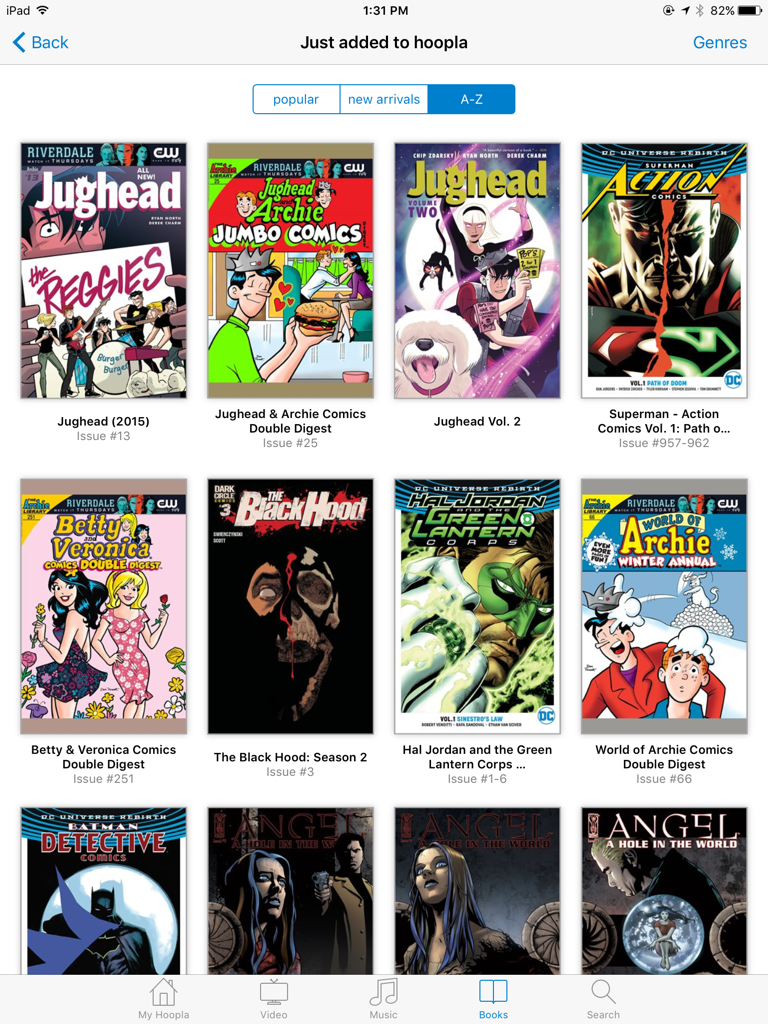
I browse the “Just added to hoopla” section of Comics, and no matter which sorting option I choose, the list of comics appears in the exact same order. Either this is a coincidence, or the sorting feature doesn’t work (at least in this particular scenario).

Repro steps

  • Open the hoopla app on my device, tap the Books tab
  • Tap the Comics selector across the top of the app window, then tap the Genres link at the top-right corner
  • Select the option Just added to hoopla
  • Scroll the resulting comics titles in the default popular view, noting that [at time of writing] three Jughead titles appear before Superman, Betty & Veronica and The Black Hood
  • Tap the new arrivals and/or A-Z view selectors along the top

Expected Result

The sort order of the displayed comics would change under one or both views (especially under the A-Z view, where Jughead titles would be listed after Betty & Veronica). The included titles may or may not change (perhaps some added, some removed in the new arrivals view, if this is meant to show just the most recently-added titles).

Actual Result

The sort order of the displayed comics appears identical to the naked eye.  Note that in the A-Z view, the Jughead comics continue to appear at the top, ahead of the Betty & Veronica comic:

hoopla sort order in A-Z view.png

User Environment

iPad 3, iOS 9.3.5, hoopla app version 4.10.2

Update my Contacts with Python: thinking about how far to extend PyiCloud to enable PUT request?

I’m on a mission to use PyiCloud to update my iCloud Contacts with data I’m scraping out of LinkedIn, as you see in my last post.

From what I can tell, PyiCloud doesn’t currently implement support for editing existing Contacts.  I’m a little out of my depth here (constructing lower-level requests against an undocumented API) and while I’ve opened an issue with PyiCloud (on the off-chance someone else has dug into this), I’ll likely have to roll up my sleeves and brute force this on my own.

[What the hell does “roll up my sleeves” refer to anyway?  I mean, I get the translation, but where exactly did this start?  Was this something that blacksmiths did, so they didn’t burn the cuffs of their shirts?  Who wears a cuffed shirt when blacksmithing?  Why wouldn’t you go shirtless when you’re going to be dripping with sweat?  Why does one question always lead to a half-dozen more…?]

Summary: What Do I Know?

  • LinkedIn’s Contacts API can dump most of the useful data about each of your own Connections – connectionDate, profileImageUrl, company, title, phoneNumbers plus Tags (until this data gets EOL’d)
  • LinkedIn’s User Data Archive can supplement with email address (for the foreseeable) and Notes and Tags (until this data gets EOL’d)
  • I’ve figured out enough code to extract all the Contacts API data, and I’m confident it’ll be trivial to match the User Data Archive info (slightly less trivial when those fields are already populated in the iCloud Contact)
  • PyiCloud makes it darned easy to successfully authenticate and read in data from the iCloud contacts – which means I have access to the contactID for existing iCloud Contacts
  • iCloud appears to use an idempotent PUT request to write changes to existing Contacts, so that as long as all required data/metadata is submitted in the request, it should be technically feasible to push additional data into my existing Contacts
  • It appears there are few if any required fields in any iCloud Contact object – the fields I have seen submitted for an existing Contact include firstName, middleName, lastName, prefix, suffix, isCompany, contactId and etag – and I’m not convinced that any but contactID are truly necessary (but instead merely sent by the iCloud.com web client out of “habit”)
  • The PUT operation includes a number of parameters on the request’s querystring:
    • clientBuildNumber
    • clientId
    • clientMasteringNumber
    • clientVersion
    • dsid
    • method
    • prefToken
    • syncToken
  • There are a large number of cookies sent in the request:
    • X_APPLE_WEB_KB–QNQ-TAKYCIDWSAXU3JXP7DXMBG
    • X-APPLE-WEBAUTH-HSA-TRUST
    • X-APPLE-WEBAUTH-LOGIN
    • X-APPLE-WEBAUTH-USER
    • X-APPLE-WEBAUTH-PCS-Cloudkit
    • X-APPLE-WEBAUTH-PCS-Documents
    • X-APPLE-WEBAUTH-PCS-Mail
    • X-APPLE-WEBAUTH-PCS-News
    • X-APPLE-WEBAUTH-PCS-Notes
    • X-APPLE-WEBAUTH-PCS-Photos
    • X-APPLE-WEBAUTH-PCS-Sharing
    • X-APPLE-WEBAUTH-VALIDATE
    • X-APPLE-WEB-ID
    • X-APPLE-WEBAUTH-TOKEN

Questions I have that (I believe) need an answer

  1. Are any of the PUT request’s querystring parameters established per-session, or are they all long-lived “static” values that only change either per-user or per-version of the API?
  2. How many of the cookies are established per-user vs per-session?
  3. How many of the cookies are being marshalled already by PyiCloud?
  4. How many of the cookies are necessary to successfully PUT a Contact?
  5. How do I properly add the request payload to a web request using the PyiCloud functions?  How’s about if I have to drop down to the requests package?

So let’s run these down one by one (to the best of my analytic ability to spot the details).

(1) PUT request querystring parameter lifetime

When I examine the request parameters submitted on two different days (but using the same Chrome process) or across two different browsers (but on the same day), I see the following:

  1. clientBuildNumber is the same (16HProject79)
  2. clientMasteringNumber is the same (16H71)
  3. clientVersion is the same (2.1)
  4. dsid is the same (197715384)
  5. method is obviously the same (PUT)
  6. prefToken is the same (914266d4-387b-4e13-a814-7e1b29e001c3)
  7. clientId uses a different UUID (C1D3EB4C-2300-4F3C-8219-F7951580D3FD vs. 792EFA4A-5A0D-47E9-A1A5-2FF8FFAF603A)
  8. syncToken is somewhat different (DAVST-V1-p28-FT%3D-%40RU%3Dafe27ad8-80ce-4ba8-985e-ec4e365bc6d3%40S%3D1432 vs. DAVST-V1-p28-FT%3D-%40RU%3Dafe27ad8-80ce-4ba8-985e-ec4e365bc6d3%40S%3D1427)
    • which if iCloud is using standard URL encoding translates to DAVST-V1-p28-FT=-@RU=afe27ad8-80ce-4ba8-985e-ec4e365bc6d3@S=1427
    • which means the S variable varies and nothing else

Looking at the PyiCloud source, I can find places where PyiCloud generates nearly all the params:

  • base.py: clientBuildNumber (14E45), dsid (from server’s authentication response), clientId (a fresh UUID on each session)
  • contacts.py: clientVersion (2.1), prefToken (from the refresh_service() function), syncToken (from the refresh_service() function)

Since the others (clientMasteringNumber, method) are static values, there are no mysteries to infer in generating the querystring params, just code to construct.

Further, I notice that the contents of syncToken is nearly identical to the etag in the request payload:

syncToken: DAVST-V1-p28-FT=-@RU=afe27ad8-80ce-4ba8-985e-ec4e365bc6d3@S=1436
etag: C=1435@U=afe27ad8-80ce-4ba8-985e-ec4e365bc6d3

This means not only that (a) the client and/or server are incrementing some value on some unknown cadence or stepping function, but also that (b) the headers and the payload have to both contain this value.  I don’t know if any code in PyiCloud has performed this (b) kind of coordination elsewhere, but I haven’t noticed evidence of it in my reviews of the code so far.

It should be easy enough to extract the RU and S param values from syncToken and plop them into the C and U params of etag.

ISSUE

The only remaining question is, does etag’s C param get strongly validated at the server (i.e. not only that it exists, and is a four-digit number, but that its value is strongly related to syncToken’s S param)?  And if so, what exactly is the algorithm that relates C to S?  In my anecdotal observations, I’ve noticed they’re always slightly different, from off-by-one to as much as a difference of 7.

(2) How many cookies are established per-session?

Of all the cookies being tracked, only these are identical from session to session:

  • X-APPLE-WEBAUTH-USER
  • X-APPLE-WEB-ID

The rest seem to start with the same string but diverge somewhere in the middle, so it’s safe to say each cookie changes from session to session.


(3) How many cookies are marshalled by PyiCloud?

I can’t find any of these cookies being generated explicitly, but I did notice the base.py module mentions X-APPLE-WEBAUTH-HSA-TRUST in a comment (“Re-authenticate, which will both update the 2FA data, and ensure that we save the X-APPLE-WEBAUTH-HSA-TRUST cookie.”) and fingers X-APPLE-WEBAUTH-TOKEN in an exception thrower (“reason == ‘Missing X-APPLE-WEBAUTH-TOKEN cookie'”), so presumably most or all of these are being similarly handled.

I tried for a bit to get PyiCloud to cough up the cookies sent down from iCloud during initial session setup, but didn’t get anywhere.  I also tried to figure out where they’re being cached on my filesystem, but I haven’t yet figured out where the user’s tmp directory lives on MacOS.

(4) How many cookies are necessary to successfully PUT a Contact?

This’ll have to wait to be answered until we actually start throwing code at the endpoint.

For now, it’s probably a reasonable assumption for now that PyiCloud is able to automatically capture and replay all cookies needed by the Contacts endpoint, until we run into otherwise-unexplained errors.

(5) How to add the request payload to endpoint requests?

I can’t seem to find any pattern in the PyiCloud code that already POSTs or PUTs a dictionary of data payload back to the iCloud services, so that may be out.

I can see that it should be trivial to attach the payload data to a requests.put() call, if we ignore the cookies and preceding authentication for a second.  If I’m reading the requests quickstart correctly, the PUT request could be formed like this:

import requests
url = 'https://p28-contactsws.icloud.com/co/contacts/card/'
data_payload = {"key1" : "value1", "key2" : "value2",  ...}
url_params = {"contacts":[{contact_attributes_dictionary}]}
r = requests.put(url, data = data_payload, params = url_params)

Where key(#s) includes clientBuildNumber, clientId, clientMasteringNumber, clientVersion, dsid, method, prefToken, syncToken, and contact_attributes_dictionary includes whichever fields exist or are being added to my Contacts (e.g. firstName, lastName, phones, emailAddresses, contactId) plus the possibly-troublesome etag.

What feels tricky to me is to try to leverage PyiCloud as far as I can and then drop to the reuqests package only for generating the PUT requests back to the server.  I have a bad feeling I might have to re-implement much of the contacts.py and/or base.py modules to actually complete authentication + cookies + PUT request successfully.

I do see the same pattern used for the authentication POST, for example (in base.py’s PyiCloudService class’ authenticate() function):

req = self.session.post(
 self._base_login_url,
 params=self.params,
 data=json.dumps(data)
 )

Extension ideas

This all leads me to the conclusion that, if PyiCloud is already properly handling authentication & cookies correctly, that it shouldn’t be too hard to add a new function to the contacts.py module and generate the URL params and the data payload.

update_contact()

e.g. define an update_contact() function:

def update_contact(self, contact_dict)

# read value of syncToken
# pull out the value of the RU and S params 
# generate the etag as ("C=" + str(int(s_param) - (increment_or_decrement)) + "@U=" + ru_param
# append etag to contact_dict
# read in session params from session object as session_params ???
# contacts_url = 'https://p28-contactsws.icloud.com/co/contacts/card/'
# req = self.session.post(contacts_url, params=session_params, data=json.dumps(contact_dict))

The most interesting/scary part of all this is that if the user [i.e. anyone but me, and probably even me as well] wasn’t careful, they could easily overwrite the contents of an existing iCloud Contact with a PUT that wiped out existing attributes of the Contact, or overwrote attributes with the wrong data.  For example, what if in generating the contact_dict, they forgot to add the lastName attribute, or they mistakenly swapped the lastName attribute for the firstName attribute?

It makes me want to wrap this function in all sorts of warnings and caveats, which are mostly ignored and aren’t much help to those who fat-finger their code.  And even to generate an offline, client-side backup of all the existing Contacts before making any changes to iCloud, so that if things went horribly wrong, the user could simply restore the backup of their Contacts and at least be no worse than when they started.

edit_contact()

It might also be advisable to write an edit_contact(self, contact_dict, attribute_changes_dict) helper function that at least:

  • takes in the existing Contact (presumably as retrieved from iCloud)
  • enumerated the existing attributes of the contact
  • simplified the formatting of some of the inner array data like emailAddresses and phones so that these especially didn’t get accidentally wiped out
  • (came up with some other validation rules – e.g. limit the attributes written to contact_dict to those non-custom attributes already available in iCloud, e.g. try to help user not to overwrite existing data unless they explicitly set a flag)

And all of this hand-wringing and risk management would be reduced if the added code implemented some kind of visual UI so that the user could see exactly what they were about to irreversibly commit to their contacts.  It wouldn’t eliminate the risk, and it would be terribly irritating to page through dozens of screens of data for a bulk update (in the hopes of noticing one problem among dozens of false positives), but it would be great to see a side-by-side comparison between “data already in iCloud” and “changes you’re about to make”.

At which point, it might just be easier for the user to manually update their Contacts using iCloud.com.

Conclusion

I’m not about to re-implement much of the logic already available in iCloud.com.

I don’t even necessarily want to see my code PR’d into PyiCloud – at least and especially not without a serious discussion of the foreseeable consequences *and* how to address them without completely blowing up downstream users’ iCloud data.

But at the same time, I can’t see a way to insulate my update_contact() function from the existing PyiCloud package, so it looks like I’m going to have to fork it and make changes to the contacts module.

Update my Contacts with Python: exploring LinkedIn’s and iCloud’s Contact APIs

TL;DR Wow is it an adventure to decipher how to interact with undocumented web services like I found on LinkedIn and iCloud.  Migrating data from LinkedIn to iCloud looks possible, but I got stuck at implementing the PUT operation to iCloud using Python.

Background: Because I have a shoddy memory for details about all the people I meet, and because LinkedIn appears to be de-prioritizing their role as a professional contact manager, I want to make my iPhone Contacts my system of record for all data about people I meet professionally.  Which means scraping as much useful data as possible from LinkedIn and uploading it to iCloud Contacts (since my people-centric data is currently centered more around my iPhone than a Google Contacts approach).

In our last adventure, I stumbled across the a surprisingly well-formed and useful API for pulling data from LinkedIn about my Connections:

https://www.linkedin.com/connected/api/v2/contacts?start=40&count=10&fields=id%2Cname%2CfirstName%2ClastName%2Ccompany%2Ctitle%2Clocation%2Ctags%2Cemails%2Csources%2CdisplaySources%2CconnectionDate%2CsecureProfileImageUrl&sort=CREATED_DESC&_=1481999304007

Available Data

Which upon inspection of the results, gives me a lot of the data I was hoping to import into my iCloud Contacts:

  • crucial: Date we first connected on LinkedIn (“connectionDate” as time-since-epoch), Tags (“tags” as list of dictionaries), Picture (“profileImageUrl” as URI), first name (“firstName” as string), last name (“lastName” as string)
  • want: current company (“company” as dictionary), current title (“title” as string)
  • metadata: phone number (“phoneNumbers” as dictionary)

What doesn’t it give?  Notes, Twitter ID, web site addresses, previous companies, email address.  [What else does it give that could be useful?  LinkedIn profile URL (“profileUrl” as the permanent URL, not the “friendly URL” that many of us have generated such as https://www.linkedin.com/in/mikelonergan.  I can see how it would be helpful at a meetup to browse through my iPhone contacts to their LinkedIn profile to refresh myself on their work history.  Creepy, desperate, but something I’ve done a few times when I’m completely blanking.]

What can I get from the User Data Archive?  Notes are found in the Contacts.csv, and email address is found in Connections.csv.  Matching those two files’ data together with what I can pull from the Contacts API shouldn’t be a challenge (concat firstName + lastName, and among the data set of my 684 contacts, I doubt I’ll find any collisions).  Then matching those records to my iCloud Contacts *should* be just a little harder (I expect to match 50% of my existing contacts by emailAddress, then another fraction by phone number; the rest will likely be new records for my Contacts, with maybe one or two that I’ll have to merge by hand at the end).

Planning the “tracer bullet”

So what’s the smallest piece of code I can pull together to prove this scenario actually works?  It’ll need at least these features (assumes Python):

  1. can authenticate to LinkedIn via at least one supported protocol (e.g. OAuth 2.0)
  2. can pull down the first 10 JSON records from Contacts API and hold them in a list
  3. can enumerate the First + Last Name and pull out “title” for that record
  4. can authenticate to iCloud
    • Note: I may need to disable 2-factor authentication that is currently enabled on my account
  5. can find a matching First + Last Name in my iCloud Contacts
  6. can write the title field to the iCloud contact
    • Note: I’m worried least about existing data for the title field
  7. can upload the revised record to iCloud so that it replicates successfully to my iPhone

That should cover all the essential operations for the least-complicated data, without having to worry about edge cases like “what if the contact doesn’t exist in iCloud” or “what if there’s already data in the field I want to fill”.

Step 1: authenticate to LinkedIn

There are plenty of packages and modules on Github for accessing LinkedIn, but the ones I’ve evaluated all use the REST APIs, with their dual-secrets authentication mechanism, to get at the data.  (e.g. this one, this one, that one, another one).

Or am I making this more complicated than it is?  This python module simply used username + password in their call to an HTTP ‘endpoint’.  Let’s assume that judicious use of the requests package is sufficient for my needs.

I thought I’d build an anaconda kernel and a jupyter notebook to experiment with the modules I’m looking at.   And when I attempted to install the requests package in my new Anaconda environment, I get back this error:

LinkError:
Link error: Error: post-link failed for: openssl-1.0.2j-0

Quick search turns up a couple of open conda issues that don’t give me any immediate relief. OK, forget this for a bit – the “root” kernel will do fine for the moment.

Next let’s try this code and see what we get back:

import requests
r = requests.get('https://www.linkedin.com/connected/api/v2/contacts?start=40&count=10&fields=id%2Cname%2CfirstName%2ClastName%2Ccompany%2Ctitle%2Clocation%2Ctags%2Cemails%2Csources%2CdisplaySources%2CconnectionDate%2CsecureProfileImageUrl&sort=CREATED_DESC&_=1481999304007', auth=('mikethecanuck@gmail.com', 'linkthis'))
r.status_code

Output is simply “401”.  Dang, authentication wasn’t *quite* that easy.

So I tried that URL in an incognito tab, and it displays this to me without an existing auth cookie:

{"status":"Member is not Logged in."}

And as soon as I open another tab in that incognito window and authenticate to the linkedin.com site, the first tab with that contacts query returns the detailed JSON I was expecting.

Digging deeper, it appears that when I authenticate to https://www.linkedin.com through the incognito tab, I receive back one cookie labelled “lidc”, and that an “lidc” cookie is also sent to the server on the successful request to the contacts API.

But setting the cookie manually with the value returned from a previous request still leads to 401 response:

url = 'https://www.linkedin.com/connected/api/v2/contacts?start=40&count=10&fields=id%2Cname%2CfirstName%2ClastName%2Ccompany%2Ctitle%2Clocation%2Ctags%2Cemails%2Csources%2CdisplaySources%2CconnectionDate%2CsecureProfileImageUrl&sort=CREATED_DESC&_=1481999304007'
cookies = dict(lidc="b=OGST00:g=43:u=1:i=1482261556:t=1482347956:s=AQGoGetJeZPEDz3sJhm_2rQayX5ZsILo")
r2 = requests.get(url, cookies=cookies)

I tried two other approaches that people have used in the past – some even successfully with certain pages on LinkedIn – but eventually I decided that I’m getting ratholed on trying to reverse-engineer an undocumented (and more than likely unusually-constructed) API, when I can quite easily dump the data out of the API by hand and then do the rest of my work successfully.  (Yes I know that disqualifies me as a ‘real coder’, but I think we both know I was never going to win that medal – but I will win the medal for “results-oriented” not “pedantically chasing my tail”.)

Thus, knowing that I’ve got 684 connections on LinkedIn (saw that in the footer of a response), I submitted the following queries and copy-pasted the results into 4 separate .JSON files for offline processing:

https://www.linkedin.com/connected/api/v2/contacts?start=0&count=200&fields=id%2Cname%2CfirstName%2ClastName%2Ccompany%2Ctitle%2Clocation%2Ctags%2Cemails%2Csources%2CdisplaySources%2CconnectionDate%2CsecureProfileImageUrl&sort=CREATED_DESC&_=1481999304007

https://www.linkedin.com/connected/api/v2/contacts?start=200&count=200&fields=id%2Cname%2CfirstName%2ClastName%2Ccompany%2Ctitle%2Clocation%2Ctags%2Cemails%2Csources%2CdisplaySources%2CconnectionDate%2CsecureProfileImageUrl&sort=CREATED_DESC&_=1481999304007

https://www.linkedin.com/connected/api/v2/contacts?start=400&count=200&fields=id%2Cname%2CfirstName%2ClastName%2Ccompany%2Ctitle%2Clocation%2Ctags%2Cemails%2Csources%2CdisplaySources%2CconnectionDate%2CsecureProfileImageUrl&sort=CREATED_DESC&_=1481999304007

https://www.linkedin.com/connected/api/v2/contacts?start=600&count=200&fields=id%2Cname%2CfirstName%2ClastName%2Ccompany%2Ctitle%2Clocation%2Ctags%2Cemails%2Csources%2CdisplaySources%2CconnectionDate%2CsecureProfileImageUrl&sort=CREATED_DESC&_=1481999304007

Oddly, the four sets of results contain 196, 198, 200 and 84 items – they assert that I have 684 connections, but can only return 678 of them?  I guess that’s one of the consequences of dealing with a “free” data repository (even if it started out as mine).

Step 2: read the JSON file and parse a list of connections

I’m sure I could be more efficient than this, but as far as getting a working result, here’s the arrangement of code I used to start accessing structured list data from the Contacts API output I shunted to a file:

import json
import os
contacts_file = open("Connections-API-results.json")
contacts_data = contacts_file.read()
contacts_json = json.loads(contacts_data)
contacts_list = contacts_json['values']

Step 3: pulling data out of the list of connections

It turns out this is pretty easy, e.g.:

for contact in contacts_list:
 print(contact['name'], contact['title'])

Messing around a little further, trying to make sense of the connectionDate value from each record, I found that this returns an ISO 8601-style date string that I can use later:

import time
print(strftime("%Y-%m-%d", time.localtime(contacts_list[15]['connectionDate'] / 1000)))

e.g. for the record at index “15”, that returned 2007-03-15.

Data issue: it turns out that not all records have a profileImageUrl key (e.g. for those oddball security geeks among my contacts who refuse to publish a photo on their LinkedIn profile), so I got to handle my first expected exception 🙂

Assembling all the useful data for all my Connections I wanted into a single dictionary, I was able to make the following work (as you can find in my repo):

stripped_down_connections_list = []

for contact in contacts_list:
 name = contact['name']
 first_name = contact['firstName']
 last_name = contact['lastName']
 title = contact['title']
 company = contact['company']['name']
 date_first_connected = time.strftime("%Y-%m-%d", time.localtime(contact['connectionDate'] / 1000))

picture_url = ""
 try:
 picture_url = contact['profileImageUrl']
 except KeyError:
 pass

tags = []
for i in range(len(contact['tags'])):
tags.append(contact['tags'][i]['name'])

phone_number = ""
try:
 phone_number = {"type" : contact['phoneNumbers'][0]['type'], 
 "number" : contact['phoneNumbers'][0]['number']}
except IndexError:
 pass

stripped_down_connections_list.append({"firstName" : contact['firstName'], 
 "lastName" : contact['lastName'], 
 "title" : contact['title'], 
 "company" : contact['company']['name'],
 "connectionDate" : date_first_connected, 
 "profileImageUrl" : picture_url,
 "tags" : tags,
 "phoneNumber" : phone_number,})

Step 4: Authenticate to iCloud

For this step, I’m working with the pyicloud package, hoping that they’ve worked out both (a) Apple’s two-factor authentication and (b) read/write operations on iCloud Contacts.

I setup yet another jupyter notebook and tried out a couple of methods to import PyiCloud (based on these suggestions here), at least one of which does a fine job.  With picklepete’s suggested 2FA code added to the mix, I appear to be able to complete the authentication sequence to iCloud.

APPLE_ID = 'REPLACE@ME.COM'
APPLE_PASSWORD = 'REPLACEME'

from importlib.machinery import SourceFileLoader

foo = SourceFileLoader("pyicloud", "/Users/mike/code/pyicloud/pyicloud/__init__.py").load_module()
api = foo.PyiCloudService(APPLE_ID, APPLE_PASSWORD)

if api.requires_2fa:
    import click
    print("Two-factor authentication required. Your trusted devices are:")

    devices = api.trusted_devices
    for i, device in enumerate(devices):
        print(" %s: %s" % (i, device.get('deviceName',
        "SMS to %s" % device.get('phoneNumber'))))

    device = click.prompt('Which device would you like to use?', default=0)
    device = devices[device]
    if not api.send_verification_code(device):
        print("Failed to send verification code")
        sys.exit(1)

    code = click.prompt('Please enter validation code')
    if not api.validate_verification_code(device, code):
        print("Failed to verify verification code")
        sys.exit(1)

Step 5: matching on First + Last with iCloud

Caveat: there are a number of my contacts who have appended titles, certifications etc to their lastName field in LinkedIn, such that I won’t be able to match them exactly against my cloud-based contacts.

I’m not even worried about this step, because I quickly got worried about…

Step 6: write to the iCloud contacts (?)

Here’s where I’m stumped: I don’t think the PyiCloud package has any support for non-GET operations against the iCloud Contacts service.  There appears to be support for POST in the Reminders module, but not in any of the other services modules (including Contacts).

So I sniffed the wire traffic in Chrome Dev Tools, to see what’s being done when I make an update to any iCloud.com contact.  There’s two possible operations: a POST method call for a new contact, or a a PUT method call for an update to an existing contact.

Here’s the Request Payload for a new contact:

{“contacts”:[{“contactId”:”2EC49301-671B-431B-BC8C-9DE6AE15D21D”,”firstName”:”Tony”,”lastName”:”Stank”,”companyName”:”Stark Enterprises”,”isCompany”:false}]}

Here’s the Request Payload for an update to that existing contact (I added homepage URL):

{“contacts”:[{“firstName”:”Tony”,”lastName”:”Stank”,”contactId”:”2EC49301-671B-431B-BC8C-9DE6AE15D21D”,”prefix”:””,”companyName”:”Stark Enterprises”,”etag”:”C=1432@U=afe27ad8-80ce-4ba8-985e-ec4e365bc6d3″,”middleName”:””,”isCompany”:false,”suffix”:””,”urls”:[{“label”:”HOMEPAGE”,”field”:”http://stark.com”}]}]}

There are four requests being made for either type of change to iCloud contacts (at least via the iCloud.com web interface that I am using as a model for what the code should be doing):

  1. https://p28-contactsws.icloud.com/co/contacts/card/
  2. https://webcourier.push.apple.com/aps
  3. https://p28-contactsws.icloud.com/co/changeset
  4. https://feedbackws.icloud.com/reportStats

Here’s the details for these calls when I create a new Contact:

  1. Request URL: https://p28-contactsws.icloud.com/co/contacts/card/?clientBuildNumber=16HProject79&clientId=63D7078B-F94B-4AB6-A64D-EDFCEAEA6EEA&clientMasteringNumber=16H71&clientVersion=2.1&dsid=197715384&prefToken=914266d4-387b-4e13-a814-7e1b29e001c3&syncToken=DAVST-V1-p28-FT%3D-%40RU%3Dafe27ad8-80ce-4ba8-985e-ec4e365bc6d3%40S%3D1426
    Request Payload: {“contacts”:[{“contactId”:”E2DDB4F8-0594-476B-AED7-C2E537AFED4C”,”urls”:[{“label”:”HOMEPAGE”,”field”:”http://apple.com”}],”phones”:[{“label”:”MOBILE”,”field”:”(212) 555-1212″}],”emailAddresses”:[{“label”:”WORK”,”field”:”johnny.appleseed@apple.com”}],”firstName”:”Johnny”,”lastName”:”Appleseed”,”companyName”:”Apple”,”notes”:”Dummy contact for iCloud automation experiments”,”isCompany”:false}]}
  2. Request URL: https://p28-contactsws.icloud.com/co/changeset?clientBuildNumber=16HProject79&clientId=63D7078B-F94B-4AB6-A64D-EDFCEAEA6EEA&clientMasteringNumber=16H71&clientVersion=2.1&dsid=197715384&prefToken=914266d4-387b-4e13-a814-7e1b29e001c3&syncToken=DAVST-V1-p28-FT%3D-%40RU%3Dafe27ad8-80ce-4ba8-985e-ec4e365bc6d3%40S%3D1427
  3. Request URL: https://webcourier.push.apple.com/aps?tok=bc3dd94e754fd732ade052eead87a09098d3309e5bba05ed24272ede5601ae8e&ttl=43200
  4. Request URL: https://feedbackws.icloud.com/reportStats
    Request Payload: {“stats”:[{“httpMethod”:”POST”,”statusCode”:200,”hostname”:”www.icloud.com”,”urlPath”:”/co/contacts/card/”,”clientTiming”:395,”uncompressedResponseSize”:14469,”region”:”OR”,”country”:”US”,”time”:”Wed Dec 28 2016 12:13:48 GMT-0800 (PST) (1482956028436)”,”timezone”:”PST”,”browserLocale”:”en-us”,”statName”:”contactsRequestInfo”,”sessionID”:”63D7078B-F94B-4AB6-A64D-EDFCEAEA6EEA”,”platform”:”desktop”,”appName”:”contacts”,”isLiteAccount”:false},{“httpMethod”:”POST”,”statusCode”:200,”hostname”:”www.icloud.com”,”urlPath”:”/co/changeset”,”clientTiming”:237,”uncompressedResponseSize”:2,”region”:”OR”,”country”:”US”,”time”:”Wed Dec 28 2016 12:13:48 GMT-0800 (PST) (1482956028675)”,”timezone”:”PST”,”browserLocale”:”en-us”,”statName”:”contactsRequestInfo”,”sessionID”:”63D7078B-F94B-4AB6-A64D-EDFCEAEA6EEA”,”platform”:”desktop”,”appName”:”contacts”,”isLiteAccount”:false}]}

I am 99% sure that the only request that actually changes the Contact data is the first one (https://p28-contactsws.icloud.com/co/contacts/card/), so I’ll ignore the other three calls from here on out.

Here’s the details of the first request when I edit an existing Contact:

Request URL: https://p28-contactsws.icloud.com/co/contacts/card/?clientBuildNumber=16HProject79&clientId=792EFA4A-5A0D-47E9-A1A5-2FF8FFAF603A&clientMasteringNumber=16H71&clientVersion=2.1&dsid=197715384&method=PUT&prefToken=914266d4-387b-4e13-a814-7e1b29e001c3&syncToken=DAVST-V1-p28-FT%3D-%40RU%3Dafe27ad8-80ce-4ba8-985e-ec4e365bc6d3%40S%3D1427
Request Payload: {“contacts”:[{“lastName”:”Appleseed”,”notes”:”Dummy contact for iCloud automation experiments”,”contactId”:”E2DDB4F8-0594-476B-AED7-C2E537AFED4C”,”prefix”:””,”companyName”:”Apple”,”phones”:[{“field”:”(212) 555-1212″,”label”:”MOBILE”}],”isCompany”:false,”suffix”:””,”firstName”:”Johnny”,”urls”:[{“field”:”http://apple.com”,”label”:”HOMEPAGE”},{“label”:”HOME”,”field”:”http://johnny.name”}],”emailAddresses”:[{“field”:”johnny.appleseed@apple.com”,”label”:”WORK”}],”etag”:”C=1427@U=afe27ad8-80ce-4ba8-985e-ec4e365bc6d3″,”middleName”:””}]}

So here’s what’s puzzling me so far: both the POST (create) and PUT (edit) operations include a contactId parameter.  Its value is the same from POST to PUT (i.e. I believe that means it’s referencing the same record).  When I create a second new Contact, the contactId is different than the contactId submitted in the Request Payload for the first new Contact (so it’s presumably not a dummy value).  And yet when I look at the request/response for the initial page load when I click “+” and “New Contact”, I don’t see a request sent from the browser to the server (so the server isn’t sending down a contactID – not at that moment at least – perhaps it’s cached earlier?).

Explained another way, this is how I believe the sequence works (based on repeated analysis of the network traffic from Chrome to the iCloud endpoint and back):

  1. User loads icloud.com, Contacts page (#contacts), clicks “+” and selects “New Contact”
    • Browser sends no request, but rather builds the New Contact form from cached code
  2. User adds data and clicks the Done button for the new Contact
    • Browser sends POST request to https://p28-contactsws.icloud.com/co/contacts/card/ with a bunch of form data on the URL, a whole raft of cookies and the JSON request payload [including contactId=x]
    • Server sends response
  3. User clicks Edit on that new contact, updates some data and clicks Done
    • Browser sends PUT request to https://p28-contactsws.icloud.com/co/contacts/card/ with form data, cookies and JSON request payload [including the same contactId=x]
    • Server sends response

So the question is: if I’m creating a net-new Contact, how does the web client get a valid contactId that iCloud will accept?  Near as I can figure, digging through the javascript-packed.js this page uses, this is the function that generates a UUID at the client:

Contacts.Contact = Contacts.Record.extend({
 primaryKey: "contactId",
 contactId: CW.Record.attr(String, {
 defaultValue: function() {
 return CW.upperCaseUUID()
 }
 })

Using this function (IIUC):

UUID: function() {
 var e = new Array(36),
 t = 0,
 n = ["8", "9", "a", "b"];
 if (window.crypto && window.crypto.getRandomValues) {
 var r = new Uint8Array(18);
 crypto.getRandomValues(r);
 for (t = 0; t < 18; t++) e[t * 2 + 1] = (r[t] >> 4).toString(16), e[t * 2] = (r[t] & 15).toString(16);
 e[19] = n[r[9] >> 6]
 } else {
 while (t < 36) e[t] = (Math.random() * 16 | 0).toString(16), t++;
 e[19] = n[Math.random() * 4 | 0]
 }
 return e[8] = e[13] = e[18] = e[23] = "-", e[14] = "4", e.join("")
 }

[Aside: I sincerely hope this is a standard library for UUID, not something Apple wrote themselves.  If I ever think that I’m going to need to generate iCloud-compatible UUIDs.]

Whoa – Pause

I need to take a step back and re-examine my goals and what I can specifically address.  I have learned a lot about both LinkedIn and iCloud, but I didn’t set out to recreate them, just find a way to make consistent use of the data I already have.

Update my Contacts with Python: thinking through the options

Alright folks, that’s the bell.  When LinkedIn stops thinking of itself as a professional contact manager, you know there’s no profit in it, and it’s time to manage this stuff yourself.

Problem To Solve

I’ve been hemming and hawing for a couple of years, ever since Evernote shut down their Hello app, about how to remember who I’ve met and where I met them.  I’m a Meetup junkie (with no rehab in sight) and I’ve developed a decent network of friends and acquaintances that make it easy for me to attend new events and conferences in town – I’ll always “know” someone there (though not always remember why/how I know them or even what their name is).

When I first discovered Evernote Hello, it seemed like the perfect tool for me – provided me a timeline view of all the people I’d met, with rich notes on all the events I’d seen them at and where those places were.  It never entirely gelled, it sporadically did and did NOT support business card import (pay for play mostly), and it was only good for those people who gave me enough info for me to link them.  Even with all those imperfections, I remember regularly scanning that list (from a quiet corner at a meetup/party/conference) before approaching someone I *knew* I’d seen before, but couldn’t remember why.  [Google Glasses briefly promised to solve this problem for me too, but that tech is off somewhere, licking its wounds and promising to come back in ten years when we’re ready for it.]

What other options do I have, before settling in to “do it myself”?

  • Pay the big players e.g. SalesForce, LinkedIn
    • Salesforce: smallest SKUs I could find @ $25/month [nope]
    • LinkedIn “Sales” SKU: $65/month [NOPE]
  • Get a cheap/trustworthy/likely-to-survive-more-than-a-year app
    • Plenty of apps I’ve evaluated that sound sketchy, or likely to steal your data, or are so under-funded that they’re likely to die off in a few months

Requirements

Do it myself then.  Now I’ve got a smaller problem set to solve:

  1. Enforce synchronization between my iPhone Contacts.app, the iCloud replica (which isn’t a perfect replica) and my Google Contacts (which are a VERY spotty replica).
    • Actually, let’s be MVP about this: all I *need* right now is a way of automating edits to Contacts on my iPhone.  I assume that the most reliable way of doing this is to make edits to the iCloud.com copy of the contact and let it replicate down to my phone.
    • the Google Contacts sync is a future-proofing move, and one that theoretically sounded free (just needed to flip a toggle on my iPhone profile), but which in practice seems to be built so badly that only about 20% of my contacts have ever sync’d with Google
  2. Add/update information to my contacts such as photos, “first met” context (who introduced, what event met at) and other random details they’ve confessed to me (other attempts to hook my memory) – *WITHOUT* linking my iPhone contacts with either LinkedIn or Facebook (who will of course forever scrape all that data up to their cloud, which I do *not* want to do – to them or me).

Test the Sync

How can I test my requirements in the cheapest way possible?

  • Make hand edits to the iCloud.com contacts and check that it syncs to the iPhone Contacts.app
    • Result: sync to iPhone within seconds
  •  Make hand edits to contacts in Contacts.app and check that it syncs to iCloud.com contact
    • Result: sync to iCloud within seconds

OK, so once I have data that I want to add to an iCloud contact, and code (Python for me please!) that can write to iCloud contacts, it should be trivial to edit/append.

Here’s all the LinkedIn Data I Want

Data that’s crucial to remembering who someone is:

  • Date we first connected on LinkedIn
  • Tags
  • Notes
  • Picture

Additional data that can help me fill in context if I want to dig further:

  • current company
  • current title
  • Twitter ID
  • Web site addresses
  • Previous companies

And metadata that can help uniquely identify people when reading or writing from other directories:

  • Email address
  • Phone number

How to Get my LinkedIn connection data?

OK, so (as of 2016-12-15 at 12:30pm PST) there’s three ways I can think of pulling down the data I’ve peppered into my LinkedIn connections:

  1. User Data Archive: request an export of your user data from LinkedIn
  2. LinkedIn API: request data for specified Connections using LinkedIn’s supported developer APIs
  3. Web Scraping: iterate over every Connection and pull fields via CSS using e.g. Beautiful Soup

User Data Archive

This *sounds* like the most efficient and straightforward way to get this data.  The “Relationship Section” announcement even implies that I’ll get everything I want:

If you want to download your existing Notes and Tags, you’ll have the option to do so through March 31, 2017…. Your notes and tags will be in the file named Contacts.

The initial data dump included everything except a Contacts.csv file.  The later Complete_LinkedInDataExport_12-16-2016 [ISO 8601 anyone?] included the data promised and nearly nothing else:

  • Connections.csv: First Name, Last Name, Email Address, Current Company, Current Position, Tags
  • Contacts.csv: First Name, Last Name, Email (mostly blank), Notes, Tags

I didn’t expect to get Picture, but I was hoping for Date First Connected, and while the rest of the data isn’t strictly necessary, it’s certainly annoying that LinkedIn is so friggin frugal.

Regardless, I have almost no other source for pictures for my professional contacts, and that is pretty essential for recalling someone I’ve met only a handful of times, so while helpful, this wasn’t sufficient.

LinkedIn API

The next most reliable way to attack this data is to programmatically request it.  However, as I would’ve expected from this “roach motel” of user-generated data, they don’t even support an API to request all Connections from your user account (merely sign-in and submit data).

Where they do make reference to user data, it’s in a highly-regulated set of Member Profile fields:

  • With the r_basicprofile permission, you can get first-name, last-name, positions, picture-url plus some other data I don’t need
  • With the r_emailaddress permission, you can get the user’s primary email address
  • For developers accepted into “Apply with LinkedIn”, and with the r_fullprofile permission, you can further get date-of-birth and member-url-resources
  • For those “Apply with LinkedIn” developers who have the r_contactinfo permssion, you can further get phone-numbers and twitter-accounts

After registering a new application, I am immediately given the ability to grant the following permissions to my app: r_basicprofile, r_emailaddress.  That’ll get me picture-url, if I can figure out a way to enumerate all the Connections for my account.

(A half-hour sorting through Chrome Dev Tools’ Network outputs later…)

Looks like there’s a handy endpoint that lets the browser enumerate pretty much all the data I want:

https://www.linkedin.com/connected/api/v2/contacts?start=40&count=10&fields=id%2Cname%2CfirstName%2ClastName%2Ccompany%2Ctitle%2Clocation%2Ctags%2Cemails%2Csources%2CdisplaySources%2CconnectionDate%2CsecureProfileImageUrl&sort=CREATED_DESC&_=1481999304007

That bears further investigation.

Web Scraping

While this approach doesn’t have the built-in restrictions with the LinkedIn APIs, there’s at least three challenges I can forsee so far:

  1. LinkedIn requires authentication, and OAuth 2.0 at that (at least for API access).  Integrating OAuth into a Beautiful Soup script isn’t something I’ve heard of before, but I’m seeing some interesting code fragments and tutorials that could be helpful, and it appears that the requests package can do OAuth 1 & 2.
  2. LinkedIn has helpfully implemented the “infinite scroll” AJAX behaviour on the Connections page.
    • There are ways to work with this behaviour, but it sure feels cumbersome – to the point I almost feel like doing this work by hand would just be faster.
  3. Navigating automatically to each linked page (each Connection) from the Connections page isn’t something I am entirely confident about
    • Though I imagine it should be as easy as “for each Connection in Connections, load the page, then find the data with this CSS attribute, and store it in an array of whatever form you like”.  The mechanize package promises to make the link navigation easy.

Am I Ready for This Much Effort?

It sure feels like there’s a lot of barriers in the way to just collecting the info I’ve accumulated in LinkedIn about my connections.  Would it take me less time to just browse each connection page and hand copy/paste the data from LinkedIn to iCloud?  Almost certainly.  To together a Beautiful Soup + requests + various github modules solution would probably take me 20-30 hours I’m guessing, from all the reading and piecing together code fragments from various sources, to debugging and troubleshooting, to making something that spits out the data and then automatically uploads it without mucking up existing data.

Kinda takes the fun out of it that way, doesn’t it?  I mean, the “glory” of writing code that’ll do something I haven’t found anyone else do, that’s a little boost of ego and all.  Still, it’s hard to believe this kind of thing hasn’t been solved elsewhere – am I the only person with this bad of a memory, and this much of a drive to keep myself from looking like Leonard Shelby at every meetup?

What’s worse though, for embarking on this thing, is that I’d bet in six months’ time, LinkedIn and/or iCloud will have ‘broken’ enough of their site(s) that I wouldn’t be able to just re-use what I wrote the first time.  Maintenance of this kind of specialized/unique code feels pretty brutal, especially if no one else is expected to use it (or at least, I don’t have any kind of following to make it likely folks will find my stuff on github).

Still, I don’t think I can leave this itch entirely unscratched.  My gut tells me I should dig into that Contacts API first before embarking on the spelunking adventure that is Beautiful Soup.

Problems-to-solve: finding meetup-friendly spaces in Portland

Preamble

Sometimes I encounter a problem in my day to day life that I find so frustrating – and to me, so obvious (hasn’t been thought of by some PM already; or should’ve been caught by PO/PM acceptance validation, or during usability testing, or in the User Story’s acceptance criteria) that I can’t help thinking of how I’d have pitched this to the engineering team myself.

Think of this as a Product Guy’s version of “fantasy football” – “fantasy product ownership/management”.

Summary

User Story: as the organizer of a Meetup in Portland, I want to be able to quickly find all the meetup-friendly spaces in Portland so that I can book my meetup in a suitable space.

BDD Scenario: Given that I have an existing meetup group AND that the meetup does not have an booked meetup space, when I search for available meetup-friendly spaces in Portland, then I see a listing of such spaces in Portland including address, contact info and maximum number of attendees.

Background

I’ve been an active participant in the meetup scene in Portland for a few years now. I’ve briefly co-led a meetup as well, and been solicited to help organize a number of other meetups.

One of the phenomena I’ve observed is how challenging it can be for some meetups to find a space for their meetings. Many meetups find one space, lock it in for a year and never roam. Some meetups have to change spaces from month to month, and regularly put out a call to attendees to help them find suitable locations. And once in a while, a meetup has to change venues for space or other logistical reasons (e.g. a very popular speaker is coming to town).

Whenever I talk to meetup organizers about this part of the job, it strikes me as odd that they’re all operating like this is a high-school gossip circle: no one has all the information, there is no central place to find out where to go/who to talk to, and most people are left to ask friends if they happen to know of any spaces.

In a tech-savvy city such as Portland, where we have dozens of meetups every day, and many tech conferences a month, it’s surprising to find that getting a meetup successfully housed relies so much on word of mouth (or just using your employer’s space, if you’re lucky to be in such a position).

I’ve been at meetups in some great spaces, nearly all of them in a public-friendly space of tech employers across Portland. Where is the central directory of these spaces? Is there an intentional *lack* of public listing, so that these spaces don’t get overrun? Is this a word-of-mouth resource so that only those event organizers with a personal referral are deemed ‘vetted’ for use?

From the point of view of the owners of these spaces, I can imagine there’s little incentive to make this a seven-nights-a-week resource. Most of these employers don’t employ staff to stick around at night to police these spaces; many of them seem to leave the responsibility up to an employee [often an existing member of the meetup group] to chaperone the meetup attendees and shoo them out when they’re too tired or have to go home/back to work.

My Fantasy Scenario

Any meetup organizer in Portland will be able to find suitable meetup spaces and begin negotiating for available dates/times. A “suitable” space would be qualified on such criteria as:

  • Location
  • Number of people the space can legally accommodate
  • Number of seats available
  • Days and hours the space is potentially available (e.g. M-F 5-8, weekends by arrangement)
  • A/V availability (projector, microphone)
  • Guest wifi availability
  • Amenities (beer, food, snacks, bike parking)
  • Special notes (e.g. door access arrangements, must arrange to have employee chaperone the space)
  • Contact info to inquire about space availability [email, phone, booking system]

Future features

I can also see a need for a service that similarly lists conference-friendly spaces around town – especially for low-budget conferences that can’t afford the corporate convention spaces. I’ve been at many community-oriented conferences here in Portland, and I’m betting the number of spaces I’ve visited [e.g. Eliot Center, Armory, Ambridge, Portland Art Museum, Center for the Arts], still aren’t anywhere near the secret treasures that await.

  • Number of separate/separable rooms and their seating
  • Additional limitations/requirements e.g. if food/drinks, must always use the contracted catering

Workarounds Tried

Workaround: the http://workfrom.co service includes a filter for “Free Community Spaces”, labelled Community spaces are free and open to all, no purchase required. Common community spaces include libraries, student unions and banks. Unfortunately, as of now there are only five listings (three of them public library spaces).

Workaround: I was told by a friend that Cvent has a listing of event spaces in Portland. My search of their site led to this searchable interface. Unfortunately, this service appears to be more oriented to helping someone plan a conference or business meeting and keeping attendees entertained/occupied – where “venue type” = “corporate