Five Ways to Use Visual Studio to Avoid Secure Coding Mistakes

I was talking with a colleague recently, and we got on the subject of static analysis and why we all have to suffer with the problem of first making the mistakes in code, and then fixing them later.  She challenged me to come up with some ways that we could avoid the mistakes in the first place, and here’s what I told her:

  1. IntelliSense — the Visual Studio IDE is pretty smart about providing as-you-type hints and recommendations on all sorts of common coding flaws (or at least, it catches me on a lot of the mistakes that I frequently make), and they’re enabled out of the box (at least for Visual Basic.NET — I can’t recall if that’s true for C# as well).  [But I wonder why IntelliSense doesn’t handle some of the basic code maintenance?]
  2. Code snippets — Visual Studio has a very handy feature that allows you to browse a self-describing tree of small chunks of code, that are meant to accomplish very specific purposes.  These snippets save lots of time on repetitive or rarely-used routines, and reduce the likelihood of introducing errors in similar hand-coded blocks of code.
  3. PInvoke.net — if you ever need to P/Invoke to Win32 APIs (aka unmanaged code), this free Visual Studio add-on gives you as definitive a library as exists of recommended code constructs for doing this right.
  4. Code Analysis (cf. FxCop) — this is a bit of a cheat, as these technologies at first are simply about scanning your code (MSIL in fact) to identify flaws in your code (including a wide array of security-related flaws).  However, with the very practical tips they provide on how to resolve the coding flaw, this quickly becomes a teaching tool to reinforce better coding behaviours so you (and I) can avoid making those mistakes again in the future.
  5. Community resources — F1 is truly this coder’s best friend.  Banging on the F1 key in Visual Studio brings up a multi-tabbed search UI that gives you access not only to local and online versions of MSDN Library, but also to two collections that I personally rely on heavily: the CodeZone community (a group of MS-friendly code-junkie web sites with articles, samples and discussions) and the MSDN Forums (Microsoft’s dazzling array of online Forums for discussing every possible aspect of developing for the Microsoft platform).  If there’s one complaint I have about the MSDN Forums, it’s that there so freakin’ many of them, it’s very easy to end up posting your question to the wrong Forum, only to have the right one pointed out to you later (sometimes in very curt, exasperated, “why do these morons keep showing up?” form).

However, if like me you’re not satisfied with just the default capabilities of Visual Studio, then try out some of these add-ons to enhance your productivity:

There are a large number of third-party code snippets available from http://www.gotcodesnippets.net as well (though the quality of these is totally unverified, and should be approached with caution).


  • Code Analysis (FxCop):
    • JSL FxCop — a coding tool that eases the difficulty of developing custom rules, as well as a growing library of additional rules that weren’t shipped by Microsoft.
    • Detecting and Correcting Managed Code Defects — MSDN Team System walkthrough articles for the Code Analysis features of Visual Studio.

I’m also working on trying to figure out how to add a set of custom sites to the Community search selections (e.g. to add various internal Intel web sites as targets for search).

Memory leaks, GDI Objects and Desktop Heap – Windows registry changes for high-memory systems

In case I haven’t blogged about it this year, I wanted to share the usual fix-up that needs to be done to make full use of more than say 512 MB of RAM:
http://www.blogcastrepository.com/blogs/mattbro/archive/2006/08/21/2013.aspx

I had to swap “shells” recently, dropping my laptop’s hard drive into a replacement chassis. I realized later that it had half the usual RAM, and to get back to the 2 GB I was supposed to have took a few weeks.

On the suspicion that Windows might readjust its memory allocation parameters if it detects less memory than it started with, I figured I’d check on it after getting the RAM upgraded back to 2 GB. Sure enough, things are back to the defaults:

  • the “Windows SharedSection” portion of the Subsystems\Windows Registry setting was configured to 1024,3072,512, and like Matt I boosted it to 1024,8192,2048
  • the “SessionViewSize” Registry setting was configured to 48 MB, and I boosted it to 64 MB (just another multiple of 16, and figured a little more probably goes a long way).

Now go and do likewise.

SharePoint Development resources

I’ve run across some great sets of resources for SharePoint developers, so I figured I’d share them rather than bookmark ’em and never remember them again:

I’m sure there’s lots of other great resources, but these were the ones I found today.  Enjoy.

Porting Word2MediaWikiPlus to VB.NET: Part 11 (The Return)

[Previous articles in this series: Prologue, Part 1, Part 2, Part 3, Part 4, Part 5, Part 6, Part 7, Part 8, Part 9, Part 10.]

After a few weeks’ hiatus to work on some other projects (including a couple of releases of CacheMyWork — now with more filtering!), I decided to come back to the W2MWPP effort.  And my overwhelming feeling right now is: thank god I was blogging as I coded!  As it is, it took me probably a full hour to figure out where to focus my attention next:

  • while the Configuration dialog still isn’t finished, I’m going to set that aside for now — it should be pretty easy to figure out what I need to add, especially once I know better which functionality is or isn’t required.
  • I’m going to start into the fundamentals of the code that’ll be called when the “Convert to Wiki” button is clicked.  This code will be called by ThisAddIn.uiConvert_Click().
  • The code in question will be derived from the VBA project’s modWord2MediaWikiPlus.bas file, from the Public Sub Word2MediaWikiPlus() routine.

Sub Word2MediaWikiPlus(): Overview

There are many types of constructs in this library, many of which I’m sure will be called as part of the base Word2MediaWikiPlus() routine.  However, the routine itself is only about 150 lines of code, so in itself the routine shouldn’t be too difficult to implement.

However, it’s probably a good idea to familiarize myself with some of the constructs in this library:

  • There are three unmanaged code Functions — two for MessageBox construction, and one called SendMessage.  I’m sure I’ll understand what they’re supposed to be for once I see them in context, and likely I can use some very simple managed code Methods in their place.
  • There are Constants both private and public.  [Thankfully, most of these seem to have been reasonably well documented.]
    • Some, like WMPVersion, will be taken care of by Visual Studio.
    • Others, like WikiOpenPage, should be implemented as configuration settings not code constants.
    • The majority, such as NewParagraphWithBR, will likely be preserved as stylistic choices whose usage choices I may not personally agree with, but likely are things that have been requested over the years and which if I dropped them, would probably piss off a whole bunch of folks who’ve grown to know and love the VBA macro.
  • There are plenty of Variables as well of course, and while the usage of the majority will likely become self-evident, there are a few (e.g. Word97) that I can probably safely drop.
  • There are some constructs labelled as Types as well here — I’m not sure, but they resemble the use of Structures in managed VB, and I’ll likely see them in heavy use.

At this point, I’m going to implement these constructs as needed.  I’d rather not add all these up front, ’cause (1) it’ll be pretty confusing for me, and (2) there’s likely some code that is no longer needed (or even has been forgotten).

Sub Word2MediaWikiPlus(): Initialize ActiveDocument

Even before generating the first set of routines, I figured I should do what I could to setup the Class Library with a little forethought:

  • Added a new Class to the Word2MediaWiki++ project called “Convert.vb”
  • Wanted to add this class to a global W2MWPP namespace (see Part 4 for details)
  • I once tried to add a namespace designation to a project after I’d already started coding it, and it was a disaster — references broke everywhere, and I’m not sure I ever got it cleaned up
  • Not knowing enough about namespace and class naming, I flipped through a couple of the books I had on hand and determined that this should be trivial to do up front
  • I wrapped the Public Class…End Class statements with Namespace Word2MediaWikiPlusPlus…End Namespace statements, and proceeded onwards

The first sixty lines or so of code in Word2MediaWikiPlus() all have to do with acquiring a handle to an active document.  In the world of Document add-ins, I presume this can be very tricky, since the code itself starts from a single document’s context and has to navigate outwards from there.  However, when we’re working with VSTO Application add-ins, it seems fairly easy to me to get access to an active document.

In fact, for the purposes of this tool, I’m going to assume that the user wants to convert whichever Word document is the active document.  The only error condition I should need to check is that there is at least one document object open.  This leads to the following code:

            Dim App as Word.Application = Globals.ThisAddIn.Application
            Dim Doc as Word.Document = App.ActiveDocument

            If Doc Is Nothing
                'When there's no active document open just return back to Word
                Exit Sub
            End If

The only code left in the document initialization block is this:

    DocInfo.DocName = ActiveDocument.Name
    DocInfo.DocNameNoExt = DocInfo.DocName
    p = InStrRev(DocInfo.DocName, ".")
    If p > 0 Then DocInfo.DocNameNoExt = Left$(DocInfo.DocName, p - 1)

I was baffled by this, so a quick trip to MSDN Library cleared it up.  The macro appears to be trying to parse out the document Name without the file extension.  DocInfo itself is an instance of the DocInfoType Type, which is just a structure to store various properties of the document.  There’s no particular reason I can see so far to use a structure for the DocName & DocNameNoExt properties, and the other properties to me don’t seem particularly related to the document itself.  At this point, I’ll assume DocInfo isn’t needed.  [Certainly my searches of the modWord2MediaWikiPlus.bas source only found two references to the DocInfo.DocNameNoExt property: once to assist the MW_GetImagePath() function, and once to set DocInfo.Articlename.  Both should be doable without this Structure, since .NET provides a Path.GetFileNameWithoutExtension function.]

However, this leads to the MW_Initialize() function, which I would guess also should be part of the Convert class’ initialization code.  I’ll check that out soon.

The last of the code in this section is the call to MW_LanguageTexts().  This is a localization macro, that will set a series of Registry values and Msg_* variables depending on a language setting retrieved from the Registry.  All this can be managed quite well using Resource files, so there’s no need to mess with setting all this via code at the moment.

I’m interested in knowing whether all the Registry settings being used by this VBA project are for localization, so let’s enumerate them all…

Registry value Purpose
AllowWiki  
CategoryArticle  
CategoryImagePreFix  
CategoryImages  
CategoryImagesUse  
ClickChartText localization
convertFontSize  
convertPageFooters  
convertPageHeaders  
deleteHiddenChars  
EditorKeyLoadPic localization
EditorKeyPastePicAsNew localization
EditorKeySavePic localization
EditorPaletteKey localization
ImageConvertCheckFileExists  
ImageConverter  
ImageDescription  
ImageExtraction  
ImageExtractionPE  
ImageMaxPixelSize  
ImageMaxWidth  
ImageNamePreFix  
ImagePastePixel  
ImagePath  
ImagePixelSize  
ImageReload  
ImageUploadAuto  
ImageUploadTabToFileName  
InsertTitlePageIfNeeded  
isCustomized  
Language  
ListNumbersManual  
OptionSmartParaSelection  
PauseUploadAfterXImages  
txt_Footnote localization
txt_PageFooter localization
txt_PageHeader localization
txt_TitlePage localization
UnableToConvertMarker localization
UsePowerPoint  
WikiAddressRoot  
WikiAddressRootTest  
WikiCategoryKeyWord localization
WikiSearchTitle localization
WikiSystem  
WikiUploadTitle localization
Z_finished  

Wow, what a…symphony of Registry settings here, only a handful of which are directly used for localization.  There’s quite a number of them used for various Image manipulation operations, and others for various application settings etc.  Generally, from what I can tell, there’s no reason these too can’t be stored in the project’s app.config file.

There’s the Msg_* variables as well – are all these devoted to localization as well?

Variable name Purpose
Msg_CloseAll localization
Msg_Finished localization
Msg_LoadDocument localization
Msg_NoDocumentLoaded localization
Msg_Upload_Info localization

Yes, that’s all of them.

Further Config and Init

The final bit of code I’ll deal with today is the “user dialog on config settings”.  It appears that this calls some additional initialization code:

  1. performs customization if never performed
    • opens the frmW2MWP_Config form
    • sets ImageExtractionPE Registry setting
    • sets the variables EditorPath, OptionHtml, OptionPhotoEditor, OptionPhotoEditor.Enabled
    • sets language settings
    • sets any configured customization settings from the Config form (aka the VSTO UI Config dialog)
  2. sets Article name
  3. sets convertImagesOnly = False
    • this variable is used in Word2MediaWikiPlus() to determine whether to convert the whole document or only the embedded images.
    • Since this is apparently never set to True, I’ll remove the references.
  4. checks Word version and sets some control characters
    • It doesn’t appear that we’ll need this, as VSTO only seems to support Word 2003 and above
  5. sets Image Path
  6. sets the image editor path
  7. caches the value of a couple of Word’s Tools, Options settings
    • I’ve commented in these commands in case they’re necessary later
    • However, I assume there are better ways of preserving Word’s initial configuration than caching before changes and then flushing after changes
    • That is, it should be possible to make per-session changes to such settings, without having to make sure that Word’s settings are explictly reconfigured after the session has completed


That’s enough for one sitting, eh?

Porting Word2MediaWikiPlus to VB.NET: Part 5

[Note: I finally found this article in the Google search cache, so while it’s posted out of order, at least it’s finally available again.]
[This series has five previous articles: the prologue, Part 1, Part 2, Part 3 and Part 4.]

Code Kick-off

When you create an Office Add-in Project with VS2005 + VSTO, it automatically generates two Sub’s in the ThisAddIn class: ThisAddIn_Startup() and ThisAddIn_Shutdown(). Now I recall using these before for some basic background behaviour, but I have a feeling there are a few other Events in which it’s recommended to put the kind of code that’s usually used for setup, tear-down, opening persistent connections & closing them, etc.

However, the only unused Events that I can see when browsing the Method Name drop-down are New, Finalize, IsCached, StartCaching and StopCaching. Nothing really compelling so far, and none of those ring any bells. Onwards.

My plan is to work from the Word UI inwards, so that (a) if the AutoWikiBrowser folks aren’t able to grant redistribution rights for this project I’m less likely to be committed to links to their code, and (b) I’ll have more time to absorb the innards of the Word2MediaWikiPlus Macro.

Thus, I figure I’ll start with two easy tasks:

  1. Port any necessary code from ThisDocument.cls to ThisAddin.vb (since ThisDocument.cls is my best guess for the code closest to the Word UI)
  2. Drop in the code for instantiating the CommandBar, CommandBarButton(s) and any related bits o’ code.

ThisDocument.cls

  • cmdCopyModuls_Click(): as it says, it copies code to Normal.dot. IIRC, VSTO Application Add-ins don’t need to link themselves into Normal.dot, so I’m going to skip this code for now.
  • CreateSymbol(): It’s not clear what they meant by “symbol” here. Do they mean “toolbar button”? Debug symbols? I suspect it refers to toolbar (aka CommandBar), as that’s what the code seems to suggest. However, before dismissing this entirely, I needed to understand what Application.OrganizerCopy does. It’s listed among the Word Interop methods, and in the Word 2003 VBA Language Reference it’s described as “Copies the specified AutoText entry, toolbar, style, or macro project item from the source document or template to the destination document or template.” It appears the Macro is copying the object from Normal.dot to the current document, so this Sub can safely be ignored.
  • CreateSymbol2(): This also instantiates the toolbar, but it’s closer to what I need in the Startup() method. I like the organization of buttons and text for the buttons so far, and there’s only three to create: Convert To Wiki, Upload Images and Configure Word2MediaWikiPlus. I’ll tuck that away for when I load in my CommandBar code.
  • CopyModulesToNormal(): once again there are references to NormalTemplate and Macros. It implements an “update” routine, to copy code to Normal.dot; in the VSTO application add-in world, however, this is unnecessary.
  • cmdSymbols_Click(): calls one method, CreateSymbol(). Since that routine is unneeded, this method (and the UI Button that calls it) can safely be skipped.
  • cmdUninstall_Click(): calls one method, Uninstall_Word2MediaWikiPlus(). Wherever that method is, it’s hardly necessary when this VSTO add-in will have its own installer and uninstall routine tied to Add/Remove Programs.

Wow, that was a little too easy. The rest of the “port” will get harder.

Creating the CommandBar

I already know that this code should be factored out of the Startup() method, but it’s easier to refactor than create the code and link it back. I suspected there’d be a Code Snippet for instantiating a CommandBar, so I started browsing through the Code Snippet hierarchy (Edit menu > Intellisense > Insert Snippet…) starting with Office Development > Office > Environment – Menus, Action Panes and chose “Create a Command Bar“.

It took me a while to figure out what the “CommandBarHost” replacement should be in

Dim commandBarsCollection1 As Office.CommandBars = DirectCast(commandBarHost.CommandBars, Office.CommandBars)

It kept telling me to “Replace with a reference to the Excel Application, Word Application or a Word Document.” I kept thinking I’d need to find some Object buried four levels deep in the namespaces, but it turns out all I needed was

Dim commandBarsCollection As Office.CommandBars = DirectCast(Application.CommandBars, Office.CommandBars)

[Someday I really hope I understand all this Cast nonsense – I’m sure there’s a very good reason why all this has to be done, but boy does it feel like a primitive hack on what is otherwise a pretty elegant language.]

Then the other lesson for the evening kicked in: I learned that my favoured variable naming convention – using “Word2MediaWiki++” as a common prefix wouldn’t work – Visual Studio at times tried to insert a “(” character before the plus signs, and otherwise told me that “Method arguments must be enclosed in parentheses”. Grrr, W2MWPP it is.

In trying to understand what the Set keyword was supposed to accomplish in VBA, I ran across a really strong article in MSDN that I’ve been looking for all weekend: Convert VBA Code to Visual Basic When Migrating to Visual Studio 2005 Tools for Office. Among the many, many tips on resolving specific code conversion issues is an explanation that indicates the Set keyword can simply be removed, leaving the remaining VBA intact.

A few Dim keywords here & there, a few more WithEnd With statements, and some string substitution to update to the name of this add-in, and we’re almost done. One last thing: what is this DoEvents method that’s called just after the toolbar is made visible? I’ve searched through all the Macro code and see it repeated dozens of times throughout, but no definition for it. Is it a built-in VBA method? Back to the “Convert VBA Code…” article it seems.

Join us again… well, you know the drill by now…

Intriguing question: What standards does Authenticode use?

A colleague of mine just asked a very interesting if potentially misleading question: what standards are used/implemented by Microsoft Authenticode?

I felt pretty dumb at first, because I couldn’t even grok the question.  Authenticode implements a set of APIs, usually derived from IE and its dependencies – that’s the nearest I can think of to a reasonably relevant answer to the question.

When pressed for details, it turns out the context was a security investigation of a particular set of software being developed by a non-security group.  The security auditor was looking for answers to questions like which digital signature standards are implemented by their code, what crypto algorithms, etc, and the responses from the developers were of the form “don’t worry, we’re using crypto, it’s all well-understood”.

I’ve been in this situation many times, and I have a permanent forehead scar from the amount of time I’ve beaten my head against a wall trying to get answers to such questions out of Developers.  I have learned (the hard way) that this is a fruitless exercise – it’s like asking my mom whether her favourite game is written in managed or unmanaged code.  Either way, the only response you should expect are blank stares.  [Yes, there are a small minority of developers who actually understand what is going on deep beneath the APIs of their code, but with the growth of 3rd & 4th-generation languages, that’s a rapidly dying breed.]

Advice: Look for Code, not Standards

My advice to my colleague, which I’m sharing with you as well, is this: don’t pursue the security constructs implemented (or not) by their code.  If you don’t get an immediate answer to such questions, then switch as fast as possible to unearthing where in their code they’re “using crypto”:

  • What component/library/assembly, or which source file(s), are “doing the crypto operations”?
  • Which specific API calls/classes are they using that they believe are implementing the crypto?

With a narrowed-down list of candidate APIs, we can quickly search the SDKs & other documentation for those APIs and find out everything that’s publically known or available about that functionality.  This is a key point:

  • once the developers have implemented a piece of code that they believe meets their security requirements, often they cannot advance the discussion any further
  • once you’ve found the official documentation (and any good presentations/discussions/reverse-engineering) for that API, there’s usually no further you can take the investigation either.
  • If you’re lucky, they’re using an open-source development language and you can then inspect the source code for the language implementation itself.  However, I’ve usually found that this doesn’t give you much more information about the intended/expected behaviour of the code (though sometimes that’s the only way to supplement poorly-documented APIs), and a security evaluation at this level is more typically focused on the design than on finding implementation flaws.  [That’s the realm of such techniques as source code analysis, fuzzing & pen testing, and those aren’t usually activities that are conducted by interviewing the developers.]

Specific Case: Authenticode

Let’s take the Authenticode discussion as one example:

  • the developers are almost certainly using Win32 APIs not managed code, since managed code developers more often refer to the System.Security namespace & classes – however, ShawnFa makes it clear that Authenticode also plays in the managed code space, so watch out.
  • Authenticode is implemented by a number of cryptographic APIs in the Win32 space
  • This page leads one to think they ought to read works from such esteemed authorities as CCITT, RSA Labs and Bruce Schneier, but as with most Microsoft stuff you’re better off looking first at how Microsoft understands and have interpreted the subject.
  • My understanding of Authenticode is that it’s more or less a set of tools and common approaches for creating and validating digital signatures for a wide array of binary files
  • However, its most common (or perhaps I should say most attention-generating) usage is for digitally signing ActiveX controls, so let’s pursue that angle
  • A search of MSDN Library for “activex authenticode” leads to an array of articles (including some great historical fiction – “We are hard at work taking ActiveX to the Macintosh® and UNIX“)
  • One of the earliest (and still one of the easiest to follow) was an article written in 1996 (!) entitled “Signing and Marking ActiveX Controls“.  This article states:
    • Once you obtain the certificate, use the SIGNCODE program provided with the ActiveX software development kit (SDK) to sign your code. Note that you’ll have to re-sign code if you modify it (such as to mark it safe for initializing and scripting). Note also that signatures are only checked when the control is first installed—the signature is not checked every time Internet Explorer uses the control.
  • Another article indicates “For details on how to sign code, check the documentation on Authenticode™ in the ActiveX SDK and see Signing a CAB File.”  The latter also says to use SIGNCODE; the former wasn’t linked anywhere I looked on the related pages.

Further searches for the ActiveX SDK led to many pages that mention but do not provide a link to this mysterious SDK. [sigh…]  However, I think we can safely assume that all APIs in use are those implemented by SIGNCODE and its brethren.  [If you’re curious which ones specifically, you could use Dependency Walker (depends.exe) to make that determination.]

  • However, one of the articles I found has led me to this, which I think provides the answers we’re after: Signing and Checking Code with Authenticode
    • “The final step is to actually sign a file using the SignCode program. This program will:
      • 1. Create a Cryptographic Digest of the file.
        2. Sign the digest with your private key.
        3. Copy the X.509 certificates from the SPC into a new PKCS #7 signed-data object. The PKCS #7 object contains the serial numbers and issuers of the certificates used to create the signature, the certificates, and the signed digest information.
        4. Embed the object into the file.
        5. Optionally, it can add a time stamp to the file. A time stamp should always be added when signing a file. However, SignCode also has the ability to add a time stamp to a previously signed file subject to some restrictions (see the examples that follow the options table).”
    • –a = “The hashing algorithm to use. Must be set to either SHA1 or MD5. The default is MD5.
    • -ky = “Indicates the key specification, which must be one of three possible values:

      1. Signature, which stands for AT_SIGNATURE key specification.
      2. Exchange, which stands for AT_KEYEXCHANGE key specification.
      3. An integer, such as 3.
      See notes on key specifications below.”

    • “The ChkTrust program checks the validity of a signed file by:
      1. Extracting the PKCS #7 signed-data object.
      2. Extracting the X.509 certificates from the PKCS #7 signed-data object.
      3. Computing a new hash of the file and comparing it with the signed hash in the PKCS #7 object.

      If the hashes agree, ChkTrust then verifies that the signer’s X.509 certificate is traceable back to the root certificate and that the correct root key was used.

      If all these steps are successful, it means that the file has not been tampered with, and that the vendor who signed the file was authenticated by the root authority.”

    • “The MakeCTL utility creates a certificate trust list (CTL) and outputs the encoded CTL to a file. MakeCTL is supported in Internet Explorer 4.0 and later.

      The input to MakeCTL is an array of certificate stores. MakeCTL will build a CTL which includes the SHA1 hash of all of the certificates in the certificate stores. A certificate store can be one of the following:

      • A serialized store file
      • A PKCS #7
      • An encoded certificate file
      • A system store”


For those who still want more detail, I’d recommend digging into CryptoAPI and especially reviewing the FIPS submissions Microsoft has made for the Windows components that FIPS evaluated.


Aside: Here’s a really neat easter egg I stumbled on: the Internet Explorer Application Compatibility VPC Image.  You can download a Virtual PC image pre-installed with the stuff you need to troubleshoot compatibility issues for IE apps, add-ins etc.  Very helpful – save you a few hours of setting up a clean testing environment every time you run into a problem (or if you’re like me, it’ll save you weeks of hair pulling when trying to troubleshoot such issues when using your own over-polluted browser).

CacheMyWork enhancements: Managed Stack Explorer ideas

Wow, what you can learn by perusing someone else’s code…

Cool Code: Managed Stack Explorer

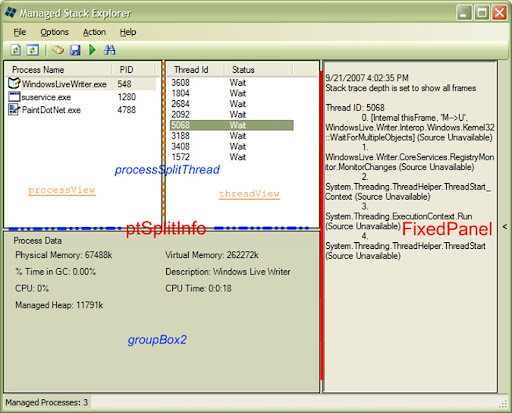
I stumbled across the Managed Stack Explorer app on CodePlex, and as soon as I ran it I knew that it had some killer features I wanted to implement in CacheMyWork!

  1. It’s got a two-panel layout for (a) Processes and (b) the Threads in each Process
  2. More importantly, it’s got auto-resizing of these panels when the whole app window is resized (much like I want to have a panel for Applications and another for the Documents open in each Application).  Very slick-looking.
  3. Whenever you click on a Process in the left-hand panel, it updates a lower display of detailed information about the Process (much like I’d wanted to put in tooltips in CacheMyWork, but this might be even better).
  4. It has another panel that is initially collapsed, but that can be opened/expanded by the user, and possibly by the app in response to certain events (much like I’d wanted the Documents panel to initially be hidden and/or hideable, but able to be opened by the user or in response to certain events e.g. (a) click on a Process; (b) if the Process has Documents open, automatically open the Documents panel).
  5. When a new .NET application starts, the list of Processes in this application is automatically updated!

ManagedStackExplorer

Makes me want to do it all now, but there are some questions to which I don’t know the answers right yet:

  • Is there such a thing (i.e. a native or custom Class available) to create a CheckListBox (as I have right now) that has multiple Columns?  Could the Columns be resizeable and resortable?
  • Does the auto-update of the Processes list require multi-threaded coding?

Reverse-engineering the code

It turns out that, for some unknown reason, when I download the source code and try to open the Design View on any of the WinForms classes (e.g. MainGui.cs, InfoSelect.cs), Visual Studio throws an error and won’t show me the visual design view.  That sucks, ’cause it’s a heckuva lot easier to explore the code by selecting the control(s) you’re interested in and jumping right to the relevant entry point.

Instead, I’ve spent a couple of hours poring over the MainGui.Designer.cs class, assembling a picture for myself of which components relate to which.  It was very instructive, but it felt kind of like trying to build a Lego model of a Tie Fighter in a pitch-black room:

  • I found out that the SplitContainer control class is what’s used to implement (1) and (2)
  • There are multiple SplitContainer objects in this application, nested one inside the other like those carved Russian dolls.
  • The SplitContainer object hierarchy appears to be like this (I’ve colour-coded the object names to show where they are in the UI below):
    • listsSplitData > ptSplitInfo & FixedPanel.Panel1
      • ptSplitInfo > processSplitThread & groupBox2
        • processSplitThread > processView & threadView
  • The other objects encapsulated in the SplitContainers are arranged:
    • groupBox2 > processDataLayout
      • processDataLayout > label1 – label 12
    • processView > ProcessName column, PID column
    • threadView > tid column, threadState column

This means the application’s UI is more or less constructed as follows:

ManagedStackExplorer-annotated

I think I’ve done a decent job mimic’ing the SplitContainer usage demonstrated here, so all I’d like to do at this point is figure out how to create that right-column expand/contract control.  [I’ll leave the auto-update with new Processes behaviour for later.]

After jumping back & forth through the code a few times, it appears that:

  • The control I’m after is labeled viewStackTraceToolStripMenuItem.
  • It appears be to an instance of ToolStripItem and a child of a ContextMenuStrip, and has a single Click() Event Handler.
  • That event handler calls a routine threadview_DoubleClick(), which calls ShowSelectedThreadStackTraces().
  • The former routine calls ExpandAndCollapse(), which appears to be the magic behind the whole thing.

If I were to implement this routine or similar, then all I have to figure out is how they created the “>” control that expands & collapses the FixedPanel.

Cool!

Porting Word2MediaWikiPlus to VB.NET: Part 10

Previous articles in this series: Prologue, Part 1, Part 2, Part 3, Part 4, Part 6, Part 7, Part 8, Part 9.]

CustomizationContext vs. Normal.dot

I just experienced another warning that Normal.dot was updated, and did I want to save it?  That tells me that the CustomizationContext is needed.  I’ve implemented a custom Word Template called “W2MWPPTemplate.dot” and the minimal code that I believe should cover this requirement.  [This code was copied from a previous VSTO project of mine.]

Next code library: modW2MWP_FileDialog.bas

  • Function TestIt() calls the custom function ahtCommonFileOpenSave(), and according to the code comments TestIt() is there just as an example
  • Function ahtCommonFileOpenSave() calls either aht_apiGetOpenFileName() or aht_apiGetSaveFileName(), which both appear to just be performing string functions — nothing interesting there
  • Function GetOpenFile() calls ahtCommonFileOpenSave() as well
  • The functions ahtAddFilterItem(), TrimNull() and TrimTrailingNull() are all just minor string manipulations

The most interesting thing about this file’s code is that it defines a few FileOpen filters, for Access, dBASE, Text and All (*.*).  I don’t know why this application would open or save from these specific file types, which leads me to wonder if this code is even in use.  It’s possible it was left behind from some experiments.  In any case, I’ll keep an eye out for something calling this code, but I’ll likely just use native System.IO methods once I find the caller.

Next up: frmW2MWP_Config.frm

If I remember correctly, the typical way to add a dialog box to a VSTO add-in is using a Windows Form.  I added a Windows Form to the project and named it W2MWPP UI Config.vb.  However, trying to infer what controls were on the VBA version of this form isn’t as easy as I thought it’d be from the code.  However, I’ll see what I can do.

First up I added the New() function to the form’s code-behind using the drop-downs along the top of the editing panel in VS2005.  In the New() method I’m adding functionality currently contained in UserForm_Initialize().  From what I’m seeing in this function, and what I’ve seen in the “old” documentation page, there are:

  1. a Registry setting for the Editor path/ImageExtractionPE (which appears to be unused now since the MS Photo Editor is no longer supported)
  2. a Registry setting and combo box (cboLanguage) for a Language setting (stored in a languageArr() variable)
  3. a Registry setting and textbox (txtURLTest) for the “Wiki Address Root” used for testing
  4. a Registry setting and textbox (txtURLProd) for the “Wiki Address Root” used for ‘production’
  5. a Registry setting and textbox (txtImagePath) for the filesystem folder path used to store extracted images
  6. a Registry setting and textbox (txtTabtoFileName) — though a NumericUpDown control would be better — to count the number of Tab characters needed to edit the Filename when automatically uploading image files
    • There also is a “Simulate upload” function documented here
  7. some sort of option to enable/disable “allow articles without category” is documented, but doesn’t seem to have an initialization state
  8. some sort of control to link to the Project’s online help pages

I’ll add the necessary controls to the Config form for (2) through (7).  However, since the Word2WikiPlus VBA project doesn’t support the MS Photo Editor any longer, I’ll skip (1).  As well, I’ll try using tooltips & status bar messages to provide help on what to do with each configuration control.

Porting Word2MediaWikiPlus to VB.NET: Part 9

Previous articles in this series: Prologue, Part 1, Part 2, Part 3, Part 4, Part 6, Part 7, Part 8.]

Final Feature from ThisDocument.cls: Normal.dot ?

One of the annoyances about VSTO development in Word is that Word always seems inclined to write settings into the Normal.dot file (Word’s default template).  I’ve never really looked into what these settings typically are, and I’m not sure in the case of this project either, but during the first few rounds of trying to get the CommandBar code working, I was getting asked every time whether I wanted to update the Normal.dot file (and having to create a workaround — see Part 8 for details — to avoid this).

I haven’t seen this come up in the last few days of coding, so I’m not sure if (a) I’ve gotten over whatever hurdle causes this because I’ve finally fixed a bug, or (b) I inadvertently slipped and let the Normal.dot get updated.  I’ll check it out in the near future, and I’m sure I’ll have to change something because of it, but for now it’s just not worth worrying about.

Button Click() Event

I was flipping through a copy of Visual Studio Tools for Office (by the two Eric’s — Lippert and Carter) and I happened to catch the section in Chapter 7 (Working with Word Events) entitled “Visual Studio Generation of Event Handlers”.  This little gem finally drilled home what the WithEvents keyword means: it allows me to select one of the controls for which I’ve tagged WithEvents in its declaration, then select any of the available Events, and VS2005 will automatically generate the Event Handler stub, complete with all those nasty parameter declarations that always give me heartburn.

So now I understand why I declared the ButtonControl, UploadControl and ConfigControl using WithEvents.  Now I can easily generate the Click() Event Handlers for each of these CommandBarButtons.

The more I look at them however, the less I like the names “ButtonControl” etc.  They’re not a whole lot better than “ButtonButton”, “UploadButton” and “ConfigButton” (which are obviously redundant, especially with an IDE that automatically describes each object’s type as you’re using it).  Further, they really aren’t easy to find when you’re looking for one of the buttons while you’re typing code.

Somewhere along the line I picked up an elegant convention, which is to prefix UI controls with the string “ui”, as in “uiButton”, “uiUpload”, “uiConfig”.  That way, any code you’re writing for UI controls will be easy to use Intellisense to narrow down to just those controls with the “ui” prefix.

I’m going to change “ButtonControl” to “uiConvert” as well.  I don’t know what the name “ButtonControl” was supposed to mean (other than the most generic way of addressing this first control), and it’ll be easier to remember when the Button label and the object Name are similar.

Issue: Word Macro Settings blocking the Click() event

I dropped a MessageBox.Show() call into each Event handler and Debug’d the application.  What’s odd isn’t that Word 2003 complained about Macro settings (“The macro cannot be found or has been disabled because of your Macro security settings”), but that the Configure button first displayed the MessageBox, and after I clicked OK, then it complained like the others.  There’s nothing different in the way I constructed the Event Handlers for these three buttons, and they all appear to be doing the same thing, but obviously there’s something happening differently with the uiConfig_Click() handler.

Once I set Breakpoints on all three of these handlers, I realized that only the uiConvert_Click() is actually executing the Sub, which is weird — this event handler is catching the Click event for the Configure button; the other two buttons are erroring before they even try to execute their code.

…Hmm, looks like I found the problem.  I’d originally started out with three separate blocks of near-identical code to generate the three CommandBarButtons and all their Properties.  Then, when I got the crazy idea to make my code more elegant, I collapse them into a single For Each loop.  This really made the code easier to follow, but I forgot to deal with the variable used to configure each of the buttons.

Right now, the loop performs all operations in each iteration on the variable uiConvert, which is typed a CommandBarButton.  What I actually need to do is have the For Each loop act on three separate variables (uiConvert, uiUpload and uiConfig) during its three iterations, so that the three buttons get configured properly. 

To try to fix this, I’ve tried adding a member to the Structure of type CommandBarButton that references the CommandBarButton variable for each button.  Then I use that Structure member in the For Each loop to assign all button Properties, thinking that it’d implicitly be configuring the referenced CommandBarButton variable.  Unfortunately, it doesn’t seem to quite work that way.

This code fragment should explain where I’m currently at:

    Structure CommandBarButtonSettings
        Public ButtonVariable As Office.CommandBarButton
        Public Tag As String
        Public StyleProperty As Office.MsoButtonStyle
        ...
    End Structure
        ...


Dim buttonSettings As New CommandBarButtonSettings()
        Dim buttonsList As New ArrayList()

        buttonSettings.BeginGroupProperty = True
        buttonSettings.ButtonVariable = uiConvert
        buttonSettings.StyleProperty = Office.MsoButtonStyle.msoButtonIconAndCaption
        ...

        buttonsList.Add(buttonSettings)
        For Each _buttonSettings As CommandBarButtonSettings In buttonsList

            'Create the CommandBarButton if it doesn't exist
            If W2MWPPBar.FindControl(Tag:=_buttonSettings.Tag) Is Nothing Then
(*)                buttonSettings.ButtonVariable = CType(W2MWPPBar.Controls.Add(1), Office.CommandBarButton)
            Else
                ' If it already exists, do not create the CommandBarButton but just obtain a handle to it
(*)                buttonSettings.ButtonVariable = W2MWPPBar.FindControl(Tag:=_buttonSettings.Tag)
            End If

            Try
(*)                With buttonSettings.ButtonVariable
                    .BeginGroup = _buttonSettings.BeginGroupProperty
                    .Style = _buttonSettings.StyleProperty
                    ...
                End With

                ...

            End Try

        Next

The problem is with the code marked with an (*), and I’m stumped on now to resolve this problem.

Aside: Update for VSTO SE available

If you’re using VSTO SE add-in for Visual Studio, then make sure you’ve installed the VSTO SE Update that Microsoft released a couple of months ago.  I didn’t know about this, and though it probably won’t affect my code, it’s never a bad thing to be sure.

Yes, in fact I *do* get mistaken a lot for…

Couldn’t help myself, and I was still surprised by the result:

What American accent do you have?

Your Result: North Central
 

“North Central” is what professional linguists call the Minnesota accent. If you saw “Fargo” you probably didn’t think the characters sounded very out of the ordinary. Outsiders probably mistake you for a Canadian a lot.

The Midland
 
Boston
 
The West
 
Philadelphia
 
The Inland North
 
The South
 
The Northeast
 
What American accent do you have?
Quiz Created on GoToQuiz