Installshield – great for developers, sucks ass for victims (aka everyone else)

Holy crap, what a safari this is turning into.  I’m trying to uninstall a piece of software (the Intel Debugger v9.1.x) that was apparently packaged with Installshield.  However, every time I tell Windows to uninstall it, it returns to me the following error:

image

Idiot move #1: look for help from InstallShield Corp

So I Google for this error and come up with a half-dozen links to various “support” articles from InstallShield and related on how to resolve this error.  It tells me to download various versions of their runtimes and engine installers, none of which make any improvement in the situation.

I went away for a while, came back again today and tried a whole different attack:

Forget the vendor, just debug it yourself (using Process Monitor)

  • Launch Process Monitor, filtering out all running processes except msiexec.exe
  • Near the end we finally see some activity that’s related to the problem:

MsiExec.exe    RegQueryKey    HKCR\CLSID\{8B1670C8-DC4A-4ED4-974B-81737A23826B}\LocalServer32

MsiExec.exe    RegQueryValue    HKCR\CLSID\{8B1670C8-DC4A-4ED4-974B-81737A23826B}\LocalServer32\(Default)    Data: C:\PROGRA~1\COMMON~1\INSTAL~1\Driver\8\INTEL3~1\IDriver.exe

  • Then there are four attempts to launch the IDriver.exe, all of which immediately halt
  • Lastly, there’s an update to the MSI log file which says this:
1: The InstallScript engine on this machine is older than the version required to run this setup.  If available, please install the latest version of ISScript.msi, or contact your support personnel for further assistance.
=== Logging stopped: 09/06/2008  14:02:26 ===

At least I know which file is “older than the version required”.

However, the next problem is figuring out how to get the ‘right one’ executed in its place:

Where Your Hero* Learns Just How Screwed Up InstallShield’s Model Really Is

* aka “just some dick on the Internet”

From what I can tell, Installshield only cares about one person: the dork who blindly builds the Installer package for their one little application.  Apparently, if you need to call on the Installshield components, don’t ever even try to discover whether they’re already installed on the target.  Instead, assume that they must *not* be installed (presumably because every developer on the planet has the privilege of being the first to get software installed on each PC where it’s being used), and always install a copy of some Installshield dependency on the end-user’s PC.  And then for good measure, make sure that there’s a hard-coded dependency on the version of the InstallShield bits that went with the installer.

They sure as hell don’t seem to care about the lowly end-user or IT administrator, who might have to actually *deal* with the nightmare of conflicting/overwriting/installed-to-every-conceivable-corner-of-the-filesystem versions of these hard-coded InstallShield dependencies.

Just for s**ts and giggles, try this at home:

  • fire up REGEDIT.EXE
  • Press [Ctrl]-F to bring up the Search dialog
  • Type Installshield and [Enter]
  • Click the [F3] button a few dozen (or hundred) times

A bit more digging on my own system:

Current version of IDriver.exe in the logged directory = 8.0.0.123

One article in the InstallShield/Macrovision/Acresso library confirms the noted location is where the IDriver.exe version 7 or 8 should be found.

Once more, I downloaded and installed the latest InstallScript 8 package (which turns out to be the 8.0.0.123 I already had installed), so I then decided to try downloading all the later versions and install them one by one as well.  I was hoping that the Registry setting that resolves to this particular IDriver.exe would be overridden (at least in the “Version Independent ProgID” or something similar) by a later install.  Here’s one set of settings that I figured were related:

  • CLSID: {8B1670C8-DC4A-4ED4-974B-81737A23826B}
  • (Default) value: InstallShield InstallDriver
  • AppID: {1BB3D82F-9803-4d29-B232-1F2F14E52A2E}
  • LocalServer32: C:\PROGRA~1\COMMON~1\INSTAL~1\Driver\8\INTEL3~1\IDriver.exe
  • ProgID: ISInstallDriver.InstallDriver.1
  • VersionIndependentProgID: ISInstallDriver.InstallDriver

Yep, after installing IScript9.msi, the CLSID under the entry HKCR\ISInstallDriver.InstallDriver changed to {B3EDE298-AE75-4A1C-AB7E-1B9229B77BBE}.  However, the uninstall “Fatal error” continued to crop up.  Apparently the fatal application’s uninstaller doesn’t chase the ProgIDs but some other reference instead.

Then by some wild fortune, I happened to stumble on a very obscure directory in which the “later version” of the InstallScript MSI installer (isn’t there some irony embedded in that?) was actually still cached.  WHY this wasn’t available from the vendor’s own web site, I’ll never know.  However, installing this version of IScript.msi did overwrite the ProgID once again, and the version of IDriver.exe installed in the target location was 8.1.0.293.

Somehow, finally, that did the trick.  Finally got that Installshield-driven crap off my system.  Trying to resist the impulse to wipe all traces of Installshield product off my system as well, and reminding myself that I could create this same hell for myself ten times over in so doing.

So, apparently all it takes is for some ancient application to overwrite the better version of an “Installation Engine”, and all hell breaks loose.  I’m beginning to see why the Installshield product line has been bought and sold more times than… well, I’m drawing a blank on a family-friendly comparison, so let’s just say this was not one of the more profitable software businesses out there.  And no freakin’ wonder.

ComponentChk.cpp – I resolved my first C++ compiler "fatal error"!

Yes, for those of you with even more grey in your beard/hair than I, this is probably a “meh” event.  However, for me, who’s always looked at C++ code and wondered how the H*** anyone could ever make sense of it, this is a big event.  [Patting myself on the back.]

Situation

I’m working on finishing up the Setup bootstrapper for my VSTO add-in Word2MediaWiki.NET.  I’m targeting Word 2003 and Word 2007 (despite Microsoft’s best efforts/worst neglect to the contrary), and I’m trying to achieve what many have done before, but which seemed impossible for me: allow the Setup.exe to detect which version of Word is installed, and then conditionally install the prerequisite software (i.e. the so-called Office PIAs) for whichever version of Word is discovered.

Problem 1: most folks in the VSTO space seem to think that, despite the fact that a version of the .NET framework is required to support VSTO, the Setup.exe that goes with your VSTO add-in install package should use UNmanaged code to detect whether the pre-requisites are installed.

Problem 2: I know squat about writing unmanaged code.

Problem 3: Microsoft’s VSTO & Office teams left it up as an exercise to the VSTO app developer to figure out how to assemble the amazing number of parts necessary to make a VSTO install work transparently to the end user.

Problem 4: There’ve been many articles written posthumously (I mean, long after VSTO v2 was released) on various aspects of automating VSTO-add-in installation, but none of them addressed the very inevitable scenario where the app developer needs to support both Word 2003 and Word 2007.  [Don’t even *think* about pre-2003 versions of Office — you’d have to be clinically insane.]

Manna from heaven

One ridiculously brave soul, Mark Hogan, actually took the time to not only figure out how to build such a conditional pre-requisite detection app in C++, but he was so overcome with glee that he beat Microsoft at something even they were too scared to do, that he published the full set of source code and XML configuration files for the entire world to use.

Now, masochist that I am, I took it upon myself to try to integrate the code that Mark Hogan published into the existing code that I’d already slotted into my Office PIA bootstrapper files.  However, I didn’t anticipate the foreseeable result that, because I’m coding this stuff in my spare time, and usually late at night, I would (a) not finish the integration work in one sitting, (b) forget what I’d originally set out to do and (c) forget to integrate any of the critical code that actually performed the conditional logic.

Mike chases his tail

Miraculously, I was left with a .CPP file that would compile and that appeared to be significantly different from the original file I started from, and that threw off an error code that created a spectacular wild goose-chase:

“Unable to satisfy all prerequisites for Word2MediaWikiDotNET.  Setup cannot continue until all system components have been successfully installed.”

Details:

“Prerequisite check for system component Microsoft Office 2003/2007 Primary Interop Assemblies (Word Only) failed.

See the setup log file located at ‘C:\DOCUME~1\msmithlo\LOCALS~1\Temp\VSD33.tmp\install.log’ for more information.”

And in the INSTALL.LOG file was the illusory answer:

Running external check with command ‘C:\DOCUME~1\msmithlo\LOCALS~1\Temp\VSD33.tmp\Office2003PIAor2007_WordOnly\ComponentChk.exe’ and parameters ‘/delete /save /word {1EBDE4BC-9A51-4630-B541-2561FA45CCC5}’

“Process exited with code 1607”

Setting value ‘1607 {int}’ for property ‘SupportedWordVersionInstalled’

Setting value ‘1607 {int}’ for property ‘PIAsRegistered’

This led me down the path of chasing InstallShield errors, since the only Google search results that looked at all related were things like these.  After a few days of trying to figure out how the InstallShield scripting engine could be related to a Visual Studio SETUP.EXE or custom C++ application, I finally got my brain back and tried to isolate where in the code or configuration files the problem existed.  That led me to a line of C++ code that threw ERROR_UNKNOWN_COMPONENT, which as it turns out also shares the 1607 error/exit value.

[The whole gruesome story is illustrated in the Bug I filed to myself here.]

Back to the original goal, with a new mission

Once I realized what I’d left out of the C++ code, I quickly got it to the point where I could try compiling it.  Now a new mission emerged – how to debug a C++ compiler error?

C:\>cl.exe /Oxs /MT /GS ComponentChk.cpp advapi32.lib
Microsoft (R) 32-bit C/C++ Optimizing Compiler Version 15.00.21022.08 for 80×86
Copyright (C) Microsoft Corporation.  All rights reserved.

ComponentChk.cpp
Microsoft (R) Incremental Linker Version 9.00.21022.08
Copyright (C) Microsoft Corporation.  All rights reserved.

/out:ComponentChk.exe
ComponentChk.obj
advapi32.lib
ComponentChk.obj : error LNK2019: unresolved external symbol __imp__WaitForInputIdle@8 referenced in function “int __cdecl MyStart(char const *,char const *)” (?MyStart@@YAHPBD0@Z)
ComponentChk.exe : fatal error LNK1120: 1 unresolved externals

That command line (cl.exe /Oxs /MT /GS ComponentChk.cpp advapi32.lib) was derived from the original article from which we were all working (or stumbling around half-blindly, it felt to me).  I just ran this without a second thought, assuming that since Mark Hogan didn’t seem to mention any modifications to it, any errors it showed must’ve been my fault.

Where is “__imp__WaitForInputIdle@8” I wondered?  It didn’t show up in the source code when I searched for it, and nor did “int __cdecl MyStart“.

After staring at this for a while longer, I figured some substring searches would work, which after a few attempts finally showed me that I was actually looking for the code

WaitForInputIdle(pi.hProcess, INFINITE);

which is called in the function MyStart().  I tried some silly things first, of course, but I eventually realized that if WaitForInputIdle() didn’t exist as a named function in the source code, perhaps it existed in another library that wasn’t yet connected to the code?  A quick MSDN Library search told me this function was actually part of USER32.DLL, and it wasn’t too painful a leap of logic to try adding USER32.LIB to the compilation parameters, like so:

cl.exe /Oxs /MT /GS ComponentChk.cpp advapi32.lib user32.lib

And when I loaded up the now-successfully-compiled COMPONENTCHK.EXE into DEPENDS.EXE, it confirmed exactly what I expected to see:

image

Mark, many thanks to you, and my apologies for calling into question your mad C++ skillz.

Do you Wiki? Word2MediaWiki.NET first release is live!

Snippy0001

I just wanted to let my faithful readers know that I have finally completed a beta version of the Word2MediaWiki.NET add-in for Microsoft Word 2003.

This’ll be useful to anyone that regularly contributes to Wikipedia, or those that have a bunch of Word documents that they’d like to share on Wikipedia.

It’s just as useful for any of the other hundreds of wikis that use the same server software as Wikipedia (known as MediaWiki), and it’ll be of interest to those folks who’ve used Word2MediaWikiPlus (from whose VBA source code I converted much of the basis of Word2MediaWiki.NET).

Grab a copy here:

http://www.codeplex.com/Word2MediaWikiDotNET

And please, let me know about any issues or experiences you have with it by posting a Discussion item here:

http://www.codeplex.com/Word2MediaWikiDotNET/Thread/List.aspx

ATOM, RSS & feeds – have YOU ever known which was the "right" one to choose??

What a friggin relief:

http://dev.live.com/blogs/devlive/archive/2008/02/27/213.aspx

“Microsoft is making a large investment in unifying our developer platform protocols for services on the open, standards-based Atom format (RFC 4287) and the Atom Publishing Protocol (RFC 5023).”

Finally I can try to stop worrying about which of the jillion “feed types” I should select to make sure that the feed subscriptions I’ve amassed are as “future-proof” as possible.  Good gravy, the number of times I’ve gone to subscribe to a certain feed, only to be faced with the choice among 2-6 different feeds (all apparently for the same set of articles) is just paralyzing:

  • Do I want the one with RSS in the final suffix?
  • Should I try to figure out which protocol is most popular/widest supported?
  • Do I need to try to figure out which one provides the most metadata with each downloaded article?
  • And which one might be sending the least data back to the author?  [This is ParanoidMike after all… wouldn’t want to disappoint my fans with a rare moment of rational thinking now]

I don’t normally like any one behemoth [aside: wasn’t that one of Godzilla’s opponent?] dictating to me a single format for anything, and I’m especially wary of any such edicts from Microsoft (having been privy to watching the sausage get made there for six years), but any time they make such an unequivocal commitment to an RFC standard and away from their “not built here” crap, I’m all in favour.

MindManager 7 ToDoList AddIn development Part 6: the Mysteries of COM interop

Sometimes there are inevitable mysteries uncovered when writing code.  Well, I’ve bumped into quite a rich source of mysteries in trying to use an aspect of the MindManager object model that thunks through a brittle COM interop module, known as CmjDocumentCollectionComObject.  Here’s just a couple of examples that have come up recently:

“unable to create document”

Here is the ‘offending’ code:

public static MMInterop.Document GetMap(string filename)
{
    MMInterop.Document toDoListMap;
    MMInterop.Documents maps;
    string toDoListMapFullPath = Connect.applicationObject.get_Path(MMInterop.MmDirectory.mmDirectoryMyMaps) + filename;
    maps = Connect.applicationObject.get_Documents(true);
    try // open a ToDoList map
    {
        toDoListMap = maps.Open(toDoListMapFullPath, String.Empty, true); // here's where the COMException is raised
    }
}

Here is the exception raised:

System.Runtime.InteropServices.COMException occurred
  Message=”Object ‘CmjDocumentCollectionComObject’ reports an error: ‘unable to create document'”
  Source=”MindManager.Application.7″
  ErrorCode=-2147220992
  StackTrace:
       at Mindjet.MindManager.Interop.DocumentsClass.Open(String pFileName, String pPassword, Boolean Visible)
       at ParanoidMike.MindManager.ToDoList.ToDoListMap.GetMap(String filename) in C:\personal\VS Projects\MM7TODOList\ToDoList.cs:line 187
  InnerException:

And do you want to know what that exception really means?  “The specified file does not exist” would be my interpretation.  If I understand the MindManager function maps.Open() correctly, this is meant to open an existing document.  I’ve just asked it to open a non-existent document, so I’d expect “can’t find it”, but I’m puzzled by “unable to create document”.  It’s like whoever wrote the error strings for the CmjDocumentCollectionComObject is interpreting the name of the Win32 CreateFile() API literally.

I am attempting to use a Try…Catch approach to testing whether the requested file exists. If the file exists, then maps.Open() would succeed; if it didn’t exist, then I’d use the Catch block to instead create the named file.  I didn’t expect to have to catch a System.Runtime.InteropServices.COMException, nor in figuring out how to catch only the exception with a specific ErrorCode/HRESULT returned by the COM object.

But then again, “Nobody expects the Spanish Inquisition”

{“Retrieving the COM class factory for component with CLSID {5B9EA9CE-76A3-4878-9A6B-22D0A3042774} failed due to the following error: 80040154.”}

Here’s the code:

MMInterop.Document toDoListMap;
try
{
    toDoListMap = new MMInterop.Document();
}
catch (System.Runtime.InteropServices.COMException e)
{
    throw;
}

Here’s the .NET exception that gets thrown:

{“Retrieving the COM class factory for component with CLSID {5B9EA9CE-76A3-4878-9A6B-22D0A3042774} failed due to the following error: 80040154.”}

And here’s the HRESULT that is being thrown by the COM object: -2147220992

In various posts, the common theme seems to be that the “component with the noted CLSID” needs to be re-registered.  Searching for this CLSID on my system (predictably) leads to Mindjet.MindManager.Interop, Version=7.0.323.0, Culture=neutral, PublicKeyToken=19247b5ea06b230f and Mindjet.MindManager.Interop, Version=7.1.388.0, Culture=neutral, PublicKeyToken=19247b5ea06b230f.  [However, there’s no ProgID registered for Mindjet.MindManager.Interop.  Is that bad — I know it’s not good for typical apps, but is a COM interop assembly a “typical” COM app?]

I remember reading somewhere that the MindManager 7 Primary Interop Assemblies were installed by default when installing MM7, so I thought perhaps and Add/Remove Programs “Repair” operation would suffice.

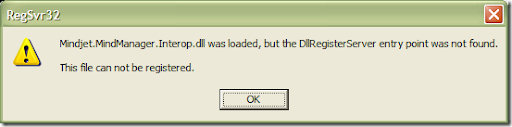
Unfortunately no — damned MindManager, I ran the full Repair, and it even reinstalled all the 41 default templates (so I know it did completely successfully), but my code is still throwing this same error.  So I went looking for the file path, which meant examining the Properties of the “MindManager” Reference, and it reports that this “ActiveX” file is stored here: C:\WINDOWS\assembly\GAC_MSIL\Mindjet.MindManager.Interop\7.1.388.0__19247b5ea06b230f\Mindjet.MindManager.Interop.dll.  Fire up a Command Prompt in that directory, run “REGSVR32.EXE Mindjet.MindManager.Interop.dll”, and I end up with this error:
image

REGASM.EXE

Here’s a riddle: how does one initialize a variable that cannot be initialized?

When I try to create a new mindmap document using a .NET AddIn, I’m finding that the variable I declare to hold a reference to the new mindmap is not usable: (a) it won’t work until it’s initialized, but (b) when it’s initialized it throws the error documented here:
http://tech.groups.yahoo.com/group/MindManagerDev/message/447

I’ve tried to dig up any hints that would help me figure out what to do to resolve this error, but so far nothing has worked (including trying to Register the Interop DLL, and Repairing the installation of MindManager).

There are plenty of people asking about this kind of issue — some related to straight COM objects, others talking about COM Interop assemblies:
http://www.thescripts.com/forum/thread731361.html
http://forums.cnet.com/5208-6141_102-0.html?forumID=8&threadID=216925&messageID=2313201
http://channel9.msdn.com/ShowPost.aspx?PostID=333247
http://forums.microsoft.com/MSDN/ShowPost.aspx?PostID=765439&SiteID=1
http://groups.google.com/group/microsoft.public.dotnet.framework.interop/browse_thread/thread/e8d8ccb58221f843/2263fa2b3db5895b

(1) I tried loading up the Interop DLL in DEPENDS.EXE, but there appear to be no missing dependencies.
(2) I tried registering the assembly using REGASM.EXE, according to the article here: http://www.simple-talk.com/dotnet/visual-studio/build-and-deploy-a-.net-com-assembly/
using the following command:

C:\WINDOWS\Microsoft.NET\Framework\v2.0.50727>regasm C:\WINDOWS\assembly\GAC_MSIL\Mindjet.MindManager.Interop\7.1.388.0__19247b5ea06b230f\mindjet.mindmanager.interop.dll
Microsoft (R) .NET Framework Assembly Registration Utility 2.0.50727.1433
Copyright (C) Microsoft Corporation 1998-2004.  All rights reserved.

Types registered successfully

C:\WINDOWS\Microsoft.NET\Framework\v2.0.50727>

Now I’m getting the same .NET exception, with a different HRESULT: -2147221164.  That HRESULT appears to be associated with needing to re-register Atl.dll, so I gave that a shot.  Unfortunately, it gave me the same error and the same HRESULT.  I also tried re-running the above REGASM.EXE command, with no change — still throwing the same exception.

Cheap Hack: avoid init issues with dummy calls

I’m almost embarrassed to even discuss how I’m getting around this intractable problem…but not embarrassed enough not to do it, so I might as well own up to it.  Who knows?  Maybe one of you will know what I’m overlooking.  Maybe I’ll find this article in six months’ time and remember why I put this hack in place.  Maybe this will just be my own personal legacy to the world. 🙂

Let’s recap: my design for this AddIn is to use a separate map to list copies of all Tasks found in the searched maps. If the named map already existed, just open it; if not, a new map should be created.  However, I kept getting blocked by not “initializing” the local variable to hold the new/opened Document handle before returning it to the calling function.  However, initializing the local variable with a “new MMInterop.Document()” call just caused other problems.

I was thinking that because Visual Studio was throwing the CS0165 error “Use of unassigned local variable ‘toDoListMap” on the final line of code “return toDoListMap”, and not on any of the preceding where the toDoListMap variable was being assigned, what Visual Studio might be reacting to is that toDoListMap wouldn’t have a non-null value on all code paths through the function.  I’d ignored this thought because (a) the code paths where it wouldn’t get a value were intentional, and (b) the documentation on CS0165 kept indicating that I needed to initialize the variable.

However, after exhausting all the “right way” options, I finally just dropped some initializations (assignments?) into the code paths where toDoListMap wasn’t previously being touched:

public static MMInterop.Document GetMap(string filename)
{
    MMInterop.Document toDoListMap;
    MMInterop.Documents maps;
    string toDoListMapFullPath = Connect.applicationObject.get_Path(MMInterop.MmDirectory.mmDirectoryMyMaps) + filename; // TODO: remove this hard-coded pathing to the ToDoList map
    maps = Connect.applicationObject.get_Documents(true); // assign/initialize the maps variable so the array can be searched by maps.Open().  "Connect" is the Class that implements a static variable "applicationObject" which is assigned to the "application" object that's captured during AddIn initialization.

    try // open the existing ToDoList map
    {
        toDoListMap = maps.Open(toDoListMapFullPath, String.Empty, false);
    }
    catch (System.Runtime.InteropServices.COMException e) // if a ToDoList map by that name does not exist, create one
    {
        if (e.ErrorCode == -2147220992) // "Object 'CmjDocumentCollectionComObject' reports an error: 'unable to create document'"
        {
            System.Windows.Forms.MessageBox.Show("Exception opening map: " + e.Message); // TODO: remove once initial debugging is complete
            string templateFullPath = Connect.applicationObject.get_Path(MMInterop.MmDirectory.mmDirectoryTemplates) + templateFileName; //construct reference to the template that's required when creating a new Document

            toDoListMap = maps.AddFromTemplate(templateFullPath, String.Empty, false);
        }
        else // this is never intended to be run - it's just here to convince the compiler that the toDoListMap variable has been initialized on all code paths, as it otherwise throws an exception "Use of unassigned local variable 'toDoListMap'.
        {
            System.Windows.Forms.MessageBox.Show("If you see this message, record the error and report it to the developer - this should never be seen: error code = " + e.ErrorCode.ToString());
            toDoListMap = new MMInterop.Document();
        }
    }
    catch (Exception e) // this is never intended to be run - it's just here to convince the compiler that the toDoListMap variable has been initialized on all code paths, as it otherwise throws an exception "Use of unassigned local variable 'toDoListMap'.
    {
        System.Windows.Forms.MessageBox.Show("If you see this message, record the error and report it to the developer - this should never be seen: error code = " + e.ErrorCode.ToString());
        toDoListMap = new MMInterop.Document();
    }

    return toDoListMap;
}

And now, miraculously this damned code compiles and runs correctly.  I really wish I had some better ideas than these “new” calls, ’cause I’ve got a feeling they’ll come back to bite me far down the line.  I’ve added some MessageBox “please let me know if you see this” dialogs, but that won’t really solve the problem — just make me look a little more like an amateur code-jockey.

[I’m still not sure why in this case, I was able to assign the toDoListMap variable without first initializing it — it’s not one of the simple datatypes, so I don’t think it’s being implicitly initialized by the compiler, and I thought I’d just re-learned that a complex Object always needs to be declared, initialized and then assigned.  Once again there’s something I don’t get about this, but I’ll leave that to dig up in the future, as yet another great surprise. :)]

MindManager 7 ToDoList AddIn development Part 5: minimizing Object overhead between classes

I’ve created quite a puzzle for myself.  In writing an AddIn that calls functions from custom Classes, I am forcing the AddIn to pass in all the data that would be needed in the custom code.  I’ve added a few helper functions to the ToDoListBuilder class including GetAllTasks(), IsTaskCompleted() and IsTopicATask().  These are easy because I’m passing simple variables into each function.

However, I haven’t yet wired up the primary function that will be called from the AddIn’s mmCommand_Click() event, and I haven’t decided what I need to pass down from the button_Click() to the cascade of encapsulated functions, nor how far down to pass any object like a baton.

It seems like it’d be correct to pass the MMInterop.Application object into the ToDoListBuilder code, but in passing the Application object to a GenerateToDoListItems() method, I’ll have to pass the Application object to at least one further layer of called functions such as GetAllToDoListMaps().  Or will I?

Now that I’m looking around, the Connect class has a private applicationObject variable.  While it seems unlikely I’d be able to make reference to that Class’ private variable from a called Class, there should be no reason why I couldn’t create another private variable in the ToDoListBuilder class as soon as the GenerateToDoListItems() method is called, and then call on that Class-wide variable from then on.

Reducing Memory Footprint of Application Object(s) without Passing References Everywhere

Here’s how the code around the Application object comes out from the Visual Studio AddIn Template wizard by default:

    public class Connect : Object, Extensibility.IDTExtensibility2
{
private Mindjet.MindManager.Interop.Application applicationObject; private Mindjet.MindManager.Interop.Command mmCommand;
... }

Changing the first declaration to public from private makes that applicationObject object available outside of the assembly as well as within it, so that pointers (references) to the object don’t have to be explicitly passed around the code.

Assuming that nothing can affect the state of the applicationObject, there should be no reason not to declare it as “public”.  I’m not entirely naive though — I assume there’s reasons why you’d want to do one and not the other, but I have to believe that any code running in the MindManager application should necessarily want/try to use a single application object anyway.

Solution: Static/Shared modifier

After bashing my skull into the wall of my ineptitude for a few days, I finally dislodged a bone fragment of useful info: the “static” modifier.  Somehow this does what I had expected the “public” keyword to accomplish — makes it possible to access the variable from outside the class, without having to instantiate another copy of the object.

Open Questions

Now I’m left wondering two things:

  1. What’s the lowest level of accessibility that the object needs?  Does it still need to be public, or would protected or less be acceptable?
  2. Under what circumstances would it be inadvisable to use the static modifier?  I can imagine that in theory, anything that is supposed to represent multiple objects should not be marked “static”, but that still leaves a ton of room for interpretation (and for subtle mistakes in code that will bite me only later).

Aside: Registry entries in Setup project Aren’t Automatically Installed

Idiot assumption of the day: just because I entered the correct Registry settings in the Setup project, doesn’t mean that when I Debug the Solution those settings will be automatically added to the computer’s Registry.  (Sigh, sometimes I surprise myself with how dense I can be.)

So which “hack” would be better — should I hand-enter the Registry settings I need (which seems pretty lame) or should I build the Setup project and actually install this AddIn (which might end up leaving behind stuff that I’ll need to rip out later after I’ve rev’d the AddIn a few times)?

I guess I’m going down the path of hand-entering the Registry settings.  I don’t like doing this, and I really wish debugging MindManager AddIns didn’t require this lame step, but it looks like I’ve got no better option.

NullReferenceException: When will I ever learn?

I can’t believe the number of times I get caught by this seemingly predictable error:

        private System.Collections.ArrayList toDoListItems; // building list of all Tasks to be emitted as the items for the ToDoList
        private Mindjet.MindManager.Interop.Application applicationObject; // local instance of the Application object

        public System.Collections.ArrayList GenerateToDoListItems(MMInterop.Application application)
        {
            System.Collections.ArrayList toDoListMaps; // collection of all maps to be searched for Task topics
            applicationObject = application; // sets the local variable equal to the value of the passed-in parameter
            toDoListMaps = GetAllToDoListMaps(); // generate the collection of maps to be enumerated and searched
            toDoListItems = new System.Collections.ArrayList(); // declare this to avoid a NullReferenceException when it's assigned below
            
            foreach (MMInterop.Document map in toDoListMaps)
            {
                    toDoListItems.AddRange(GetAllTasks(map));
            }
            return toDoListItems;
        }

I really don’t get why I don’t have to declare the “new toDoListMaps” object, but I have to declare the “new toDoListItems”.  Is there something about creating the object inside the method that implicitly initializes it, but this implicit initialization doesn’t occur for objects that are created outside of the method?

And why does creating an int object not require initialization, but creating an ArrayList object does?  This might make sense to veteran coders, but my god it’s confusing for those of us just trying to get their first few apps out the door…

MindManager 7 ToDoList AddIn development Part 4: Fixing the Registry Settings in the Setup Project

The MM VS2005 AddIn wizard created a set of Registry settings for my project, and the friendly folks at Mindjet’s Dev Support team helped me fix a problem with my project (and in the process had to remove most of those Registry settings). Well, now we’re taking it back [anyone else remember Bono’s intro to Helter Skelter?].

It took me a bit of time to track down the hidden place where Visual Studio “hides” the Registry settings for a Setup project: right-click the Setup Project (“AddInSetup_en” in this case), choose View, Registry. There’s a stub for each hive, but not all of them contain actual Registry Keys or Values.

For my project, the only Key with any entries was HKLM\Software\Mindjet\MindManager\7\AddIns, with the Values (though different settings) that I’d noted earlier. The ProgID that it’s setting is ParanoidMike.ToDoListBuilder.AddIn which isn’t really representative of what I’m intending to release – ToDoListBuilder is just one portion of the functionality I want to provide (i.e. I’ve also spec’d out a ToDoListManager class that’ll be a peer to ToDoListBuilder).

Also, if I’m going to define a namespace rooted in ParanoidMike, I figure I should use the application name as the next-level-down, and then describe the actual code/app/add-in as the third-level-down. That gives me the namespace ParanoidMike.MindManager.ToDoListAddIn, so I’ve replaced the existing ProgID with this as the new ProgID (and .NET namespace for my source code). I deleted the old Registry entries that reference this ProgID, added the new ProgID and its entries, and also added the HKCR settings that were still missing when I published this article.

That results in the following Registry entries populated in the AddInSetup_en project:

Complete Set of Registry Entries for MM7 Add-in

HKLM\Software\Mindjet\MindManager\7\AddIns

Value

Data type

Setting

Description REG_SZ MindManager ToDoList AddIn for MM7 – Built by ParanoidMike
FriendlyName REG_SZ MM7ToDoList
LoadBehavior REG_DWORD 2

HKCR\ParanoidMike.MindManager.ToDoListAddIn

Value

Data type

Setting

(Default) REG_SZ ParanoidMike.MindManager.ToDoListAddIn

HKCR\ParanoidMike.MindManager.ToDoListAddIn\CLSID

Value

Data type

Setting

(Default) REG_SZ {33B60353-E8F3-4F38-98B6-41C7E5C6D32B}

Note: this little tip (HowTo: Create a Default Registry Value in Registry Editor) saved me a lot of trouble futzing around with these infrequently-created values.

Note: if you’ve used the MM7 AddIn template for Visual Studio, the CLSID above can be found in the Connect.cs file just under the ///

comment, like so:

GuidAttribute("33B60353-E8F3-4F38-98B6-41C7E5C6D32B")

Open Issue: ProgID versioning

There’s conflicting evidence on whether it’s best to create the ProgID using the “.1” suffix notation, so that the ProgID can be rev’d, or whether it’s just as good to leave it without the “.1” suffix and replace it upon every install (upgrade?). For the moment, until I stumble across anything better, I’m just going to leave it without.

Open Issue: ProgId in AddIn’s source code

After cleaning out the old entries from my computer’s Registry and testing this new set of code, I noticed that there was still the old ProgId referenced in the Connect.cs code:

    /// 
    ///   The object for implementing an Add-in.
    /// 
    ///    
    [
     CLSCompliant(false),
     ComVisible(true),
     GuidAttribute("33B60353-E8F3-4F38-98B6-41C7E5C6D32B"), ProgId("ParanoidMike.ToDoListBuilder.AddIn")
   ]

Since the add-in loaded and executed successfully, I’m now left to wonder what effect this ProgId entry is really supposed to have. Clearly it doesn’t affect the operations of debugging the code (i.e. hitting F5 from within Visual Studio 2008 and waiting for MindManager to launch), but I can’t imagine it’s just there for decoration either. It’s possible that, because I haven’t rebooted since I cleaned out the Registry and updated the AddInSetup_en project settings, there’s still enough of this information cached to allow the Add-in (with the same CLSID) to still work.

I’m taking no chances of a vaguely-specified error down the line, so I’ve updated this ProgId entry to the current value, but if anyone knows how these entries are related, I’d sure love to hear it.

MindManager 7 "ToDo List" Add-in development: Notes to Self

Notes to Self: Object Model stuff I Might Use in my Add-in

  • Application.ActiveDocument: the currently-displayed Map
  • Application.Visible: enables/disables the MM UI
  • DocumentObject.Guid, DocumentObject.ResetDirty: this seems like a generic object type within the MM object model — might be useful for manipulating a whole collection of different objects at once
  • Document.Attributes: collection of document’s custom attributes
  • Document.CentralTopic
  • Document.Guid
  • Document.IsModified
  • Document.Properties
  • Document.AssignMapMarkers(): assigns a map markers template to the document
  • Document.GetAttributes()
  • Document.Range(): returns a new Range collection of all the specified objects (topics, boundaries, relationships) in the document
  • Topic.AllSubTopics: subtopics connected to the topic
  • Topic.Attributes
  • Topic.Document: the document in which the Topic is found
  • Topic.Guid
  • Topic.Icons, Topic.UserIcons
  • Topic.IsFirstSibling: TRUE if the topic is the first in a set of siblings
  • Topic.IsMainTopic: TRUE if the topic is a child of the Central topic
  • Topic.IsSubTopic: TRUE if the topic is a child of another topic
  • Topic.Level
  • Topic.NextSibling
  • Topic.ParentRelationship
  • Topic.ParentTopic
  • Topic.SubTopics, Topic.UnfilteredSubTopics
  • Topic.Synchronization: ????
  • Topic.Task
  • Topic.Text
  • Topic.TopicLabel
  • Topic.TopicPrefix: sets the prefix for the topic — something to do with “numbering”
  • Topic.Type
  • Topic.AddControlStripType()
  • Topic.AddSubTopic()
  • Topic.CreateHyperlinkToTopicByGuid(): Cool! This could be used to hyperlink topics in ToDoList back to their original Topics. Might be useful to sync properties, attributes automatically.
  • Topic.GetAttributes()
  • Topic.NewTopicFinder(): helpful for traversing sub-topics from the current topic.
  • Topic.ResetDirty(): resets dirty bit of this and all subsequent objects. [Could be used to determine if a Topic has been changed since last “sync”.]
  • Topics.Add()
  • Topics.AddWithGuid(): creates new Topic with a given Guid
  • CustomProperty.Value
  • CustomAttributes.GetAttributeValue(), CustomAttributes.SetAttributeValue()
  • Task.IsDone
  • Task.IsValid
  • Task.Priority
  • Task.Topic: the parent Topic for this object
  • TextLabels.AddTextLabel()
  • Icons.AddStockIcon(), Icons.AddCustomIcon()
  • Icon.Delete()
  • Utilities.Execute

Notes to Self: Questions to Research

  1. What’s the difference between a CustomProperty and a CustomAttribute?
    • Attributes are persistent
    • Nick Duffill has more info here
  2. Is a TextLabel the same thing as a Text Marker?
  3. What’s the difference between a CategoryMarker, a CustomIconMarker and a CustomIcon?
  4. What Events are available to which to respond (such as Topic.Moved)?
    • Nick Duffill alludes to “topic-delete” and “topic-add” here
  5. Is there a way to find the current position among siblings for a Topic? Could there be a Property that indicates the Topic’s position?
    • There is the Topics.Item property…
  6. Can you get a handle to a Topic when you know its Guid? Do you need to be attached to its Document, or can you search all open Documents (e.g. searching through the AllDocuments or Documents collections)?
  7. Is there some way (e.g. derive a class from the Topic class) that would allow me to define a Property whose Value was equal to its 1-index position among its siblings?
  8. Does the Dirty flag get toggled automatically as soon as any change is made to the object? Or is this a flag that must be explicitly set?
  9. Does the Dirty flag inherit up the tree — i.e. if any Object in a Document has the Dirty flag set, does that implicitly “set” the Dirty flag on the Document as well?
  10. Can you reset the Dirty flag on a Document, and would that reset the Dirty flag on every Object in the Document all at once?
  11. Could the InsertCustomProperties event be used to automatically propagate a Property to another attribute on the Topic object (e.g. taking the Index of a Topic next to its ToDoList siblings and convert that to a custom ToDoListPriority property, or to use the Priority icon’s value as a ToDoListPriority value)?
  12. Is the SetCustomPropertyValue event the one that’ll let me trigger when the user changes the Topic’s ToDoListPriority value (either automatically, by moving the Topic to a different position among its List siblings, or manually, by typing the value in or selecting it from a pre-populated list) to propagate that value back to the source Topic?
    • If so, could I reset the Dirty flag on the Topic in the ToDoList, but leave open the possibility that the ToDoList overall is still “Dirty” and prompt the user to save unsaved changes?

Notes to Self: MM-specific Objects to Manipulate

There’s all these new Object types defined in the MM object model:

  • BusinessTypeRegistry/Business Topics (see Nick Duffill’s expert explanation of these Object classes here)
  • External Topics
  • Map Parts
  • MapShortcutCollections
  • Baselines
  • DocumentBars
  • Filter
  • Control Strips

Notes to Self: Code Tidbits

“use the Document.Range() method to iterate over all Objects” (Create and Use Custom Attributes)

Add Topics

Iterate over Topics (includes sample code for using the TopicFinder, an iterator)

Work with the Object ID (includes reference to FindByGuid() method that finds DocumentObjects by GUID in any Range, such as Document.Range)

Get an Object’s Type (which refers to an enumeration of DocumentObject that includes mmDocumentObjectTypeTopic)