Delight 2012 conference

“Technology is nothing without humanity.” Not only are Mount Hood using technology to make the rental process less painful and gruelling for customers.

But they’re also using RFID as a means of not only getting traffic patterns and telemetry on missing skiers, but enable every customer to visualise their usage across the entire season’s visits.

Not least, every time the speaker ran into PowerPoint trouble during the presentation, he’d repeat the mantra to great amusement.

There were a number of presentations by iSite Design’s favourite customers, some of which were informative and insightful (Ruby Receptionists, Nordstrom Labs), but not all. In a few cases I had the visceral reaction of wondering if the session was designed for my benefit or the speaker’s.

I think the greatest lesson I learned that day was hearing how many organisations in Portland are finding their best ways to make their customers’ experience with them as pleasant and friction-free as possible.

The most interesting takeaway? Nordstrom Labs has a metric they keep prominently displayed in their workspace: Number Of Days Since We Left The Lab. The day after every customer visit, the clock starts counting. I’d like to start tracking my own personal “number of days since I spoke to a customer” metric. As of today, that metric stands at five.

My experience design manifesto (as of 2012-10-18, 9:18am)

20121018-091731.jpg

The most fun, most inspiring work that I do these days is changing the experience of my customers.

Change their experience of laborious, confusing and bloated processes to something that gets to the heart of *helping* them. Help them figure out what is the goal at each stage or zoom level, how to describe the results that would mean they were successful, and see examples of what has been deemed acceptable.

Change their experience of learning how to find the training materials they need – from navigating a far-too-dense eye chart to a needs-centric dashboard of only-what-each-user-needs-to-see information.

Changing their experience of talking to my team about what it would take to adapt our processes to their unique business needs. Listening hard to hear not only what they ask for but what they really need – probing and pursuing that ground truth until I’m satisfied that I’ve found the subterranean lair in which their most closely-guarded desires are secreted, then patiently and persistently coaxing them out into considering a new, more satisfying way to satisfy the needs they have (and not the needs they happened to visualise when they first encountered me).

I defend my customers to the point of making myself hoarse. I impersonate them to the point that colleagues wonder how long I must’ve worked in that field.

Review: Iron Man: Extremis

Iron Man: Extremis
Iron Man: Extremis by Warren Ellis
My rating: 5 of 5 stars

This is a story that redefines Iron Man for me for the 21st century. I’ve re-read this story multiple times, and every time it gives me chills and makes me respect Tony Stark a little more.

Moreso, it makes me respect Ellis as a writer more each time. This is a very tight, compelling read that wastes no time on filler panels, just keeping us sprinting alongside the characters trying to keep up.

Granov brings a very different technique to the visuals – balanced precariously between hyper-realistic and fluidly just-out-of-focus. It was jarring to see such clean visuals the first time I read this, but I’ve since found it is a great way to keep me focused on the core action & storyline.

View all my reviews

Too many UX books to read – Content Strategy or Agile Experience?

After a six-year slide away from reading long-form books (I’m almost exclusively reading graphic novels by now), my career shift into UX is forcing me to face the daunting task of reading a bunch of significant works to “catch up” on what’s gone before me.

Getting indoctrinated into a new culture is always a stressful situation: I’m doing this voluntarily, but I’m still nervous about “following the right gurus” and “not losing my own unique perspective on the world”.  I don’t want to pick the wrong texts to start out – the first few will anchor the rest of my learning, and the last thing I want to do is read stuff that’s no longer relevant or will only make me a “me too” player in this culture.  I’d much rather do what I’ve done in the last two careers I’ve had: find something that’s just emerging, get caught up quickly and find my own unique spin on the subject.

Focus: What’s My Next Book?

So I’m at a strategic and tactical crossroads right now (i.e. today): two very new books I have good tactical reasons to read, with not a lot of excess energy to invest in either of them (let alone both):

Agile Experience Design is the next book being discussed at the UX Book Club PDX .  I’ve never attended, but there’s a bunch of folks I’ve met that recommend and/or belong to the club, and who are planning to go out for the meet.  I’d feel like a fraud to show up without having at least read a fair chunk of the book. More than that though, I strongly believe that so much of SW development is “going Agile” [even at my Big Corp work there’s a ton of movement in that direction], and I can see the writing on the wall – if you can’t contribute Design and UX to a Sprint-driven world, then you’ll be left behind, you’ll be frustrated, and you’ll fail at the real mission of your work (to make the iterations relevant and successful for the users).
Content Strategy for the Web is something I did *not* expect to ever look into, but I decided to go out for the PDX Content Strategy Meetup this past week, where the author (Kristina Halvorson) led a rousing, fascinating Q&A session on Content Strategy. I honestly didn’t know that I had a “content strategy” problem, even though I’ve been working as an editor, knowledge manager, author, collateral manager and site owner in various roles for over a decade.  Damned glad I went out to this – about ten minutes into the session, I realized I’m in *exactly* the kind of pain and lack of strategy that Kristina is preaching.
I am now feeling *very* motivated to dig my way out of this “content strategy hole” I’ve gotten dug into.  In fact, I can accept some responsibility for the problem – I’ve let our content languish & drift, fearing the gauntlet of reviews I fear I’d have to do before I would be “allowed” to publish a fresh, tight and goal-oriented set of content for our users.

My First Impressions of these two books

Agile Experience Design: intro/background/justification in the first section, tools/techniques in the second.  I foolishly started from the beginning, even though I knew I would get bored.  And thus my wish was granted – here’s what I’ve said on Goodreads so far: “Starts out fairly hard to “get into” – even though the authors are clearly motivated to convey something they strongly believe in, it’s amazing to me how hard it is to wade through the first chapter. It’s all setup, strangely very dry and content-free. The payoff will likely come in the 2nd half of the book where they dig into tools and practices, but I figured I should start off by understanding the mindset of the authors, but slogging through the first chapter alone has been challenging to say the least.
Content Strategy of the Web: engaging from the get-go.  Kristina doesn’t mess around – she directly engages with her reader, and wants you to know she understands the problem space and that she’s got some immediate things for you to do.  No f***ing around.  And I see exactly how her lessons will immediately benefit me – I’ll be able to deliver a “content strategy” to my boss in the next week or two, if I read just a few more chapters here.  Easy.
Even though I *want* to participate in the Agile UX conversation next month, there’s no question for me where my eyeball time will be spent.  Kristina, you have another convert!
Categories ux

Good sharp leftie-friendly capacitive stylus for iPad

Finally dove into the most awesome right-brain-enabling technology, an iPad 3. I want to use this to help me quickly dash off sketches and mockups of web page designs, business process workflows and the kinds of stuff I’d whip out on a whiteboard.

I’m addicted to whiteboards; whenever I’m in a meeting with folks at work I’ll inevitably go up to the whiteboard and start sketching out thoughts. Sometimes I’m just organizing the random ideas that people (including me) are spouting off; other times I’m trying to express a thought that just isn’t coming through clearly from my sometimes-addled brain-mouth interaction. (I have a love-hate relationship with the way my brain makes me feel like brilliant ideas are a lottery – they’ll sound amazing in my head, but it’s a crapshoot whether they’ll come out of my mouth – or my hands – in any recognizable form.)

So there’s two cases when the ubiquitous whiteboard isn’t nearly ubiquitous: working with someone as-hoc (e.g. meeting in the cafeteria), and working with someone who’s a state or country out of reach from me.

When I can’t get up to my usual tricks with the totally-free-of-expectations whiteboard markers, I seem to have an aversion to capturing stuff in my little paper notebook. Well, it’s a learned aversion – after years of carrying this little memory crutch around, I’ve noticed that it’s the intellectual equivalent of the Roach Motel: lots of ideas go in, very few of them escape the gravity well back out into the public sphere.

What’s Your Point, Mike?

Sorry, sometimes I get on a confessional roll. (Recovering catholic tendencies.)

So I’ve been trying out a bunch of note-taking, sketching and mockup tools on my shiny New iPad. I find it’s pretty easy to get started, but I quickly get bogged down by the lack of control I feel over my finger. (weirdly, I don’t get hung up on what my whole hand – in control of a whiteboard marker – can or can’t do.)

I’ve also tried my partner’s stylus. It’s a pretty smooth experience, though I can see what people mean about how the thing can get a bit “grippy” when it starts to wear. Worse though for me is that it feels like I’m not able to precisely target the pen “tip” – the tip is rounded, fat – seems like I’m drawing with my fingertip, not a pencil.

Not only does it feel like I can’t quite get the line to go where I think the stylus is touching down, but the damned stylus itself is blocking my view of what I’m drawing. I’m sure it’s the same experience as others watching me writing something on a whiteboard (as I’m left-handed, more on that later).

(Or now.) One of my fears of getting a really precise stylus is that it’ll work really poorly for me, a leftie. (Both politically and in manipulating a writing implement.) One of the problems that all lefties know too well is that we (at lesdt those who scribe in left-to-right languages) have to push the writing implement across the piece of paper – whereas you damned righties get to drag across the page. The really sharp precise pens that just lightly scritch the paper for a rightie act more like a dagger or digging tool when we southpaws are trying to force the little f*cker across the page.

So: I’m keeping my eyes peeled for good well-worn recommendations for stylii:
– Warren Ellis (ritual abuser of technology) happened to FAQ-ate his current tech complement here : http://www.warrenellis.com/?p=13843 and happened to mention the Boxwave stylus for his iPad. I’m a huge fan of Warren, and I know that what he talks about using are things that stand up to his brand of torture – he brooks no crap. However, looking over their entire line of stylii, I can’t help but think they’re all going to be fat, obtuse and opaque.
– google search led to the Just-Mobile Alu-Pen http://www.amazon.com/review/RAHGTD4T5XQ1P/ref=cm_cr_dp_cmt?ie=UTF8&ASIN=B0042U9AT6 (rave) and http://www.amazon.com/review/R1QD3A6WP6BL66/ref=cm_cr_pr_perm?ie=UTF8&ASIN=B0042U9AT6 (just a toy)
– a “clear sharp tip”stylus comes from DAGI. Their web site (http://www.dagi.com.tw/) is really no help, but they sure have an array of different models that might all be good, if only I could tell what the differences are. (Why are there like eight or 10 different models, all mentioning Apple products? Do some work better than others, or can theses dudes just not make up their minds?). Bottom line of reading all the reviews that are on Amazon: sounds like it works great until it breaks (which is early and often).
– another hit led to this recent Kickstarter star, the Jot Pro http://adonit.net/product/jot/ with a clear disk and a ridiculously fine tip. Looks good on paper – ideal for my desires really – but I figure it’d be irritating in practice to always have to “flatten” the disk each time you lift and re-use the pen. Which bears out from this thread I found here (which gravitates to IFaraday products) http://www.ipadforums.net/ipad-accessories/44578-jot-stylus-6.html
– iFaraday review here: http://www.macworld.com/article/1165546/ifaraday_fabric_styluses_for_ios_devices_are_simple_but_sturdy.html
– the last consideration is a personal recommendation I got, for the Bamboo Stylus http://www.amazon.com/Bamboo-Stylus-for-iPad-CS100K/product-reviews/B004VM0SE6/ref=cm_cr_dp_synop/185-4762383-9477650?ie=UTF8&showViewpoints=0&sortBy=bySubmissionDateDescending#RXZ21W2ZX6GGR. The reviews are good (for the mashable-rubber-tipped stylii), but still not stellar.

I’m inclined towards the iFaraday RXII or the Bamboo – sounds like the Jot is terribly precise but damned irritating when you write non-cursive like me and raise the pen a lot while writing.

As for the leftie angle:
– page after page of google results keep repeating the same marketing BS from Griffin – “great for left or right-handed users”. Which just means (a) they did nothing special to help lefties and (b) it’s unlikely they talked to any lefties in the first place. (Damned right-handed world.)
– anytime someone says “designed for” or ” developed for”, that’s telegraphing to me that the writer is right-handed and just parroting the marketing drivel. (Especially clear if they qualify with “basically…”)
– first-person testimonials from lefties using iPad with a stylus don’t tend to talk about this problem, even though I noticed it pretty much instantly. All the talk is about how many apps assume their “wrist detection” only think about right-handed users – or amazement about the apps that finally figured out how to mirror the setting for lefties. Lots of chatter about apps such as http://www.ipadforums.net/ipad-apps/55326-lefty-note-taking.html
– for some good old-fashioned anecdotal evidence (I.e. the kind I was looking for), this positive review of the Bamboo from Wacom makes specific mention of the “drag” non-issue – but it looks like the author is driving their writing while holding the stylus straight up, which avoids the problem entirely http://www.themacuniverse.com/2011/07/02/review-wacom-bamboo-stylus-for-ipad/
– same question asked here but not well answered: http://www.thriveforums.org/forum/toshiba-thrive-accessories/4514-thrive-capacitive-stylus-2.html

Bottom line, I think I’ll order both the Bamboo and the iFaraday – I want this iPad to replace all my other note-taking and sketching carry-arounds, so I better get the maximum satisfaction out of my input. Trying to save $30 now after spending $600 on the damned iPad would be pretty short-sighted.

And I’m going to pray that the combination of keeping my wrist off the screen and the supposed “smooth glide” of these devices is enough to counteract the usual “digging into the medium” problem of a leftie who usually pushes the writing implement into paper like an amateur pool player tearing into the felt on a pool table.

Grappling with the perennial question: am I using the right tool for UX design?

I’ve been using Balsamiq
for years, gets me some pretty quick “sketchy” wireframes worked out without
fussing too much over the pixel-ish details, and is usually enough for my very
tolerant developers to coalesce around the ideas I’m otherwise hand-waving too
much about.  Great for communicating “what
controls will go where”, but not terribly great at communicating layout [the
controls can only be manipulated a little], and always feels a bit limited in
terms of what kinds of controls I can bring to bear.
Lately I’ve been struggling in certain scenarios with coming
up with something more flexible – and while I can’t quite put my finger on what’s
missing, I *do* know that I’ve been avoiding opening up Balsamiq more
often and going back to my pen-and-paper notebook for sketching out simple
ideas.
Maybe I’m actually trying to design flows, not “pages” [i.e.
prototypes not just wireframes], so maybe it’s not just about “what goes where
on the page” but “how does a user intercept functionality”.
Regardless, every time I see another discussion of “wireframing”, “mocking” and 
“prototyping” tools {as much as those are ill-defined – or at least
not-terribly-precisely-used – terms}, I end up looking for something that would
fill this mysterious void.  Here’s what’s
been on my radar lately:
  • The celebration of pen & paper: e.g. Shades of
    Grey: Thoughts on Sketching
  • Axure: saw this
    demo’d at PDX-UX user group a couple of months ago.
      Wonderfully productive, near-code (without
    the code-construction overhead) to demonstrate not just a static page, but also
    to richly illustrate the user interactions in a way that drives real
    conversation with stakeholders about what’s working and what’s missing.
      Has a striking similarity to Visio for how to
    build the work product in this tool.
     
    Requires customization to get the full value for your money.  Great bang for your buck when pre-testing
    usability before ‘coding’.
  • OmniGraffle: so very
    different from Axure – saw this demo’d next to Axure at the PDX-UX group.
      Orientation to line drawing (freehand on the
    iPad), rather than a set of pre-canned shapes.
     
    Great for people that do their wireframes in Illustrator – much faster.
  • Invision:
    import your own graphics from other tools, wire them together with
    interactions, and share the crap out of them.
     
    Online, reasonable monthly rates. 
    Tempting.
  • UXPin: similar plans to
    Invision.
      Killer value prop for a guy
    like me who still doodles on paper: “You can now literally put your design
    ideas from paper into the App and continue your work. Amazingly simple.”
  • Mockflow:
    very ‘sketchy’, as much or moreso than Balsamiq.
      No major visible differences at a 2-minute
    glance.
  • Visio: hardly “sexy” but not uncommon in these
    settings.
      Excels (!) at Interaction
    Design diagramming, which is complementary to the topic at hand.
  • Microsoft Expression Studio: I am conflicted on
    this.
      I’ve used a lot of the related MS
    tools (FrontPage, Visual Studio, SharePoint Designer, Visio) for related tasks,
    but I can’t get my head out of the notion that Expression tries to do
    everything (design, workflow, code, UI) and can’t help [given Microsoft’s poor
    but consistent track record] but do everything *
    almost* well.

And here’s a couple
of the discussions
on this topic that I most recently butted up against.  The quora discussion makes a solid case for
high-fidelity prototypes, the different approaches used with different audiences,
and the real difference between prototyping and wireframing.  To wit:
·        
Wireframes are static – you will fill in the
interactions implicit between these static pictures.
·        
Prototypes should be dynamic – explicitly illustrating
as much of the *interaction* as possible – as much attention to the
interactions as the wireframes.
I like to think of prototypes as “storyboarding” like directors
& DP’s do for movies, and wireframes as “photos” snapped with varying
lenses on the camera.
Now for the $64K question: What do you use and why?

How to practice user experience design

Spotted a fascinating discussion of some of Google’s recent UX design changes to various of their apps, and some excellent responses.

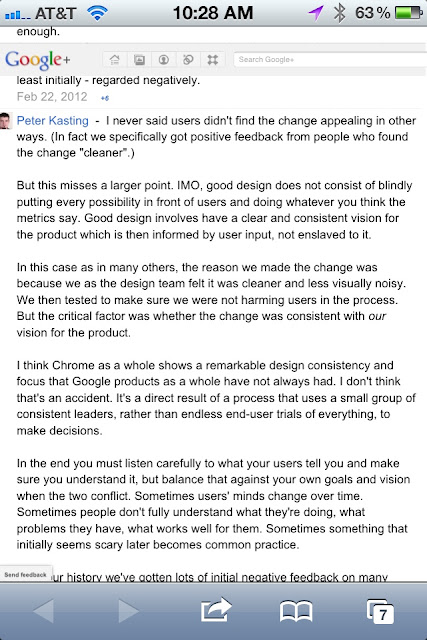
The discussion started with Kevin Fox, a former lead designer on many of Google’s premier apps. The responses include at least a couple of *current* uX designers from Google, including the response from Peter Kasting I snapshot’d in the enclosed image.

I note this especially as something inspirational to my own career as a UX designer – user feedback is essential, but not the whole story, and a strong design vision is just as essential to ensuring continuity, clarity and consistency.

I live my life these days walking that fine tightrope, and I appreciate those others who share their own experience of it.

Stalk Google’s stalking of you

What with all the attention on Google right now because of the sweeping and selfish privacy policy changes they just publicized, it’s smart, fun and sometimes a little disturbing to see just what Google’s advertising arm thinks it knows about you.  Play along at home – browse to this page from whatever browser(s) you like to use, and compare with what I found.

http://www.google.com/ads/preferences

(1) Here’s what Google thinks based on the cookie in my iPhone’s Twitter cache:

Your categories
Below you can review the interests and inferred demographics that Google has associated with your cookie. You can remove or edit these at any time.
Arts & Entertainment – Comics & Animation – Comics
Arts & Entertainment – Humor – Live Comedy


Your demographics
We infer your age and gender based on the websites you’ve visited. You can remove or edit these at any time.
Age: 35-44
Gender: Male

(2) Here’s what Google says about me (the same user) according to my
iPhone’s browser cookie (i.e. in Safari):

Your categories
Below, you can review the interests and inferred demographics that Google has associated with your cookie. You can remove or edit these at any time.
Beauty & Fitness
Jobs & Education – Jobs
Reference – General Reference
World Localities – North America – USA – Pacific Northwest – Oregon – Portland (OR)


Your demographics
No demographic categories are associated with your ad preferences so far. You can add or edit demographics at any time.

(3) Here’s what Google thinks of me according to Chrome on my laptop:

Your categories and demographics
No interest or demographic categories are associated with your ads preferences so far. You can add or edit interests and demographics at any time.

(4) Here’s who they think I am according to IE on my laptop:

Your categories
Below you can review the interests and inferred
demographics that Google has associated with your cookie. You can remove
or edit
these at any time.
Computers & Electronics – Computer Security – Antivirus
& Malware
Computers & Electronics – Software – Freeware &
Shareware
Computers & Electronics – Software – Software
Utilities
Online Communities – File Sharing & Hosting
Reference – General Reference – Time &
Calendars


Your demographics
We infer your age and gender based on the websites
you’ve visited. You can remove
or edit
these at any time.
Age: 25-34
Gender: Male

Frankly, I’m glad that Google has multiple fragmented profiles on me (at least for this usage models of this ad service they sell). If I was to see the exact same data across all apps and devices) I’d be chilled to the bone.

But I’m not naive enough to think they’re not deliberately and inevitably taking us (along for the ride) there. The closer try get to a single, unified, aggregated view of my behaviour and interests, the more they’ll be able to charge their advertisers for every impression and click-through (or whatever new metrics they’re currently stewing up).

Share that revenue stream with me?  Then I’m all for the kind of surreptitious gathering that you’re doing.  Steal that from me and pretend that “more relevant advertising” is fair compensation (legal: “consideration”)?  You know where you can stuff it.

Got the "2012 security suite" infection? This should fix it

I heard from colleagues who’ve been infected with the “2012 security suite” – yet another in a long line of malware that pretends to be an antivirus program, able to shut down legitimate antimalware like McAfee, and gets itself embedded deeply in your system.

Another colleague posted the following instructions on how they got rid of the “2012 security suite” infection.  I’m posting as-is with no firsthand knowledge of how well this would work for others, but in the spirit of sharing whatever smarter people have tried in hopes it helps a few others.

“I had to fix this one for a friend recently.  I had to use 3 different tools and it took several passes to get in entirely cleaned out.  Here’s what worked in the end (I make no guarantees of course):

  1. Download, install, and update Malwarebytes and SpyBot Search & Destroy.  They are free. Do this on two computers, the one that’s infected and another one.
  2. Remove the drive from the system and connect it to the other system as a secondary drive. Boot that system into Safe Mode with Networking.  Scan with Malwarebytes and allow it to remove anything it finds.  Reboot into Safe Mode with Networking and run SpyBot and allow it to remove anything it finds.
  3. DO NOT REBOOT YET (if you reboot at this point you will be re-infected).  First delete the following:
    • %AllUsersProfile%\Application Data\ LocalAppData\kdn.exe
    • %LocalAppData%\Temp\%UserProfile%\Templates
    • All files in c:\windows\temp (Yes you will lose your browsing history and cookies, sorry)
    • Your Temporary Internet Files (on the infected drive, not the system you’re running on)
  4. Now remove the drive from the second computer and put it back in the original computer.
  5. Boot into Safe Mode with Networking
  6. Turn off System Restore.
  7. 7. Delete the following registry keys if they exist:
    • HKEY_USERS\.DEFAULT\Software\Microsoft\Internet Explorer\BrowserEmulation “TLDUpdates” = ‘1’
    • HKEY_CURRENT_USER\Software\Classes\.exe\shell\open\command “(Default)” = ‘”%LocalAppData%\kdn.exe” -a “%1” %*’
    • HKEY_CURRENT_USER\Software\Classes\exefile\shell\open\command “(Default)” = ‘”%LocalAppData%\kdn.exe” -a “%1” %*’
    • HKEY_CLASSES_ROOT\.exe\shell\open\command “(Default)” = ‘”%LocalAppData%\kdn.exe” -a “%1” %*’
    • HKEY_LOCAL_MACHINE\SOFTWARE\Clients\StartMenuInternet\FIREFOX.EXE\shell\open\command “(Default)” = ‘”%LocalAppData%\kdn.exe” -a “C:\Program Files\Mozilla Firefox\firefox.exe”‘
    • HKEY_LOCAL_MACHINE\SOFTWARE\Clients\StartMenuInternet\FIREFOX.EXE\shell\safemode\command “(Default)” = ‘”%LocalAppData%\kdn.exe” -a “C:\Program Files\Mozilla Firefox\firefox.exe” -safe-mode’
    • HKEY_LOCAL_MACHINE\SOFTWARE\Clients\StartMenuInternet\IEXPLORE.EXE\shell\open\command “(Default)” = ‘”%LocalAppData%\kdn.exe” -a “C:\Program Files\Internet Explorer\iexplore.exe”‘
    • HKEY_LOCAL_MACHINE\SOFTWARE\Microsoft\Security Center “AntiVirusOverride” = ‘1’
    • HKEY_LOCAL_MACHINE\SOFTWARE\Microsoft\Security Center “FirewallOverride” = ‘1’ 
  8. Run Malwarebytes and allow it to clean anything it finds.
  9. Reboot into Safe Mode with Networking
  10. Run Spybot and allow it to clean anything it finds.
  11. Assuming you are able to run your antivirus software, run a full scan of your system.
  12. Reboot normally.
  13. Scan with both tools and your anti-virus software.
  14. Re-enable system restore.

NOTE: If at any time during this process you find you can no longer start your applications, follow the instructions here: http://www.techerator.com/2010/03/virus-blocks-exe-files-from-opening-2/ You’ll find a fix that you can download and run.”

2012 Manifesto

Here is my manifesto for 2012: to move in a more creative career direction, I will think more visually by working more visually.

I will become my own style of visual designer, user experience engineer, crackpot scientist of ideas. This will happen by spending more of my working day more visually – drawing, whiteboarding, illustrating the noise in my head. I will create sketches, wireframes, storyboards, flow charts, ideographs, gonzo business apps, unintelligible charts and results that scare the shit out of me.