
Today I wanted to dive back into my research on Ansible, so I fired up one of my Debian VMs under Vagrant/Virtualbox. The VM was an older image (8.5.3) so I updated to the latest (8.6.0), and then found myself troubleshooting weird connectivity issues for hours.
Eventually I got myself to this point, where the VirtualBox Manager wouldn’t even start up the VM:
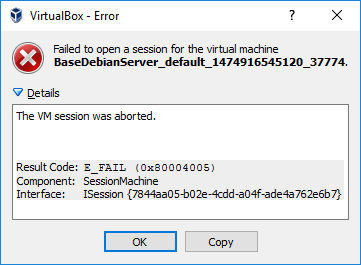
This error leads to the following article:
The AppCompatFlags entry doesn’t exist, but as for another user, even though VirtualBox Manager reports it’s running the latest version (5.0.26), looking at the Downloads page tells a different story (5.1.6). Installed that, then of course Vagrant howled loudly:
C:\Users\Mike\VirtualBox VMs\BaseDebianServer>vagrant destroy
The provider 'virtualbox' that was requested to back the machine
'default' is reporting that it isn't usable on this system. The
reason is shown below:

Vagrant has detected that you have a version of VirtualBox installed
that is not supported by this version of Vagrant. Please install one of
the supported versions listed below to use Vagrant:

4.0, 4.1, 4.2, 4.3, 5.0

A Vagrant update may also be available that adds support for the version
you specified. Please check www.vagrantup.com/downloads.html to download
the latest version.

C:\Users\Mike\VirtualBox VMs\BaseDebianServer>vagrant -v
Vagrant 1.8.1
There’s a 1.8.5 Vagrant version available, so I installed that too.
There, once again the master and the servant are back in sync:
C:\Users\Mike\VirtualBox VMs\BaseDebianServer>vagrant up
Bringing machine 'default' up with 'virtualbox' provider...
==> default: Importing base box 'debian/jessie64'...
==> default: Matching MAC address for NAT networking...
==> default: Checking if box 'debian/jessie64' is up to date...
==> default: Setting the name of the VM: BaseDebianServer_default_1474924390887_22621
==> default: Clearing any previously set network interfaces...
==> default: Preparing network interfaces based on configuration...
 default: Adapter 1: nat
==> default: Forwarding ports...
 default: 22 (guest) => 2222 (host) (adapter 1)
==> default: Booting VM...
==> default: Waiting for machine to boot. This may take a few minutes...
 default: SSH address: 127.0.0.1:2222
 default: SSH username: vagrant
 default: SSH auth method: private key
 default:
 default: Vagrant insecure key detected. Vagrant will automatically replace
 default: this with a newly generated keypair for better security.
 default:
 default: Inserting generated public key within guest...
 default: Removing insecure key from the guest if it's present...
 default: Key inserted! Disconnecting and reconnecting using new SSH key...
==> default: Machine booted and ready!
==> default: Checking for guest additions in VM...
 default: No guest additions were detected on the base box for this VM! Guest
 default: additions are required for forwarded ports, shared folders, host only
 default: networking, and more. If SSH fails on this machine, please install
 default: the guest additions and repackage the box to continue.
 default:
 default: This is not an error message; everything may continue to work properly,
 default: in which case you may ignore this message.
<editorial understatement=”on”>Based on the SuperUser question above, I’m guessing this isn’t an uncommon problem as Vagrant and Virtualbox rev their engines.</editorial>
 The rattled cough of a Hyper-Empathetic PM
One thought on “Troubleshooting E_FAIL SessionMachine between Virtualbox and Vagrant”